
It is now possible to integrate GoHighLevel GHL into Reportei and thus track the entire journey of your leads from acquisition to closure directly in your reports and dashboards without needing to manually consolidate data
Basically, GoHighLevel is an all-in-one platform widely used by agencies and businesses to capture leads, organize the sales funnel, and centralize customer service in one place
Therefore, this integration is especially useful for those who already use GHL daily and want to gather this data alongside other channels within Reportei
The integration is available for users starting from the PRO Plan in Reportei
What is possible to track
By integrating GoHighLevel, you can bring complete commercial operation data into Reportei, including
- Contacts meaning new contacts, total contacts and their evolution over time, as well as lead sources when available
- Opportunities pipeline for example, volume and value of open opportunities, won and lost, win rate, average closing time, reasons for loss, and distribution by funnel stage
- Conversations also volume of conversations and messages, as well as operational indicators such as unassigned conversations and unread messages
This way, it becomes much easier to track the evolution of the sales funnel and consequently make data-driven decisions without the need to switch between platforms
What is needed to integrate
Before connecting your account, it is important to check if
- Your GoHighLevel account has a plan with API access enabled
- In addition, you have the necessary API permissions configured in your GoHighLevel account: contacts, opportunities, calendars
- Finally, your GoHighLevel subaccount is active and correctly configured with the data you wish to track
By following these requirements, you avoid errors during the connection process
How to connect GoHighLevel to Reportei
Currently, there are two ways to connect your GoHighLevel account to Reportei. Therefore, choose the one that best suits your case
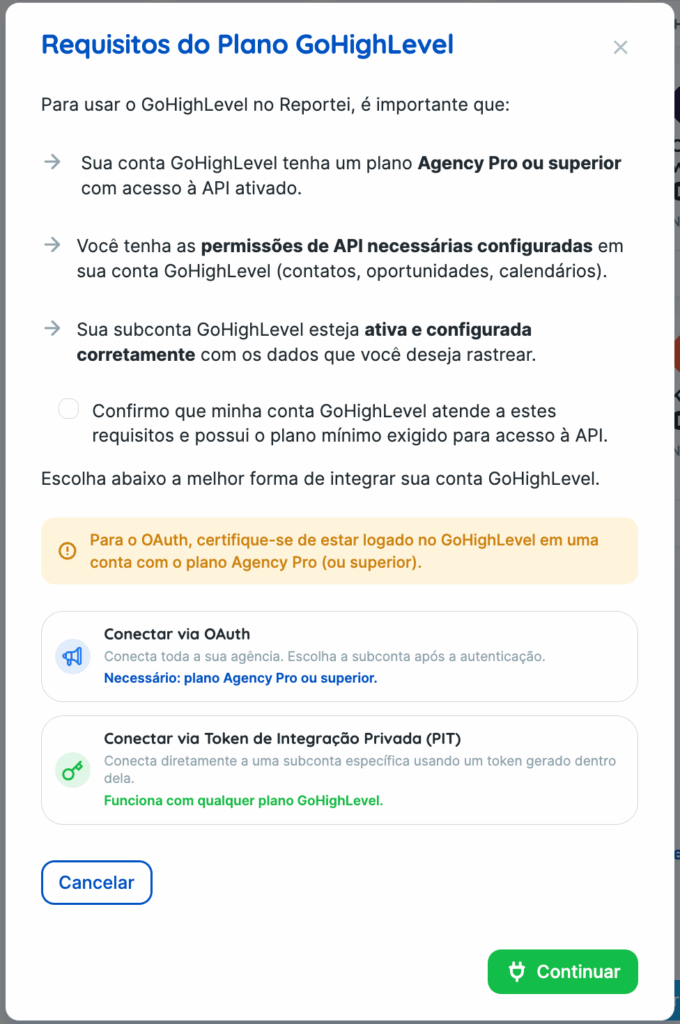
Option 1: Connect via OAuth
In this case, the option connects your entire agency at once, allowing you to choose the desired subaccount right after authentication
It is worth noting that this option requires Agency Pro or higher plan on GoHighLevel with API access enabled. Therefore, make sure to be logged into GoHighLevel with this account before starting the connection
- In Reportei, access the desired project and go to Manage Integrations.
- Select GoHighLevel and choose Connect via OAuth.
- Log in to your GoHighLevel account if prompted
- Select the subaccount you wish to integrate
Option 2: Connect via Private Integration Token (PIT)
This option connects Reportei directly to a specific GoHighLevel subaccount using a token generated within it. In other words, it works with any GoHighLevel plan without the need for an agency account
In GoHighLevel
- Within the subaccount you wish to integrate, access Settings > Business Profile and copy the Location ID field available at the bottom of the page or in the URL
app.gohighlevel.com/v2/location/{LOCATION_ID}/dashboard). - Still in the subaccount, access Settings > Private Integrations > Create New Integration.
- Select the scopes View Contacts, View Opportunities, View Conversations, View Users, View Locations, View Calendars, View Pipelines.
- Copy the generated token, it starts with pit-).
In Reportei
- Access the desired project and go to Manage Integrations.
- Select GoHighLevel and choose Connect via Private Integration Token (PIT).
- Fill in the fields
- Integration name a name to identify this account in your reports, e.g., My GHL Account
- Location ID the ID copied in step 1
- PIT Token the token copied in step 4
- Click on Integrate now.
Important
Currently, the integration with GoHighLevel is in Beta Furthermore, the available metrics may vary depending on your GoHighLevel account plan and configuration
If you have any questions, contact our support via chat