
WhatsApp now has more uses in Reportei. In addition to automated report delivery, you can use this channel to follow your projects’ day-to-day activity.
From Reportei’s official number, you can receive Control indicator alerts and reconnection notices when an integration expires. This makes it easier to spot issues that need attention without relying only on email.
This feature is in Beta. We are monitoring usage and message volume as we continue improving the experience.
Control alerts on WhatsApp
Alerts configured for Reportei Control indicators can also be delivered through WhatsApp.
When an indicator reaches a goal or limit, ends its period without meeting the target, or performs above or below expectations, Reportei notifies the numbers configured for that project. WhatsApp follows the same trigger rules as existing Control alerts.
How to configure alerts
In Alert settings, a new WhatsApp tab lets you add up to 3 numbers to receive the project’s alerts. These numbers are shared by all indicators that have WhatsApp delivery enabled.

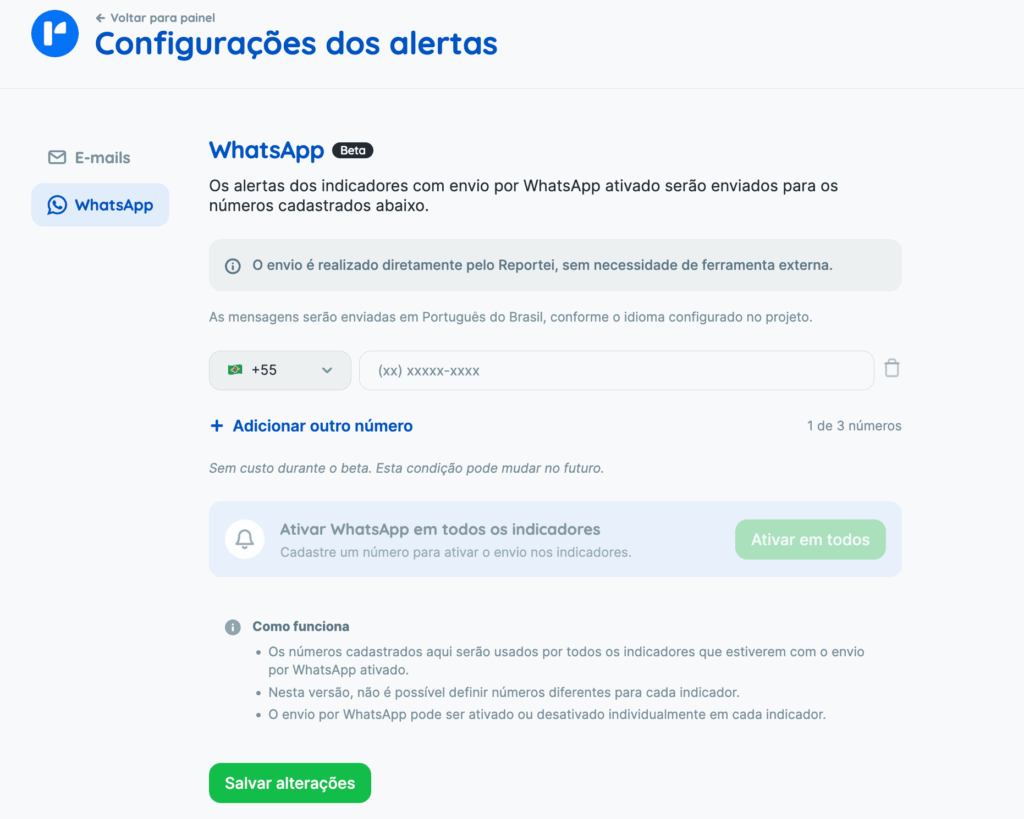
You can also enable WhatsApp alerts for several indicators at once from Alert settings, using the bulk option.
When creating or editing an indicator, choose whether its alerts should also be sent through WhatsApp.
What the alert includes
The alert displays the indicator’s main details directly in WhatsApp: current value, goal or limit, progress, expected value, and days remaining in the period.
For example:
You have an indicator update for the XPTO Store project.
Total Reach is currently below the expected level for reaching the goal.
Current value: 1,098,020
Goal: 6,000,000
Frequency: Monthly
Progress: 18% – Expected: 29% – Time remaining: 14 daysSee more details in the indicator dashboard: [Control dashboard link]
You can understand the indicator’s status directly in WhatsApp. For a deeper analysis, open the indicator dashboard using the link in the message.
Note: you can stop receiving alerts at any time using the button in the message. This stops alerts from all projects, not just the project in that message. You can enable them again later.
Integration reconnection notices on WhatsApp
You can also receive notices when an integration expires.
When a supported integration stops collecting data, Reportei can send a WhatsApp message identifying the expired integration and affected project, with a link to reconnect it.
For example:
Integration expired
The Instagram integration for the XPTO Store project has expired, which may affect the collection of some data. Open [link] to reconnect it as soon as possible.
When several accounts expire together, Reportei may group them in a single notice to reduce message volume. The message shows how many accounts are affected and directs you to reconnect them.
Note: this initial version supports reconnection notices for Instagram and Threads.
How to enable the alert
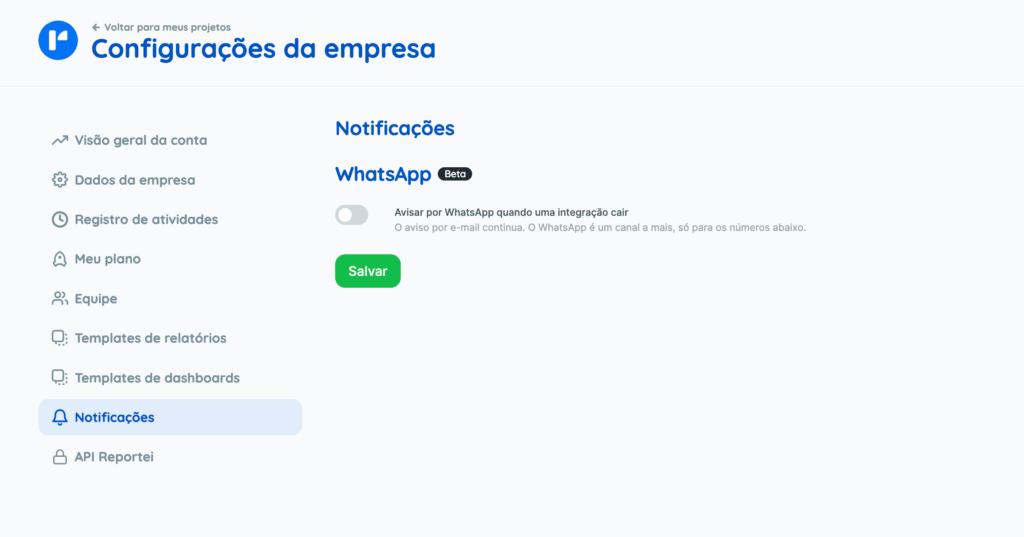
To enable expired-account notifications, open Company settings from the top menu, then go to Notifications, as shown below. You can add up to 3 numbers to receive these alerts.
How to disable notices
You can disable WhatsApp integration notices without stopping email notices. Select “Stop these notices” to stop that type of WhatsApp notification for the number. To receive them again, re-enable the option in your account settings.
Frequently asked questions
How many numbers can receive alerts?
Up to 3 numbers per project, shared by all indicators with WhatsApp delivery enabled.
If I stop receiving alerts, does it affect only one project?
No. Using the button in a message stops alerts from all projects for that number. You can enable them again whenever you want.
Do expired-integration notices replace email?
No. They are an additional channel. You can disable WhatsApp notices and continue receiving email notices as usual.
Which integrations support WhatsApp reconnection notices?
Currently, Instagram and Threads.
If you have questions, contact our Support team through chat. =)