
Reportei now includes an AI chat that lets you retrieve data, analyze metrics, and perform actions directly in the platform, without navigating between screens to find what you need.
An update released in September 2026 also lets you query your Meta Ads account in real time. See the details below:
What Reportei Chat AI can do
In addition to answering questions, Reportei Chat AI can create reports, dashboards, automations, goals, and Timeline entries. It can also generate artifacts—AI-created content in formats such as HTML, charts, code, Markdown, and diagrams—rendered directly in the conversation.
Data and metric analysis
- Retrieve performance data from any connected integration (Instagram, Facebook Ads, Google Ads, GA4, TikTok, LinkedIn, YouTube, Search Console, and many others);
- Compare periods: month over month, quarter over quarter, week over week, and more;
- Generate performance summaries by channel (organic social, paid media, analytics, CRM, e-commerce, and email marketing);
- Identify the best-performing posts and content;
- Analyze audience demographics (age, gender, and location).
Reports and dashboards
- Create static reports using your chosen integrations and date range;
- Create live dashboards with automatically updated data;
- List and search existing reports and dashboards;
- Analyze the content of an existing report or dashboard;
- Generate shareable links for your clients.
⚠️ Chat cannot yet edit metrics or widgets in existing reports and dashboards. You still make those changes directly in Reportei.
Automations
- Create report delivery automations (email, WhatsApp, and in-app notifications);
- Enable or disable existing automations;
- Update existing automation settings, such as delivery time, recipients, channels, and frequency.
Goals and KPIs
- Create goals linked to actual metrics (for example, “reach 10,000 Instagram followers this month”);
- Track progress toward each goal, with projected results;
- Update target values and configure alerts when goals are met or missed.
Timeline and milestones
- Record milestones, notes, and analyses for your projects;
- Create events with structured content (sections, lists, and highlights);
- Edit or delete existing events, with confirmation required before each action.
Meta Ads recommendations
- Check the Reportei opportunity score for Meta Ads;
- List optimization recommendations and the campaigns and ads they affect.
Live Meta Ads data
Alongside data already collected by Reportei, Chat AI can retrieve live information directly from your Meta Ads account using your existing Reportei integration. You can ask what is happening in the ad account now without opening Ads Manager or logging in again.
This works alongside historical data; neither replaces the other:
- Historical data, already collected by Reportei, helps you analyze results for a period;
- Live information, retrieved directly from Meta, helps you understand how the account is configured or operating right now.
For example, you can ask: “Which campaigns are active now?”, “What is the current budget for my campaigns?”, “Are any campaigns in the learning phase?”, “Why has this ad set’s delivery dropped?”, “Which custom audiences are available in this account?”, or “Show me the creative running in campaign X.”
Chat can also retrieve information about creatives, audiences, campaign statuses, improvement opportunities, and some performance signals provided by Meta.
What you need
To retrieve live Meta Ads data, you need:
- a plan that includes AI;
- an up-to-date Meta Ads integration with the required permissions.
Because this permission is new, accounts that connected Meta Ads some time ago may need to reconnect. Reconnection is quick and does not delete or affect data already collected by Reportei. During the process, approve all permissions requested by Meta.
How to enable it
In Reportei Chat, click the gear icon and go to Native connectors → Meta Ads → Connect.
The gear icon is only shown to users whose plan includes AI.
If you ask a question that requires live Meta information and the integration does not yet have the required permission, Chat tells you to reconnect. This notice appears only when needed: historical questions continue to work normally without requesting reconnection.
Can Chat change campaigns?
Not by default. The integration initially allows information retrieval only. Actions such as creating or changing campaigns, ads, or budgets must be enabled individually. Even then, you always confirm the operation before any change is made.
Permissions and privacy
- You can still see information only from projects you already have access to in Reportei.
- Your existing Meta Ads connection is reused. You do not need a separate integration for Chat.
- This feature is available in Reportei Chat. The WhatsApp assistant does not have this access.
- When authorizing access in Meta, make sure you grant access to the ad accounts you want to query. Chat cannot access an account you have not selected.
Generating artifacts
In addition to text responses, Chat can generate visual outputs rendered directly in the conversation:
| Type | Example uses |
|---|---|
| HTML | Visual dashboards and styled tables |
| Charts | Performance charts |
| Code | Scripts, snippets, and integrations |
| Markdown | Structured reports and analyses |
| Mermaid | Flowcharts and sequence diagrams |
What you cannot do directly in Chat AI
- Edit metrics or widgets in existing reports and dashboards;
- Access data from platforms that are not connected to Reportei;
- Resolve billing issues, bugs, or account access problems. Contact Support for those issues.
Use cases
Here are some examples of what you can do with Reportei Chat AI:
- analyze campaign performance;
- compare periods;
- quickly find information in Reportei;
- create reports and dashboards;
- configure automations;
- check goals;
- record Timeline events;
- generate charts, HTML, tables, and other artifacts;
- combine Reportei data with external tools.
How to open Chat AI
You can open Reportei Chat AI from the top menu bar, as shown below:

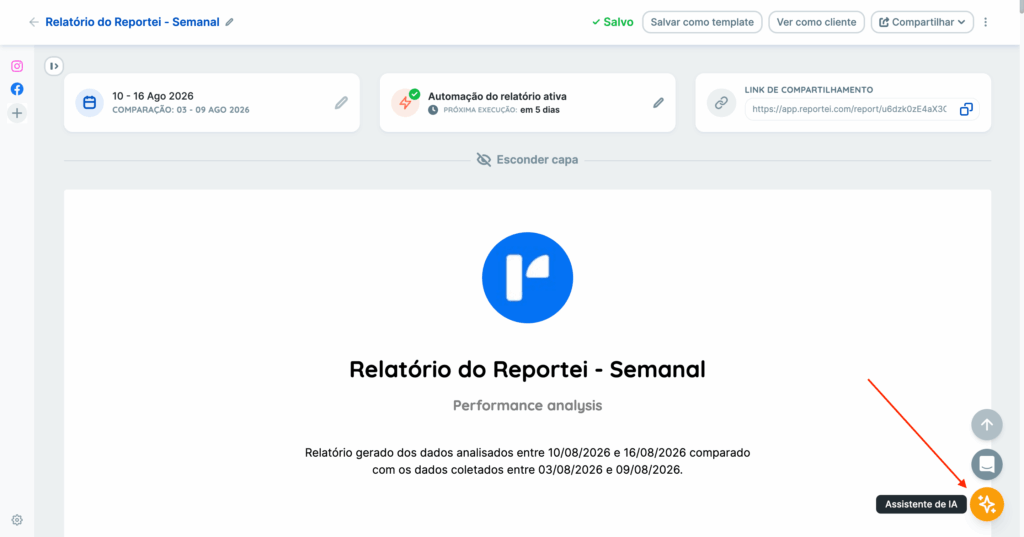
An option also appears in the bottom-right corner whenever you are viewing reports or dashboards. Click the icon shown below to open the conversation and start asking questions.
🔌 Connecting external tools (MCP)
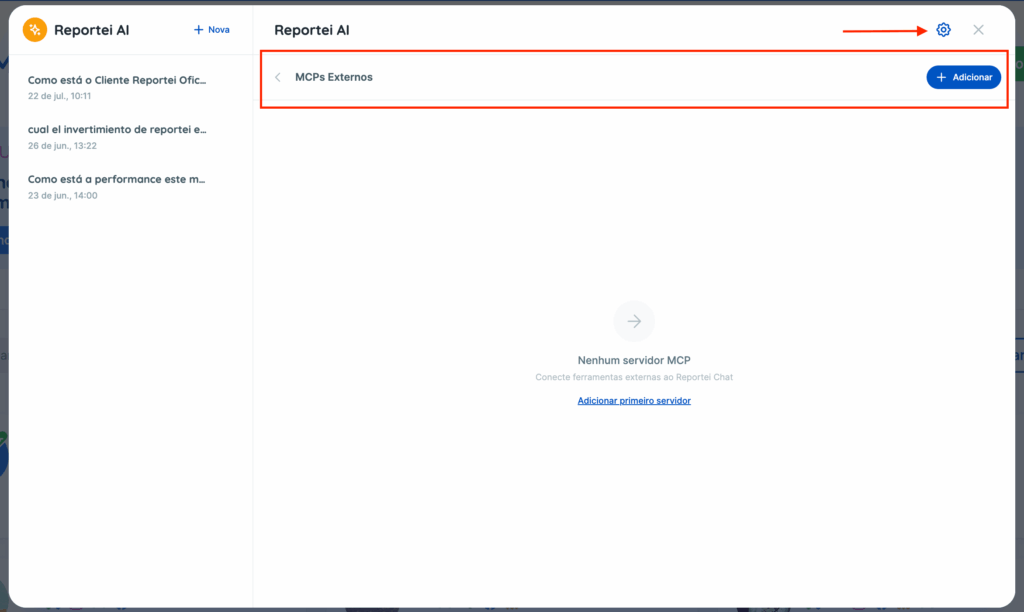
Users whose plan includes AI can add external MCP servers to Chat, such as PostHog, Asaas, or any other compatible service. This lets Chat combine external data with Reportei data in the same conversation.
To connect one, open Chat AI, click the gear icon, and add it:
Note: Reportei MCP is available to all customers and lets you connect to Reportei data from Claude, ChatGPT, and other compatible tools. Connecting an external MCP server in Chat AI works the other way around: it brings information from other tools into Chat AI, giving it more detail and context for its analyses.
| Reportei MCP | External MCP | |
|---|---|---|
| Available to | All users, on any plan | Only users whose plan includes AI |
| Provides access to | Data from the Reportei platform itself | Other tools (PostHog, Stripe, Asaas, etc.) |
Usage limits
Chat AI is currently available to customers at no additional cost, with limits based on their Reportei plan.
The feature is still in its initial release and continues to evolve. We are refining the experience based on usage and feedback.
If you have questions or suggestions, contact our Support team.