
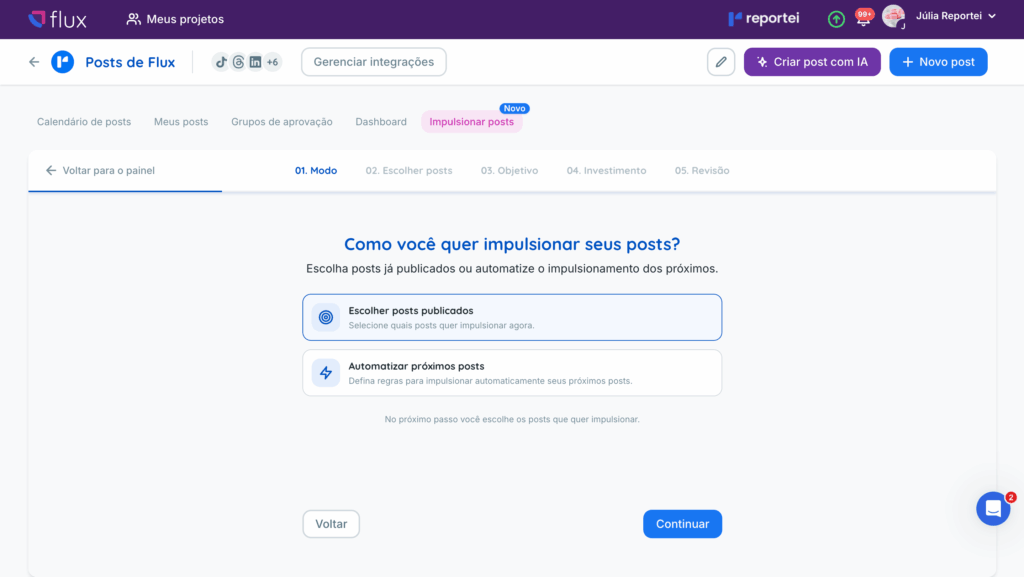
Boost posts turns Instagram posts into Meta Ads without leaving Flux. Choose between boosting content that is already published and automating boosts for upcoming posts.
For automated boosts, you can include every new post in a format or only posts that reach an organic performance target. This supports both hands-on control of each investment and a more automated workflow.
How it works
Open Boost posts and choose how to proceed:
- Choose posts to boost: select published content and configure its boost;
- Automate upcoming posts: set rules so Flux automatically boosts new content that meets your criteria.
Choose based on how much control you want over each post.
✅ Requirements
For either option, make sure that:
- your Instagram profile is a professional account;
- your Instagram profile is linked to a Facebook Page;
- you connected Instagram to Flux using Facebook login;
- your connected Meta Ads account has access to that same Instagram profile;
- the person configuring the boost has the required permissions for the Page, Instagram profile, and ad account;
- your Meta ad account has a valid payment method.
👉🏻 Accounts connected directly through Instagram login cannot use this feature. Reconnect through Facebook login instead.
Meta also does not allow boosting posts published before a profile was converted to a professional account. It automatically rejects content published before that change.
👉🏻 Flux does not check the payment method during setup. If it is missing or invalid, the boost can still be activated, but posts show an Error status until you fix the payment method.
Choose posts to boost
This option is useful when you want to decide individually which posts receive ad spend. You:
- Select one or more published posts, up to 20 at a time.
- Set the objective, daily budget, and duration of the boost.
- Review the summary and maximum expected spend, then confirm.
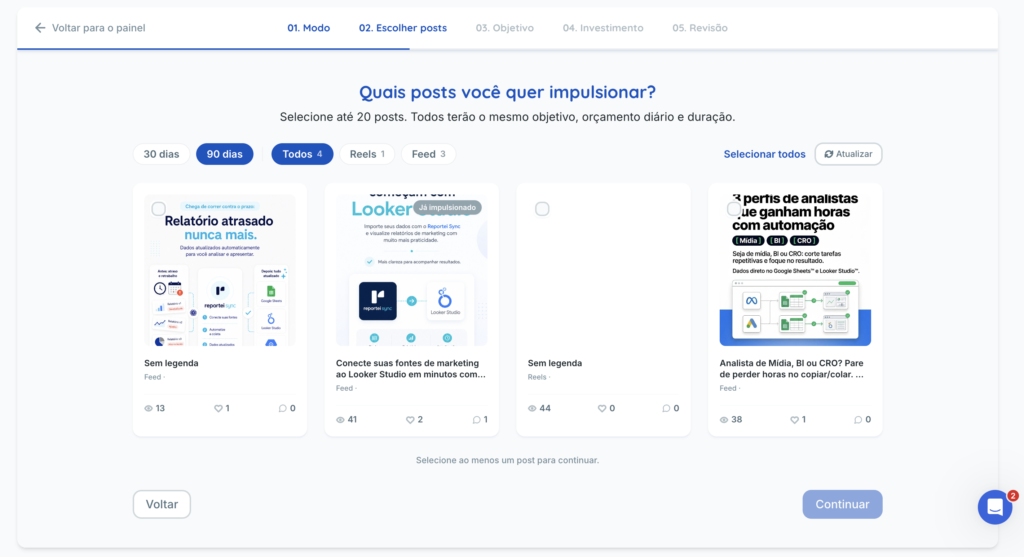
👉🏻 When you select more than one post, they all receive the same settings. The objective, daily budget, and duration apply equally to every selected post.
To use different settings, create separate boosts—for example, one at R$30 per day and another at R$50 per day. Before confirmation, Flux always shows a summary with the maximum expected spend across all selected posts.
⚙️ Automate upcoming posts
This option keeps content promoted regularly without requiring you to boost every post manually.
How to configure it
- Open Boost posts in Flux and select Automate upcoming posts.
- Connect Instagram through Facebook and select the profile Flux should monitor. If the project already has this integration, Flux takes you directly to the ad account step.
- Connect the Meta Ads account that has access to that profile. If several accounts qualify, select one. If the selected account cannot access the profile, Flux explains the issue and directs you to connect the correct account.
- Configure the automation in four steps: About, Objective, Rules, and Review.
- In Review, check the summary and click Activate automation.
Flux then starts identifying eligible posts and creating ads automatically.
What you configure in each step
Objective: what the ad should aim to achieve:
- More engagement: likes, comments, and saves;
- More profile visits: bring people to the Instagram profile;
- More followers: grow the audience.
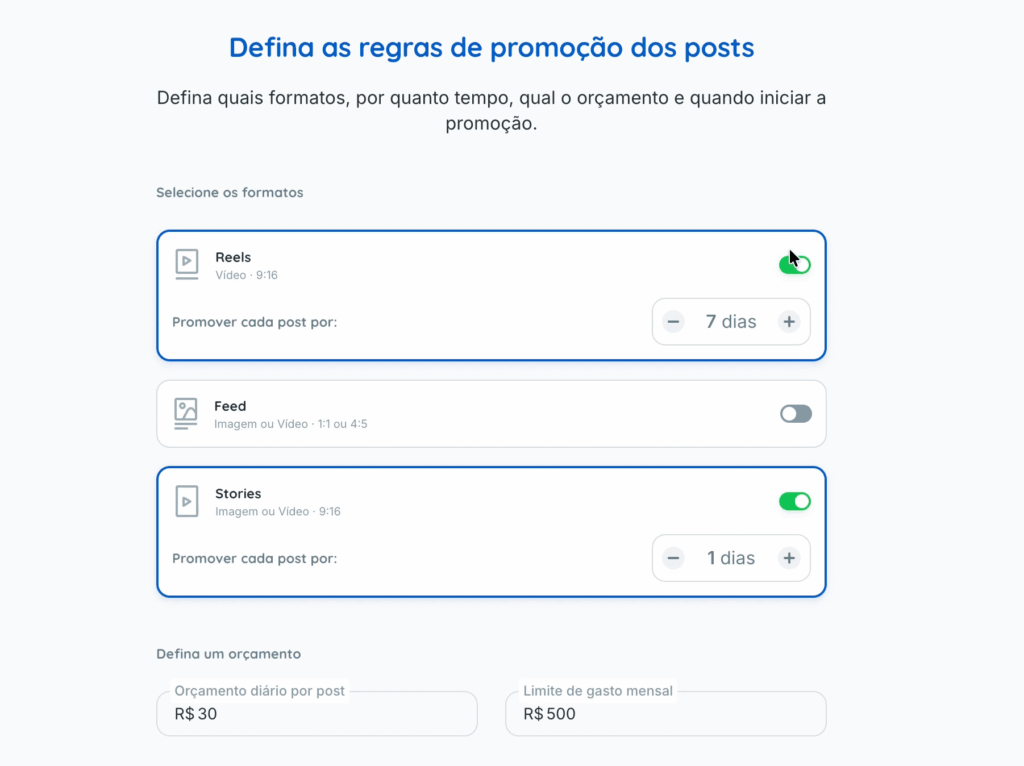
Rules, all on one screen:
- Formats: Reels, Feed, and/or Stories, with a duration in days for each format (how long each post is boosted);
- Which posts to boost in each format: all posts or only those reaching a target, as explained below;
- Daily budget per post (in BRL);
- Monthly spending limit (in BRL), the combined ceiling for the entire automation that month;
- Boost start time: 1, 2, 4, 6, 12, or 24 hours after publication.
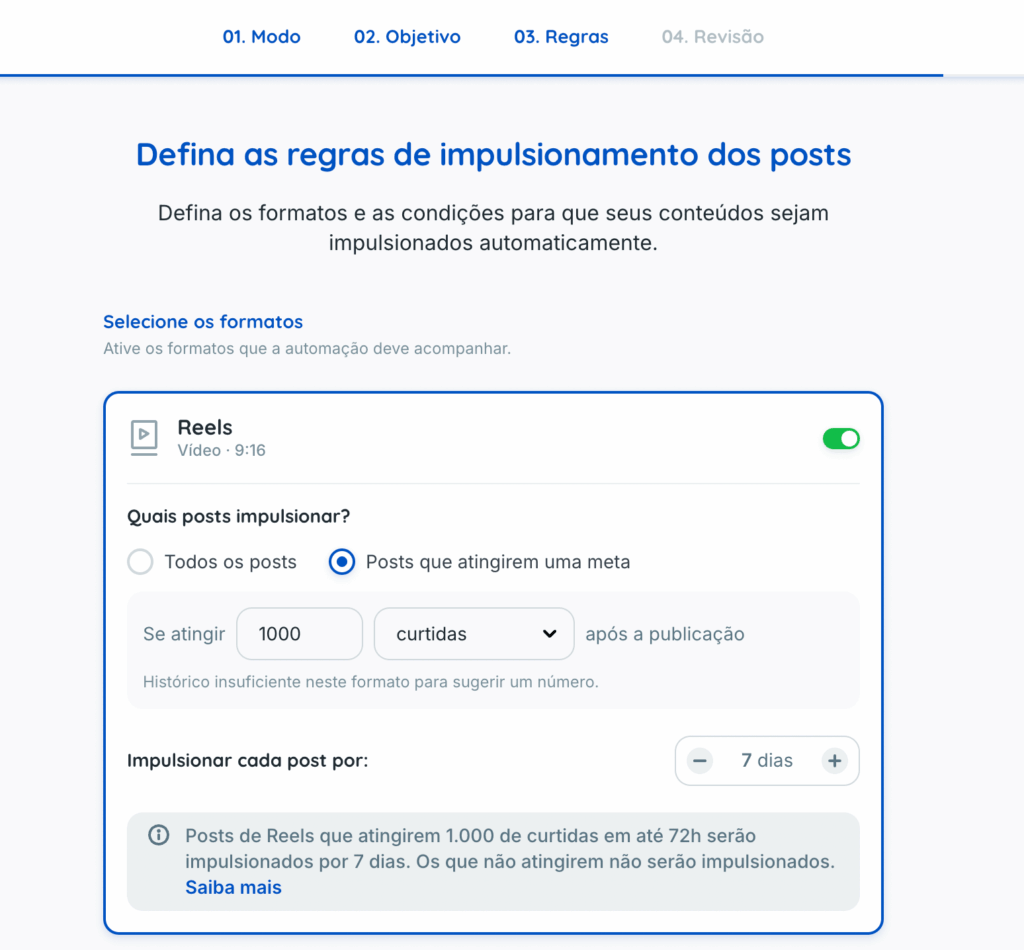
🎯 All posts or only posts that reach a target
For each format, choose one of two options:
- All posts: every new post in that format is boosted automatically after the configured delay;
- Posts that reach a target: Flux monitors organic performance and boosts a post only when it reaches your target.
This directs ad spend toward content that has already performed well organically. Settings are separate for each format: for example, you can set a shares target for Reels and a new-followers target for Feed posts.
How targets work
For each format, choose a metric and the result the post must reach. Available metrics depend on the format and the data Instagram provides. They include reach, views, interactions, shares, saves, comments, and likes. Feed and Stories also have some format-specific metrics.
After publication, a post enters evaluation. Flux starts checking performance after 6 hours and continues checking periodically:
- Reels and Feed: evaluated for up to 72 hours;
- Stories: evaluated for up to 24 hours.
Once the post reaches its target, boosting proceeds automatically. If the evaluation period ends first, Flux does not boost the post and records the reason “Did not meet the criterion”.
👉🏻 Flux does not reserve any budget while a post is being evaluated. Budget is committed only when the target is reached and the post proceeds to boosting.
Target suggestions based on historical performance
Flux may suggest a target based on the account’s recent performance. It considers the top 20% of posts in that format over the last 30 days, together with your selected automation objective.
A suggestion is shown only if there are at least 5 posts in that format during the period. Without enough history, enter a target manually. Suggestions are recommendations only: you can change both the metric and its target value during setup.
👉🏻 Existing automations do not change automatically. They continue boosting all posts as before. Performance targets are optional; enable them by editing the automation’s rules.
How the automation selects posts
Posts are selected by format and the option configured for that format: all posts or only those meeting the target. The automation does not filter by topic, caption, or hashtag. When activated, it also considers posts published in the last 7 days.
A post is never boosted twice, even if two automations are active for the same profile. It appears as Ignored in the second automation. To select posts individually, use Choose posts to boost.
Before boosting each post, Flux calculates its expected cost (daily budget × configured days). If this exceeds the monthly ceiling, the post is not boosted and is marked Ignored because the monthly limit has been reached. It is not queued for the following month.
📊 What happens after activation
- Flux checks the profile for new posts every hour.
- If the format uses a target, an eligible post remains Under evaluation until it reaches the target or the evaluation period ends.
- When a post is ready to boost, Flux marks it Scheduled, and boosting starts after the configured delay.
- At the scheduled time, Flux creates the ad in the connected Meta Ads account.
- When the configured duration ends, the ad stops and the post is marked Completed.
Audience: Meta handles targeting automatically through Advantage+, using the ad account’s country and an age range of 18–65. There is no manual audience configuration, so you do not have to build targeting for each post.
What is the same for both options
Both options require an Instagram connection and a Meta Ads account. Meta charges media spend directly to the linked ad account’s payment method. Flux adds no fee to that amount.
👀 What you can track
At the top of the boosting page, you can see:
- active boosts, including automations and manual selections;
- posts currently being boosted;
- monthly spending compared with the combined boost ceilings.
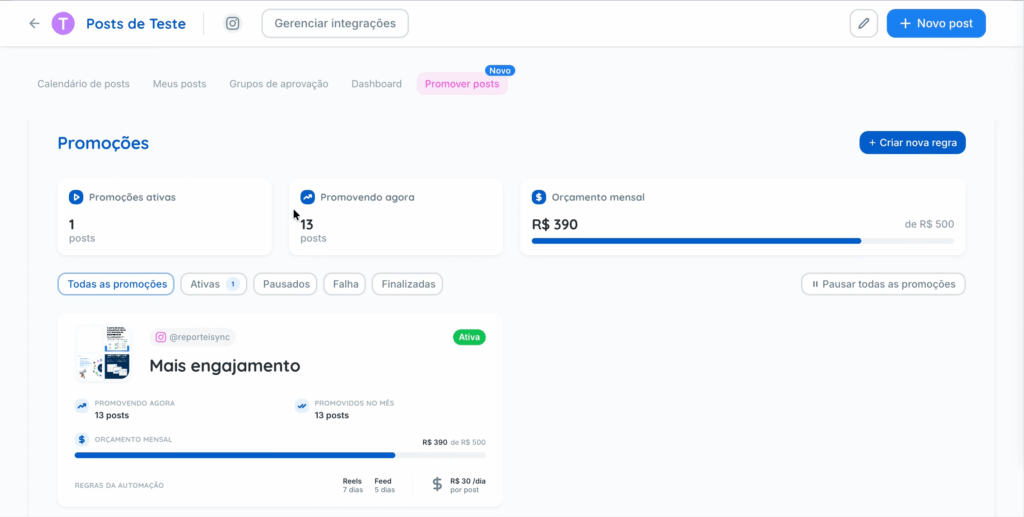
For each boost, you can also see its status—Active, Paused, Finished, or Failed—the number of posts boosted that month, its budget, and its rules.
Open a boost to track individual posts:
- each post’s status: Under evaluation, Scheduled, Boosting, Completed, Paused, Error, or Ignored;
- for posts Under evaluation, current performance against the target and the remaining evaluation time;
- for posts ignored because they “Did not meet the criterion”, the result they reached;
- spending and reach for each boosted post;
- days already boosted and the expected budget;
- a full history of events for that post.
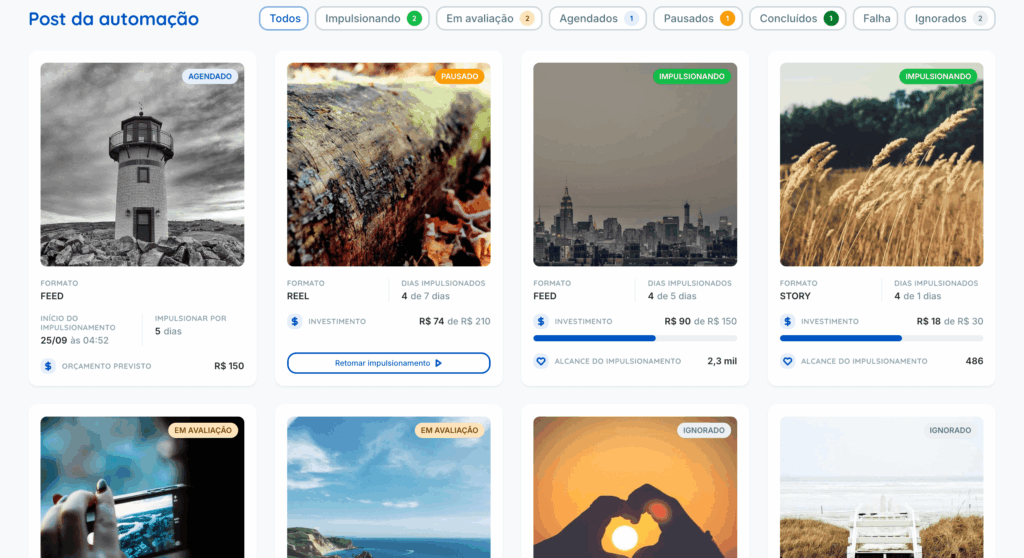
Each ad’s metrics update hourly.
🔧 What you can change afterward
- Pause or reactivate a boost;
- Pause or resume an individual post;
- Retry a failed post;
- Edit rules, including enabling or changing performance targets, or rename a boost at any time;
- Archive a boost (this is permanent and also archives every post linked to it);
- Pause everything to stop all boosts in the account at once.
Pausing a boost prevents new posts from being boosted. Posts already active continue until their configured period ends.
Frequently asked questions
Can I choose individual posts to boost?
Yes. With Choose posts to boost, you manually select published content. With Automate upcoming posts, selection is based on format, and you can restrict it to posts reaching a performance target.
Can I boost only well-performing posts?
Yes. In the automation, choose Posts that reach a target for the relevant format and set a metric and value. Flux boosts only posts reaching that result within the evaluation period.
What happens if a post misses its target?
It is not boosted. It appears among ignored posts with the reason “Did not meet the criterion” and the result it reached. Flux does not reserve budget during evaluation, so no money is spent on that post.
Did my existing automations start using targets?
No. They continue boosting all posts as before. Edit the rules to use targets.
Can I define the target audience?
No. Meta always handles targeting automatically.
Who pays for the ads?
You do, directly through your Meta ad account. Flux adds no fee to that amount.
Can the automation exceed its monthly limit?
No. Flux blocks new posts when their expected cost would exceed the monthly ceiling.
What if a post cannot be boosted?
It shows an Error or Ignored status with a reason, and you can retry it.
Can I run more than one boost for the same profile?
Yes. Each boost has its own settings. However, a post is never boosted twice, even when several boosts are active at the same time.
If you have questions, contact our Support team through chat.