
Connecting WooCommerce to Reportei is quick and straightforward, and the integration is available on our Pro and Premium plans. WooCommerce is an open-source e-commerce platform for WordPress that lets you create and manage customized online stores. Follow the steps below to connect your account and start tracking store data in Reportei.
Requirements
WordPress version 5.3 or later is not required to connect your account to Reportei, but it is important for checking your own data directly in WooCommerce.
To connect your WooCommerce account to a project, open “Manage integrations” and scroll to the WooCommerce icon:
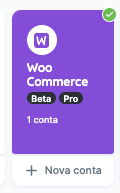
Click “Connect” or “New account” (if you already have a WooCommerce account connected) to open the screen below with the instructions to follow:
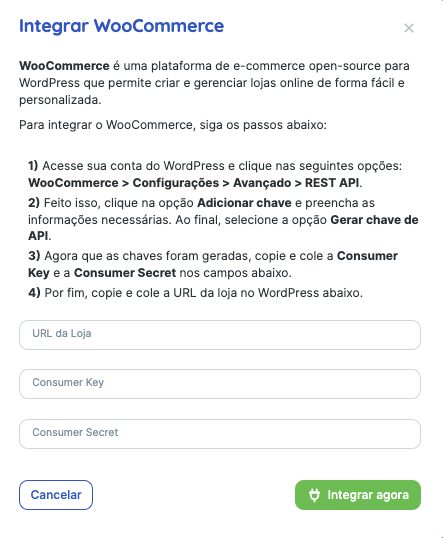
Note: copy only the key values. Do not add words such as “Basic” to the code.
For details on creating and retrieving these keys, see this WooCommerce guide.
What happens next?
After completing these steps, your WooCommerce account will be connected to Reportei. You can generate reports and view key store data directly in our platform.
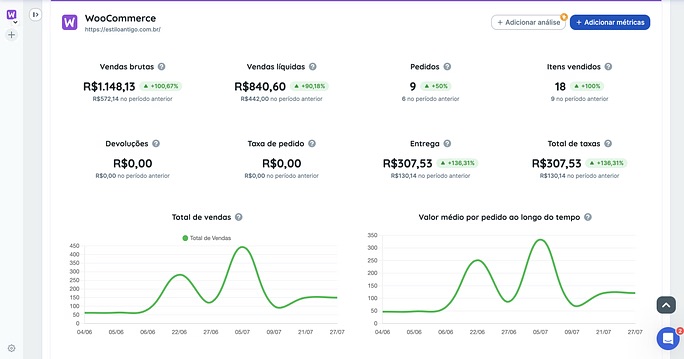
Here are some metrics available in WooCommerce reports. The full list is available in the report’s metric selector.
- Orders;
- Items sold;
- Returns;
- Gross sales;
- Net sales;
- Order fees;
- Shipping fees;
- Total fees;
- [Table] Product performance;
- [Table] Revenue by day;
- [Chart] Total sales;
- [Chart] Average order value over time.
If you have questions, contact our Support team! =)