
The Test Reel is a feature on Instagram that allows you to publish content in a controlled manner, displaying it only to people who have not yet follow the account. This means that the post does not appear on the profile or is shown to existing followers.
The idea is precisely to give more freedom to test ideas, formats, and approaches before publishing to the main audience without impacting the current audience.
Instagram has an official article explaining more details about the feature. Access here
To use this feature, the Instagram account needs to meet all of the following criteria.
- Be a professional Business or Creator account.
- Have at least 200 followers.
- Have the feature enabled by Instagram.
How to set up Test Reels in Flux
The Test Reels option is available within the Other preferences block when creating or scheduling a post in the Instagram Reels format..
Just activate the toggle Publish as Test Reel before scheduling or publishing the content.
If the account does not meet the minimum requirements, the toggle will be disabled, and an alert will be displayed indicating the reason.
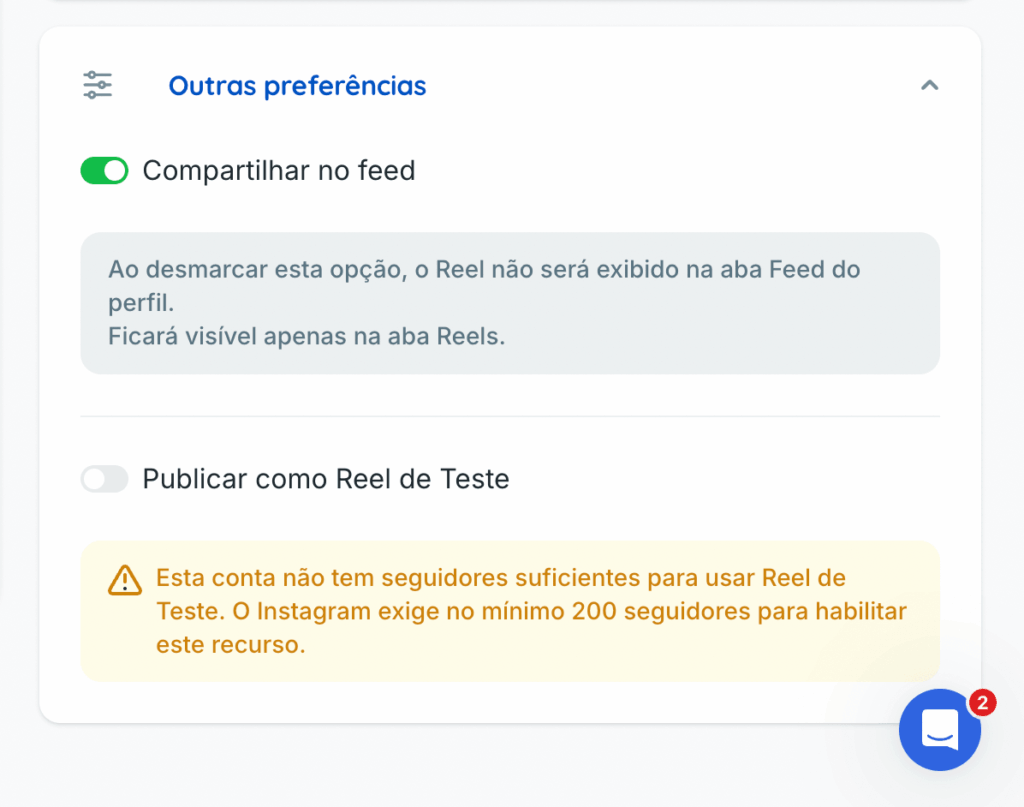
Other preferences available for Reels
In the same block, you also find the option Share on feed. When this option is enabled, the Reel appears both in the Feed tab and the Reels tab of the profile. When disabled, it will be visible only in the Reels tab..
⚠️ Instagram has been releasing the Test Reels feature gradually. Even if the account meets all the requirements, the feature may still not be available.
If you have questions, contact the support team via chat.