
You can now integrate Cardápio Web with Reportei and track your business’s key sales data directly in reports and dashboards, without opening the Cardápio Web dashboard separately.
Cardápio Web is a digital menu platform for restaurants, bars, snack bars, and other businesses that sell food online. Businesses can publish menus, accept orders through a direct link, and track orders, revenue, products sold, and payment methods.
👉🏻 The integration is available on the Reportei PRO plan and higher.
What you can track
The Cardápio Web integration brings your store’s main sales data into Reportei, including:
- Orders
- Revenue
- Average order value
- Best-selling products
- Performance by sales channel
You can analyze delivery results alongside your other marketing and sales channels without switching platforms.
How to connect Cardápio Web to Reportei
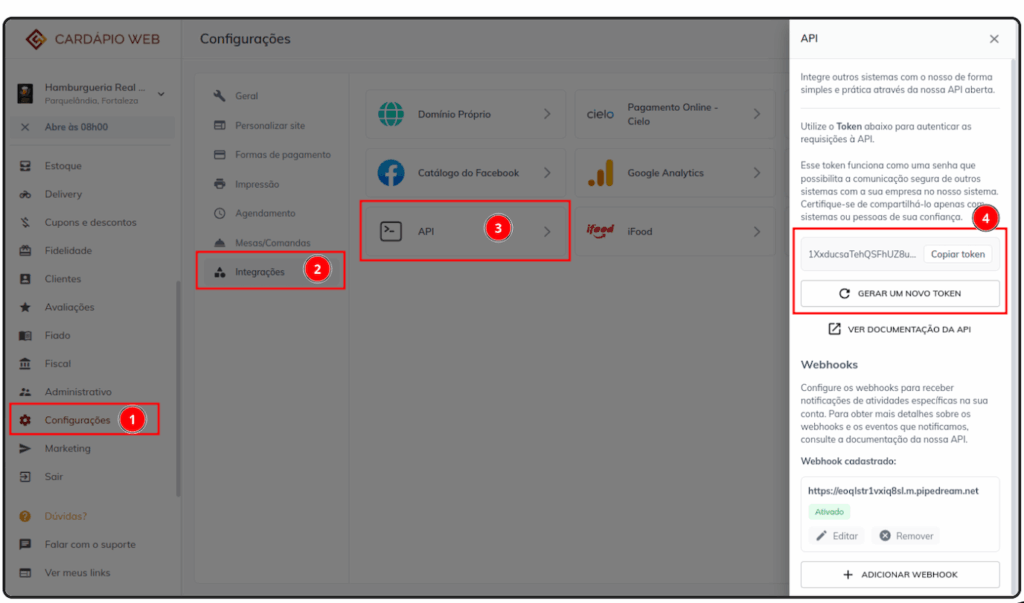
To connect Cardápio Web, you need your store’s API key. Follow these steps:
In the Cardápio Web dashboard:
- Open Settings.
- Go to Integrations > API.
- Copy the generated token or create a new one.
In Reportei:
- Paste the API key into the integration field.
- Enter a name to identify the store.
⏳ Initial synchronization
After you connect the account, Reportei starts its initial data synchronization. This may take a few minutes.
During synchronization, the account shows the Syncing data status, and you cannot generate reports using Cardápio Web data. Once synchronization is complete, you can use the account in reports and dashboards as usual.

📅 Historical data
When you connect a Cardápio Web account, Reportei synchronizes up to 90 days of historical data, counting back from the connection date.
After this initial synchronization, data continues to update normally. The synchronized historical data remains available for future queries.
Example: if you connect the account today, Reportei retrieves up to 90 days before today. You will still be able to query that data in subsequent months.
⚠️ Current-day data
The Cardápio Web integration does not return data for the current day. If your report’s date range includes today, the available data ends yesterday.
Example: if today is July 7, 2026, the report’s data is available through July 6, 2026.
If you have questions, contact Support through chat!