
Now you can integrate Airtable with Reportei and bring the data you organize in your bases to reports and dashboards. This way, leads, sales, content, projects, and campaigns appear alongside other client metrics.
The Airtable integration is available on the Premium plan.
What is Airtable
Airtable is a platform that combines spreadsheets and databases. In it, you organize information in bases and each base contains tables Each table stores records with fields such as text, number, date, and dropdown selections.
Additionally, Airtable has views which are saved views of a table with custom filters and sorting. For example, a view with only this month’s leads.
Unlike other integrations, Airtable does not have fixed metrics because each company organizes its base in its own way. Therefore, in Reportei, it functions like Google Sheets, a custom data integration where you create metrics.
How to create the access token in Airtable
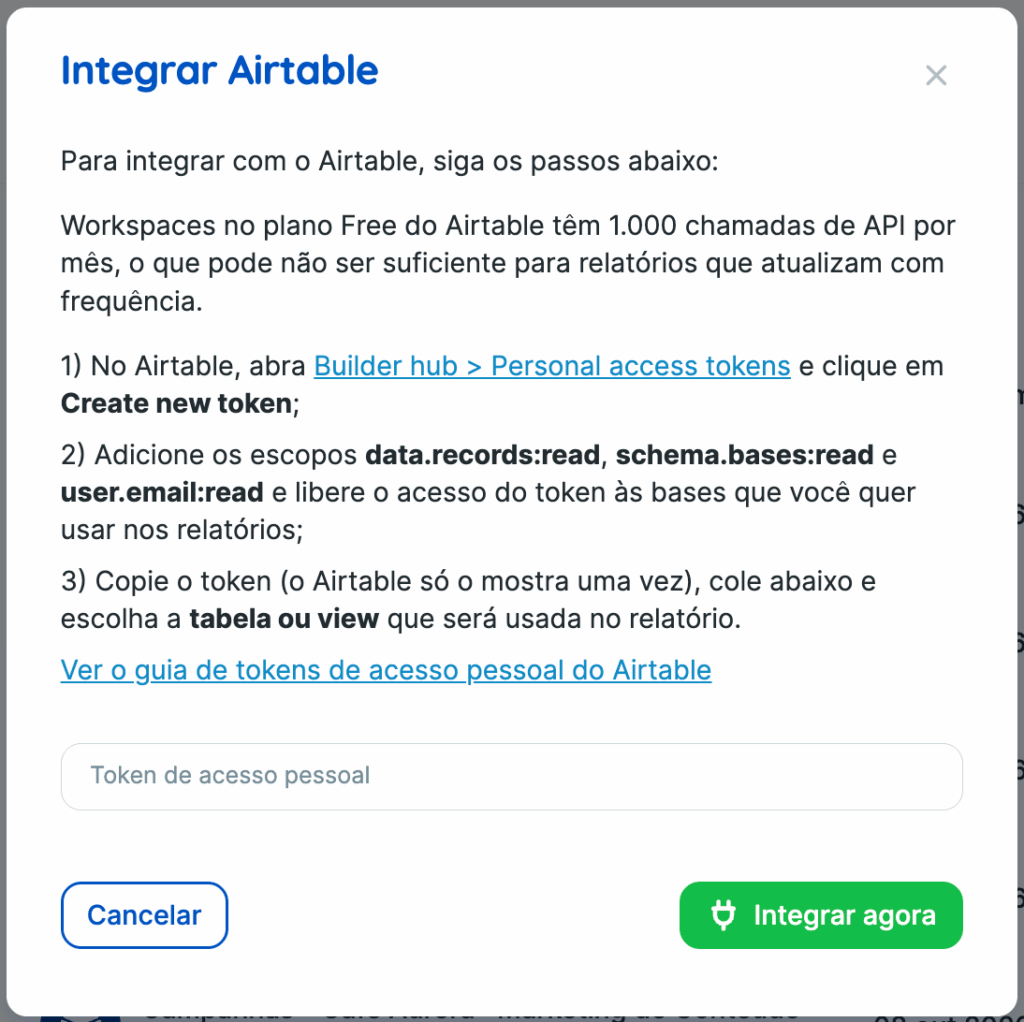
The connection uses a personal access token from Airtable. To create the token,
- In Airtable, go to Builder hub > Personal access tokens and click on Create new token.
- Add read permissions for records, base structure, and user email data.records:read, schema.bases:read and user.email:read.
- Grant token access to the bases you will use in reports
- Copy the token
Airtable displays the token only once when it is created. Therefore, save the token before closing the screen.
How to connect Airtable to Reportei
- Go to Manage integrations and choose Airtable.
- Paste the token in the integration form
- Choose the table or view to be used in the report
The selection list shows tables and views from all bases accessible to the token. The email of the token owner also appears next to it. However, form-type views do not appear because they do not hold data for reporting.
How to create the metrics
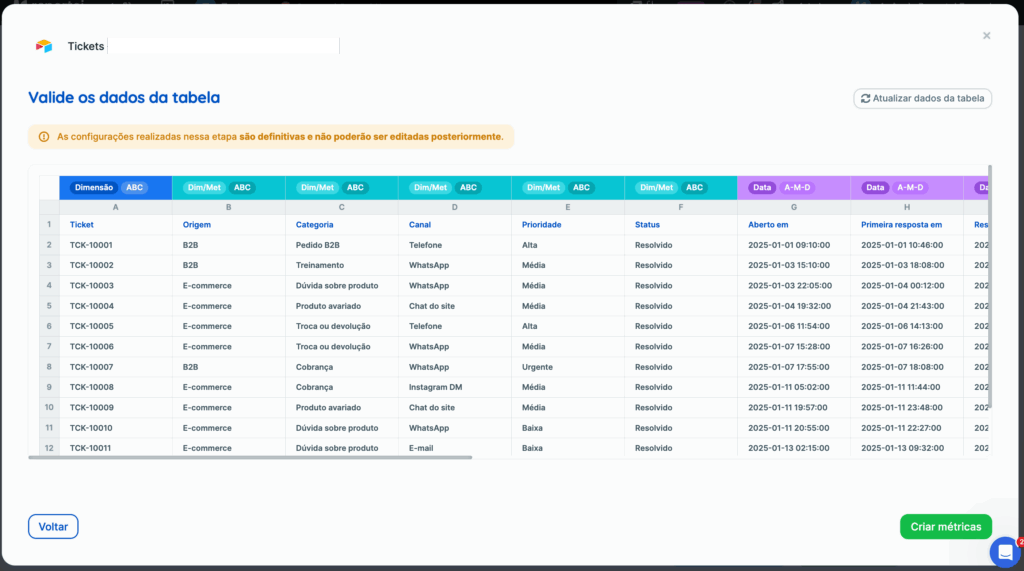
After choosing the table or view, the process is the same as in Google Sheets.
- Reportei reads the table and identifies the columns
- You check how each column should be read as a number, date, text, etc.
- You create metrics in the same Google Sheets editor manually or using the Create metrics feature that uses AI to suggest metrics from the data.
Since Airtable already informs the type of each field—number, date, text, selection—Reportei starts with the columns already classified. So you just need to confirm.
With the metrics created, you use Airtable in reports and dashboards like any other source. You build numbers, graphs, and tables and filter by the analyzed period.
Limits and precautions
Up to 2500 records at a time Reportei reads up to 2500 records at a time. When the table or view exceeds this, the report shows a warning instead of partial numbers. For larger bases, use a view with a filter, for instance, with only the current year’s records. When metrics use the same date column, the limit applies only to records of the analyzed period.
Airtable Free Plan Workspaces on Airtable Free plan have only 1000 API calls per month. Therefore, this limit may not be sufficient for frequently updated reports.
Request limit When Airtable reaches the request limit, a warning appears asking to wait 30 seconds and click Try again.
Data update Airtable data may take up to a minute to appear updated in the report.
Time zone The period filter uses the table dates in the project’s time zone in Reportei.
Possible warnings
- Table not found appears when a table is deleted or when the token loses access to it.
- Field deleted if you delete a field in Airtable, only the metrics using that field will stop working. The others continue as usual.
- Reintegration Reportei only requests reintegration when the token is revoked or becomes invalid.
Frequently asked questions
Why doesn’t Airtable have ready-made metrics
Because each company organizes the base in its own way. Therefore, just like in Google Sheets, you create metrics from the table columns.
Can I use a view instead of the entire table
Yes. In fact, this is the best solution for bases with more than 2500 records; create a view with filters and use that view in the report.
I lost the token. What now?
Airtable shows the token only once. In this case, create a new token in Airtable and use this token in the integration.