
It is now possible to integrate CallRail into Reportei and thus monitor the performance of your calls and forms directly on your reports and dashboards without needing to consult the CallRail dashboard separately
The CallRail is a platform mainly focused on call tracking and lead generation. With it, you can identify which campaigns, ads, keywords, and marketing channels are generating calls, messages, and other contacts for a company
Furthermore, the platform includes marketing attribution features and analysis of conversations held with leads. Therefore, the integration is especially useful for businesses where phone calls represent an important step in conversion, such as clinics, offices, real estate agencies, and service companies in general
The integration is available for users starting from the Premium Plan in Reportei
What can be monitored
By integrating CallRail, you can bring metrics into Reportei such as
- Calls
- Answered calls
- Missed calls
- Qualified calls
- Answer rate
- Call qualification rate
- Average call duration
- First-time calls
- First-time call rate
- Form submissions
- First-time form submissions
- Qualified form submissions
In this way, it becomes much easier to understand where your opportunities are coming from and, consequently, better direct marketing investments
How to connect CallRail to Reportei
Access Manage integrations in the desired project and locate CallRail
To integrate the network into Reportei, it is necessary to provide an API key See the step-by-step guide
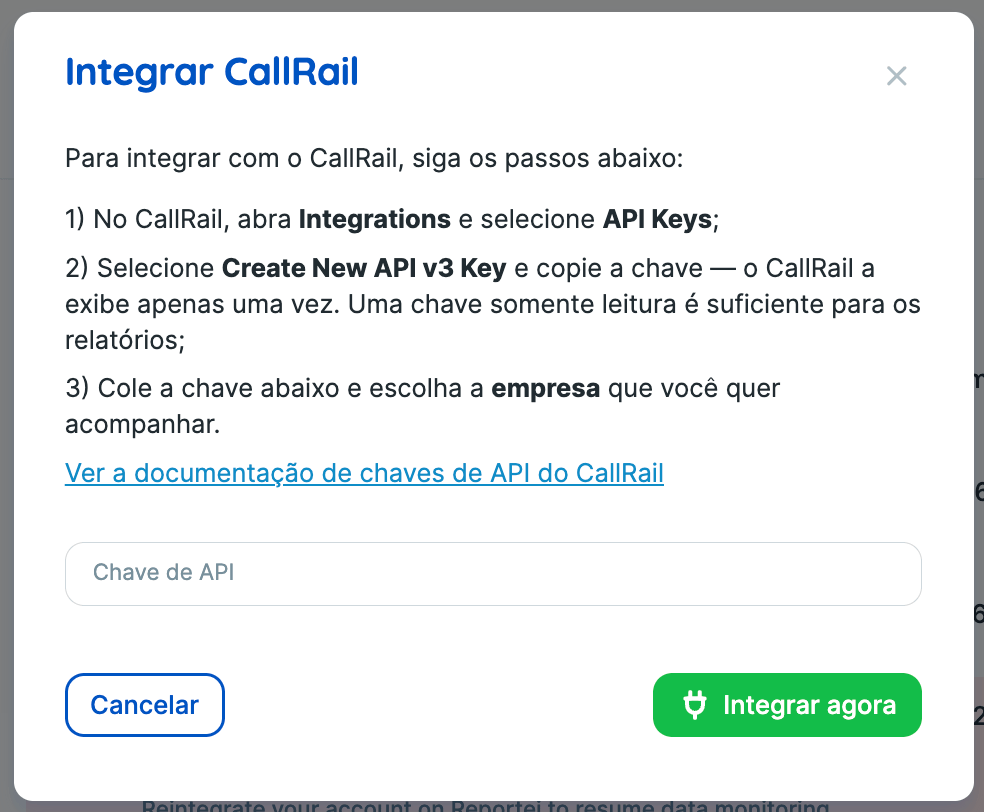
In CallRail
- Open Integrations and select API Keys.
- Select Create New API v3 Key and copy the generated key; CallRail displays it only once. A read-only key is sufficient for the reports
In Reportei
- Paste the key into the integration field
- Choose the company you want to monitor
🔗 See CallRail’s API key documentation
Important
- Currently, integration with CallRail is in the Alpha.
- Since the key is displayed only once by CallRail, it is important to copy it carefully before closing the creation screen