
Real-time dashboard of Reportei allows you to track your marketing data automatically updated without needing to reload the page. This feature has come to transform the way you monitor your results.
What changed in this update
Real-time Selector New button at the top of the dashboard to enable/disable continuous updating, also available on the shareable link.
Automatic Update When real-time is active, data is automatically updated every minute with no action needed.
New Period Selector More modern and responsive design that displays both the name of the option and the corresponding dates in the same field.
Layout Adjustments UI improvements to better utilize screen space and avoid viewing issues on smaller monitors.
How Real-time Works
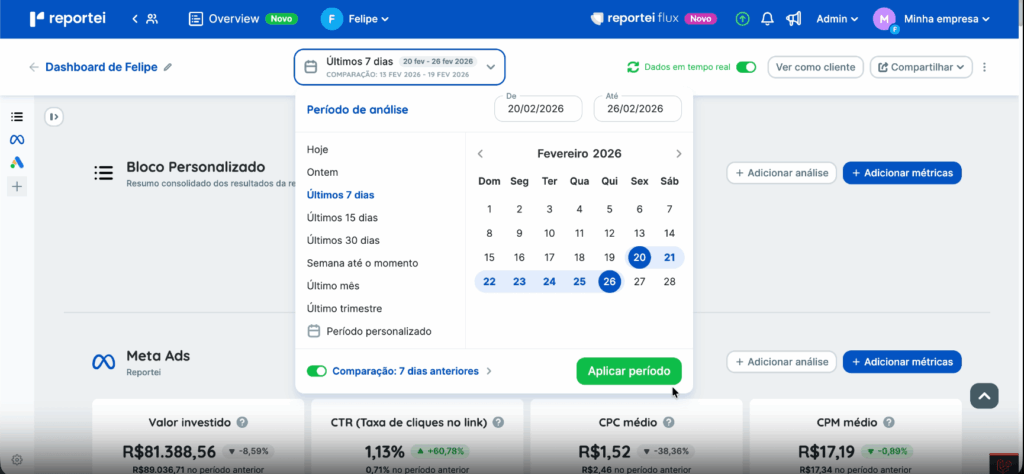
When you activate the Real-time Data selector, the dashboard starts to automatically fetch and display updated data. Understand the operating rules.
Periods compatible with Real-time
- Real-time can only be activated when the analysis period is a relative interval, such as Last 7 days, Last 15 days, Last 30 days.
- Custom periods with fixed dates do not allow Real-time to be activated even if the end date is today.
What happens when selecting an incompatible period
If you try to apply a custom period while Real-time is active, Reportei will display a confirmation message stating that Real-time will be deactivated. You can
- Confirm the period, and it is applied, and Real-time is automatically deactivated.
- Cancel, the period is not changed, and Real-time remains active.
| Tip: Daily automatic updateEven with Real-time deactivated, when using a relative period like Last 30 days, the dashboard automatically advances every new day, ensuring you always see the data for the correct interval without needing to adjust anything. |
Real-time in the shareable link
The dashboard’s shareable link also supports Real-time. This means whoever accesses the link can
- Enable or disable Real-time Data
- Change the analysis period
- Change the comparison period
| 🔗 Real-time synchronization changes made in the shareable link also appear in the dashboard’s editing mode and vice versa. The behavior is the same as today for other link controls. |
Dashboards created before this update
To ensure no existing dashboard is impacted, we applied the following compatibility rules.
| What changes in old dashboards created before the update Period displayed as Custom Old dashboards retain the period that was already saved. However, the selector will display the period as Custom, fixed dates, even if it is equivalent to a relative interval like Last 30 days. Real-time Selector deactivated by default The Real-time button comes deactivated in all existing dashboards. To activate it, you first need to change the period to a relative option, e.g., Last 30 days, and then manually turn on Real-time. |
If you want to take advantage of Real-time in an existing dashboard, follow these steps
- Open a dashboard you wish to update in Reportei.
- In the period selector, choose a relative option, for example, Last 30 days.
- Activate the Real-time Data selector at the top of the dashboard.
- All set! The data will be automatically updated every minute.
Learn the difference between Reports and Dashboards here.
If you have any questions, contact our support team via chat