The official Meta Ads MCP is now in Reportei Chat. With it, you can analyze your campaign results and make changes in Meta Ads in the same conversation, without opening Ads Manager.
The official Meta Ads MCP was built by Meta and now works inside Reportei Chat. With it, you analyze and change campaigns in the same conversation, and every change only happens after you ask for it and confirm it. To activate it, just click Connect Meta Ads MCP in the chat. Changes apply only to Meta Ads, but the analysis uses data from every channel connected to Reportei.
In this post, we explain what changes for people who manage ads and how to turn the feature on in your project. Keep reading to learn:
- What the official Meta Ads MCP is
- What you can do in Reportei Chat
- How to activate it
- How the integration protects your account
- Frequently asked questions
What is the official Meta Ads MCP?
MCP (Model Context Protocol) is a standard that lets an AI use tools from other systems. With MCP, the AI can do more than answer questions. It can also look up data and take actions on another platform.
Meta built its own MCP server for Meta Ads, and Reportei integrated that server into Reportei Chat, our platform’s AI assistant. Until now, the chat could read your campaign data. Now it can also act on your campaigns, always based on a request from you.
Already using the Reportei MCP in Claude or ChatGPT? It keeps working as usual, and its job is to bring your report data into other AI tools. What this post covers is the official Meta Ads MCP, which now lives inside Reportei Chat. Learn more about the Reportei MCP for Meta Ads.
What changes in the routine of people who manage ads
Today, adjusting a campaign means switching between two tools. You open Reportei, check spend, ROAS, CPM and the comparison with last month, and figure out what needs to change. Then you leave the platform, open Ads Manager, find the client’s account, find the campaign and make the change. At the end, you go back to the report to check that it worked.
With one account, that takes a few minutes. At an agency with dozens of clients, that back-and-forth repeats all day.
With the official Meta Ads MCP, analysis and action happen in the same place. The report shows a campaign whose cost per result is going up, you ask the assistant to pause it, review what will change and confirm.
What you can do in Reportei Chat
You make requests in plain language, the same way you’d ask someone on your team.
- Analyze performance: compare campaigns across periods and rank them by spend or by cost per result.
- Create and adjust campaigns: launch new campaigns, change budgets, pause the ones that are underperforming and duplicate the ones that are doing well.
- Build audiences: custom and lookalike audiences, right in the conversation.
- Check tracking: pixel, recorded events and conversion setup.
- Run A/B tests: the experiment is set up and tracked through the chat.
Recommendations based on data from all your channels
The assistant can also see the other channels you’ve already connected to Reportei. There are more than 50 integrations, including Instagram, Google Ads, GA4, TikTok, LinkedIn, RD Station and Shopify.
A campaign can show a good ROAS inside Meta and, once you put the Google Ads and GA4 data next to it, turn out not to be driving sales. Ads Manager on its own can’t see that gap. For now, changes only happen in Meta Ads.
How to activate the official Meta Ads MCP in Reportei
1- Open Reportei Chat in your project
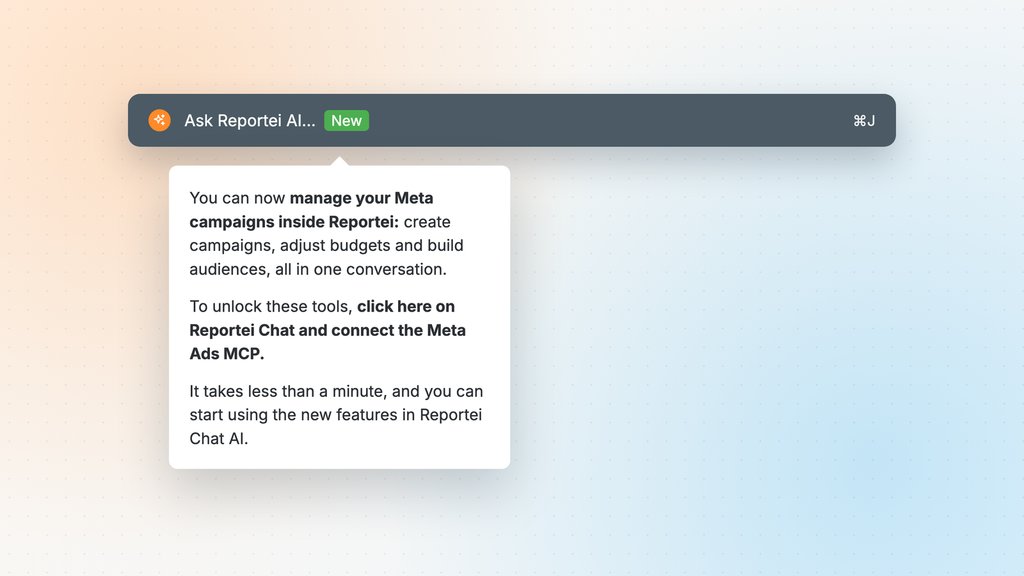
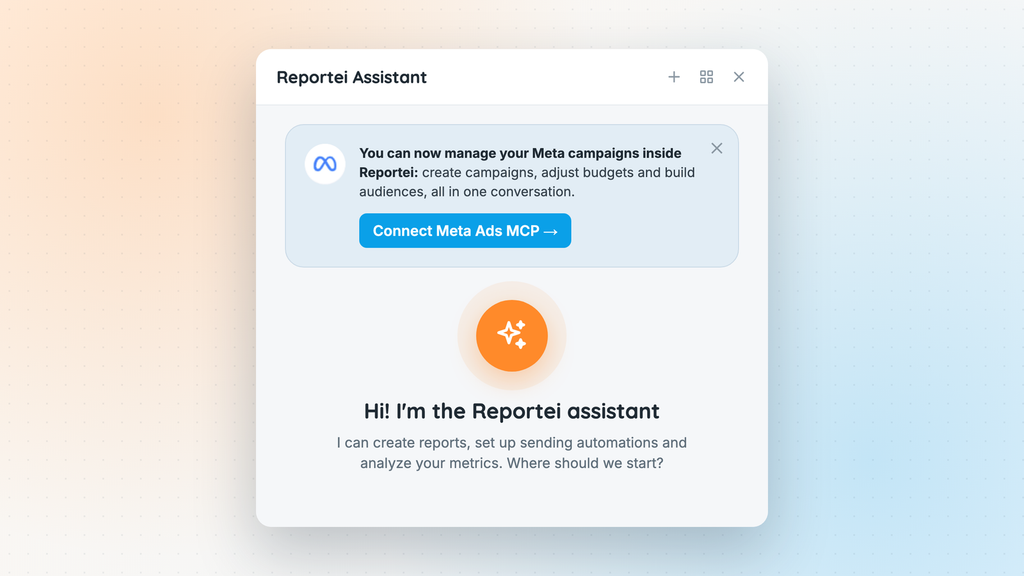
2- Click Connect Meta Ads MCP
3- Authorize the connection with your Meta account
Once you’re connected, try a request like: “What are my 3 campaigns with the highest spend this week, and which one has the worst cost per result?”
How the integration protects your account
Ad accounts handle your clients’ money, so it makes sense to want to know how the connection works:
- The MCP was built by Meta itself, and the integration with Reportei is official.
- You connect through Meta’s login, the same one used in other integrations. Reportei never sees or stores your password.
- The assistant only makes changes when you ask. By default, it analyzes and recommends, and before applying any change it shows you what it will change and waits for your confirmation.
FAQ
The Reportei MCP brings your report data into AI tools like Claude and ChatGPT. The official Meta Ads MCP works inside Reportei Chat and lets you make changes to your Meta campaigns.
If you connected Meta Ads before this integration, yes. When you click Connect Meta Ads MCP in Reportei Chat, the connection is updated with management permission.
No. Every change depends on a request from you and your confirmation.
For analysis, yes. For changes, not yet.
Final thoughts
With the official Meta Ads MCP, reporting and operations are in the same place. You spot the problem in Reportei and fix it in the same conversation, approving each change before it goes live.