
You can now integrate NAMTAB with Reportei and bring your agency’s operational data into your reports and dashboards. Show clients what was delivered for their projects and how much time your team spent on them.
NAMTAB is a management platform for agencies. It helps agencies organize project tasks, track the hours worked by their teams, and manage their sales pipeline.
👉🏻 The NAMTAB integration is available on the PRO plan and higher.
What is NAMTAB?
Unlike social networks and advertising platforms, NAMTAB provides agency operations data rather than marketing data. It covers three areas:
- Task management: projects, tasks, and assignees, with tracking of what was created and delivered;
- Timesheets: the hours each team member spent on each project;
- Sales pipeline: ongoing deals, organized by pipeline and stage, including the value of each deal.
This makes the integration a useful addition to marketing reports. For example, you can show campaign results alongside the amount of work that went into achieving them.
👉🏻 NAMTAB is a partner-developed integration. The NAMTAB team built it and is responsible for maintaining it.
📊 What you can track in reports
NAMTAB data is displayed as numbers and tables. The integration does not provide charts showing changes over time.
Tasks
- Deliveries (tasks completed during the selected period)
- Tasks created
- Deliveries by project
- Deliveries by assignee
Timesheets
- Hours logged
- Hours by project
- Hours by member
Sales pipeline
- Deals created
- Deals won
- Value of won deals
- Deals by stage, including the number and value of deals at each stage
- Deals by pipeline, including the number and value of deals in each pipeline
You can also build custom tables by combining the Project, Assignee, Member, Stage, and Pipeline dimensions.
🔗 How to connect NAMTAB to Reportei
The connection does not use an account login. Instead, you use an access key generated in NAMTAB.
First, generate the key in NAMTAB:
- Open Settings.
- Click Integrations, then Reportei.
- Generate the access key and copy it.
Then connect the account in Reportei:
- Open Manage integrations and select NAMTAB.
- Paste the key into the integration form.
- Enter a name for the account. This is the name that will appear in reports.
- Check and confirm the account details before saving.
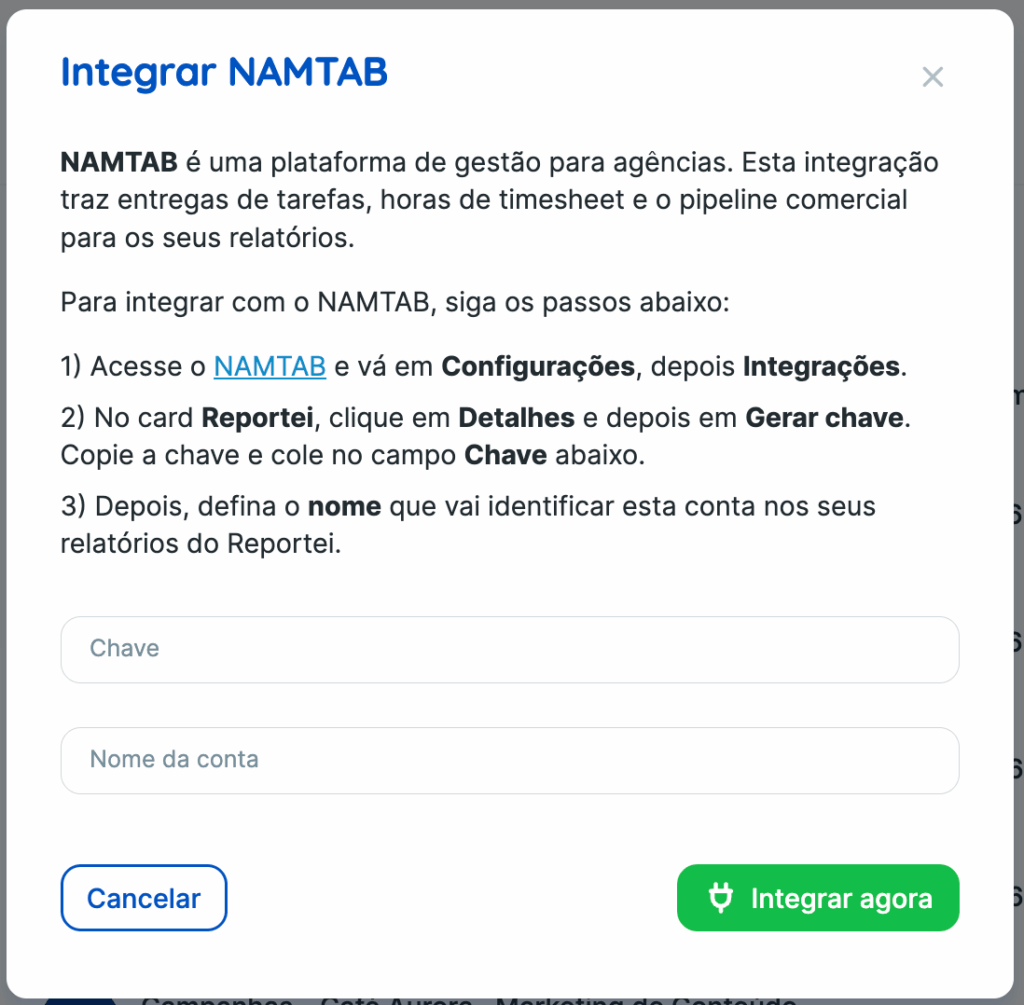
👉🏻 NAMTAB does not send the account name to Reportei. You therefore enter the name yourself when connecting the integration. Choose an easily recognizable name, such as your agency’s or client’s name.
Once connected, you can use the account in both reports and dashboards, just as you would with other integrations.
Frequently asked questions
Does NAMTAB provide marketing metrics?
No. NAMTAB provides data about tasks, hours worked, and deals. For social media, advertising, or website metrics, use the dedicated integration for each platform.
Why is the account name not filled in automatically?
NAMTAB does not send the account name to Reportei. The name displayed in reports is the one you entered when connecting the account.
Which plan do I need?
The integration is available on the PRO plan and higher.