
Connect Flux MCP: paste https://flux.reportei.com/mcp/v1 into your AI client. MCP documentation and setup guide.
Flux REST API: base URL https://flux.reportei.com/api/v1. API documentation.
The Flux API and Flux MCP connect your content workflows to other systems and AI assistants. You can retrieve information, create and edit posts, and record approvals without opening the dashboard for every task.
Flux Webhooks also notify other systems automatically when important events occur, such as a successful publication, a failure, or a new approval.
Flux API
The API lets external systems connect directly to Flux. Use it to connect projects, posts, and approvals to your agency’s internal systems, dashboards, and automations.
For example, you can create an automation that checks which posts are still awaiting approval each day, then organizes that information in your team’s tool. Similarly, a custom system can create posts directly in Flux and submit them for approval.
Flux MCP
MCP connects Flux to AI assistants, such as Claude Code. You can retrieve information and create content using natural language, without developing an integration.
For example, you can ask the assistant:
- “Which posts are awaiting approval this week?”
- “What is scheduled for this client?”
- “Do any projects have a disconnected social account?”
- “Who still needs to approve tomorrow’s posts?”
- “Create a post with this image and caption and submit it for approval.”
The assistant uses Flux data and organizes its response around your request.
👉🏻 The main difference: the API is intended for programmatic integrations between systems. MCP provides access to the same functions through conversations with an AI assistant.
What you can do through the API and MCP
Retrieve information
- Projects: the projects available in the account and the platforms connected to each one;
- Posts: posts, captions, media, statuses, and scheduled or actual publication dates;
- Approvals: approval counts, change requests, and reviewers who have not yet responded;
- Approval history: who approved a post, who requested changes, and the comments recorded;
- Approval groups: posts grouped for review and the progress of each one;
- Social accounts: accounts that are connected, disconnected, or have expired authorization;
- Content across multiple platforms: the different versions of the same content published on more than one platform.
Create, edit, and approve content
- Upload media: photos and videos for new posts;
- Create posts: choose whether to save a post as a draft, submit it for approval, or schedule it for publication;
- Edit posts: change the caption, media, or date before a post is published;
- Record approvals: approve a post or request changes directly through the integration.
How scheduling works
When you schedule a post through the API or MCP, Flux publishes it automatically at the specified date and time. It does not ask for another confirmation before publishing. This works just like scheduling a post directly in Flux.
Saving a draft or submitting a post for approval does not publish it automatically. In those cases, you need to schedule the post afterward.
Publishing to TikTok and Pinterest through MCP
TikTok and Pinterest require certain publication settings. When you use MCP, the assistant asks for this information before continuing, following the same requirements as the Flux publishing workflow:
- Pinterest: specify the board where the post will be published;
- TikTok: confirm the privacy settings.
The assistant submits the post only after you confirm these details.
🔔 Flux Webhooks
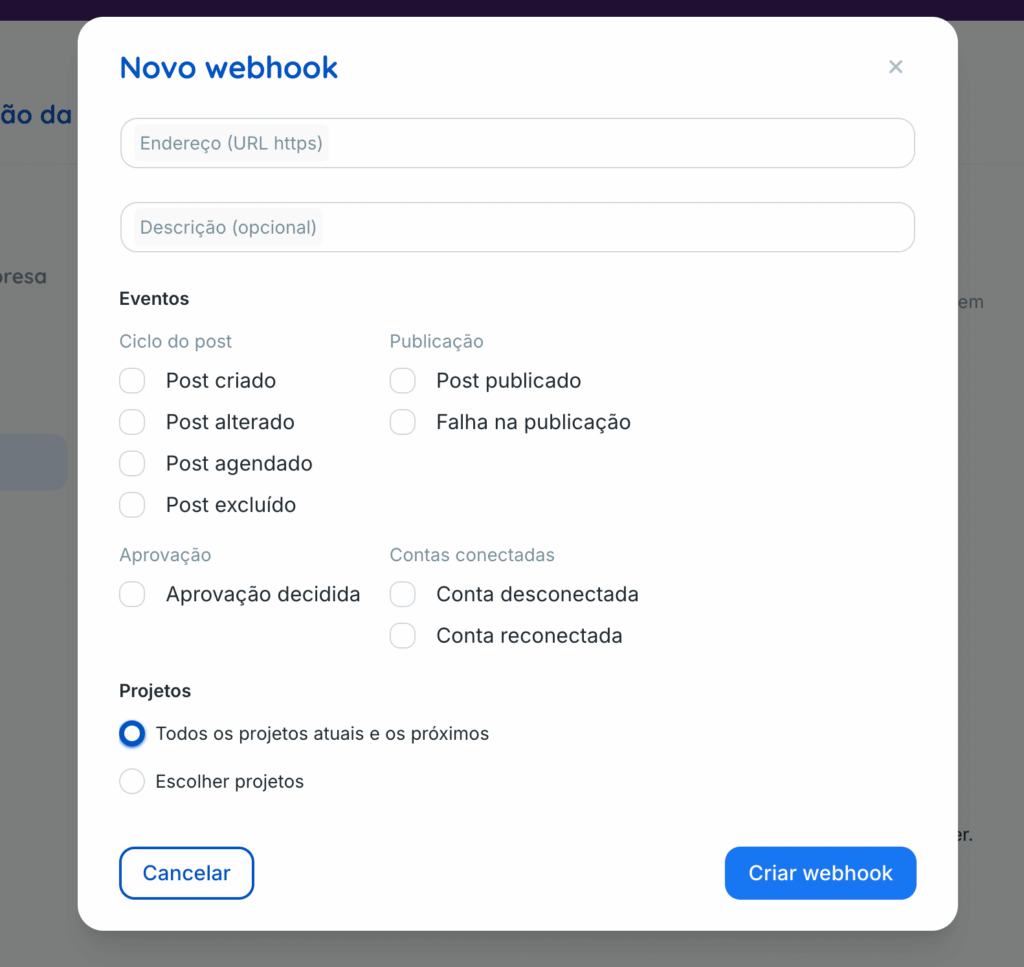
Webhooks let Flux notify an external system automatically when specific events occur. The connected system does not need to repeatedly query the API to find out what has changed.
In practice, creating a Webhook answers this question: what does the other system need to know about Flux? The Webhook determines where the notification goes, and its events determine when Flux sends it.
Available events
- Post created: notifies you when a new post is created in Flux;
- Post updated: notifies you when an existing post is changed;
- Post scheduled: notifies you when a post is scheduled for publication;
- Post deleted: notifies you when a post is removed;
- Post published: notifies you when publication completes successfully;
- Publication failed: notifies you when Flux attempts to publish a post but publication does not complete;
- Approval decision: notifies you when someone makes an approval decision, such as approving the content or requesting changes;
- Account disconnected: notifies you when a social account connected to Flux loses its connection;
- Account reconnected: notifies you when that connection is restored.
A practical example
Imagine an agency with its own task management system. It can create a Webhook for the Post published and Publication failed events. Whenever a post is published, the system automatically marks the task as complete. If publication fails, the system creates an alert for the team.
Security and retries
Each notification includes a signature that lets the external system verify that it was sent by Flux.
If the configured endpoint does not respond, Flux automatically retries delivery for a few days. If failures continue, Flux disables the Webhook.
Important limits
- Each key is limited to 120 requests per minute;
- Each key also has a separate limit of 20 create or edit actions per minute;
- Each account can register up to 5 Webhooks;
- Media URLs returned by the API expire after 48 hours.
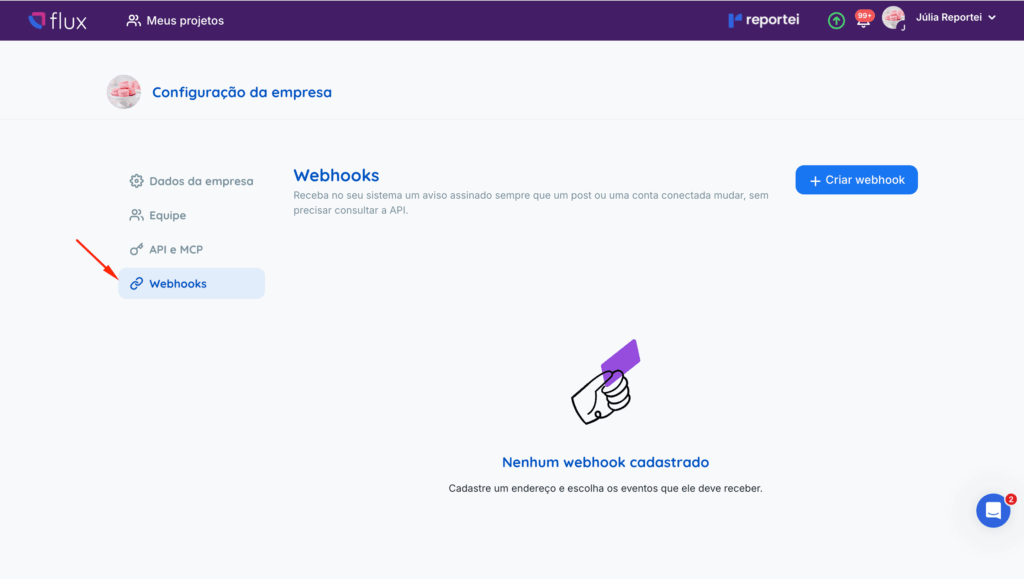
How to access these features
In Flux, go to Company settings > API and choose an option:
- Integration guide: instructions for using MCP;
- Create token: instructions for using the API;
- Webhooks: a tab for creating and managing your Webhooks and selecting their events.
The complete technical documentation is available here:
Frequently asked questions
Can I create or edit posts through the API or MCP? Yes. You can upload media, create posts, edit unpublished posts, and record approvals or change requests.
Will a post scheduled through the API be published without confirmation? Yes. Just as in Flux, a scheduled post is published automatically at the specified date and time. If you want to review it first, save it as a draft or submit it for approval.
What is the difference between the API and MCP? The API is intended for programmatic integrations between systems. MCP lets you retrieve information and create content in natural language through an AI assistant.
Why use Webhooks if there is already an API? The API responds when your system asks for information. Webhooks work in the opposite direction: Flux notifies your system as soon as something happens, without requiring repeated queries.
Are there usage limits? Yes. Each key is limited to 120 requests per minute and 20 create or edit actions per minute. Each account can have up to 5 Webhooks, and media URLs expire after 48 hours.
If you have questions, contact our Support team through chat. =)