
Now you can integrate Ahrefs into Reportei and bring the SEO data of the sites you track into your reports and dashboards. This way, you show the client the site’s authority, backlinks, keywords, and estimated organic traffic. You can even track the site’s citations in AI assistant responses.
What is Ahrefs
Ahrefs is one of the most used SEO tools on the market. It analyzes a site’s authority and the backlinks from other sites to it. It also shows the keywords the site appears for in Google and the estimated organic traffic. Additionally, it shows performance in paid search and the site’s citations in AI assistant responses.
In Reportei, the data comes from three areas of Ahrefs
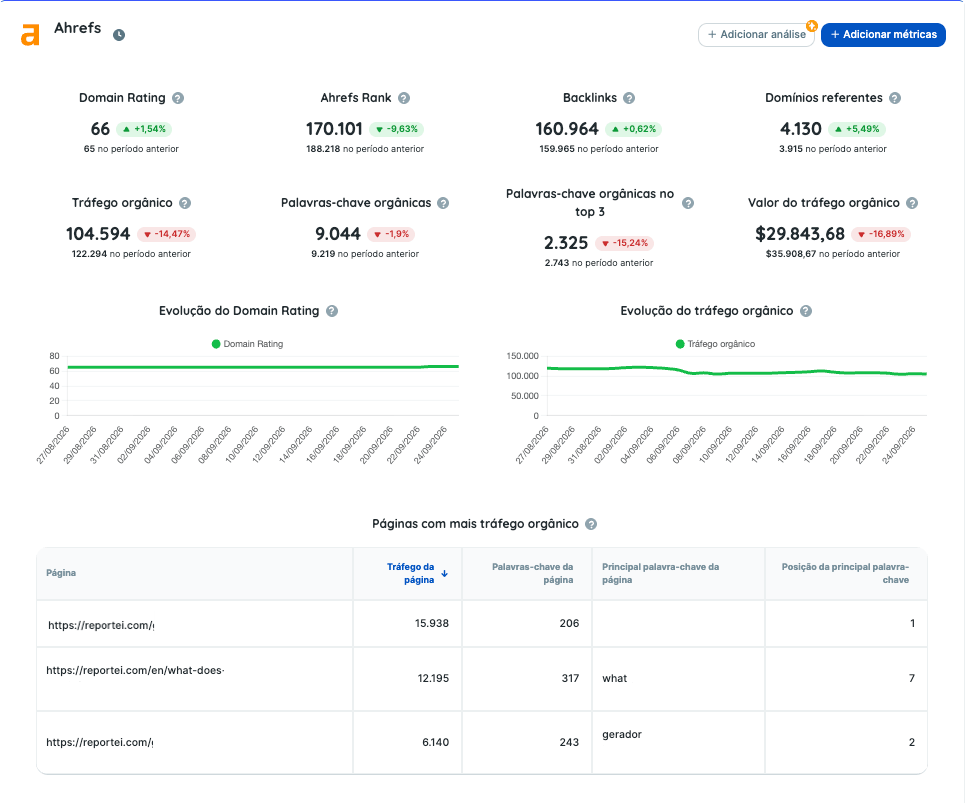
- Site Explorer — the SEO X-ray of the domain with Domain Rating authority, backlinks, referring domains, organic keywords, estimated traffic, and pages that bring the most visits.
- Rank Tracker — monitoring the chosen keywords in Ahrefs with each one’s position in Google, competitor comparison, and share of voice.
- AI Visibility — how many times the site is cited in responses from ChatGPT, Google AI Overviews and AI Mode, Perplexity, Gemini, Copilot, and Grok.
Unlike Google Search Console, which shows the real data from the site itself, Ahrefs works with estimates calculated from its index. In return, it provides information that the Search Console doesn’t have, like authority, backlinks, and competitors.
Prerequisites
Before integrating, check if
- your Ahrefs account is on the Lite plan or higher because the Ahrefs API is only available from this plan onwards.
- you are the owner or administrator of the Ahrefs workspace or have help from someone who is, as only these profiles can create the API key.
How to connect Ahrefs to Reportei
The connection doesn’t use an account login. Instead, you use an API key created in Ahrefs itself. In Reportei, you need to have the Premium plan subscribed to proceed with the integration.
First, create the key in Ahrefs
- Access Account settings.
- Click on API keys and create a new key
- Copy the key
Then connect the account in Reportei
- Go to Manage integrations and choose Ahrefs.
- Paste the key into the integration form
- Choose from the workspace project list the project that will go to the report
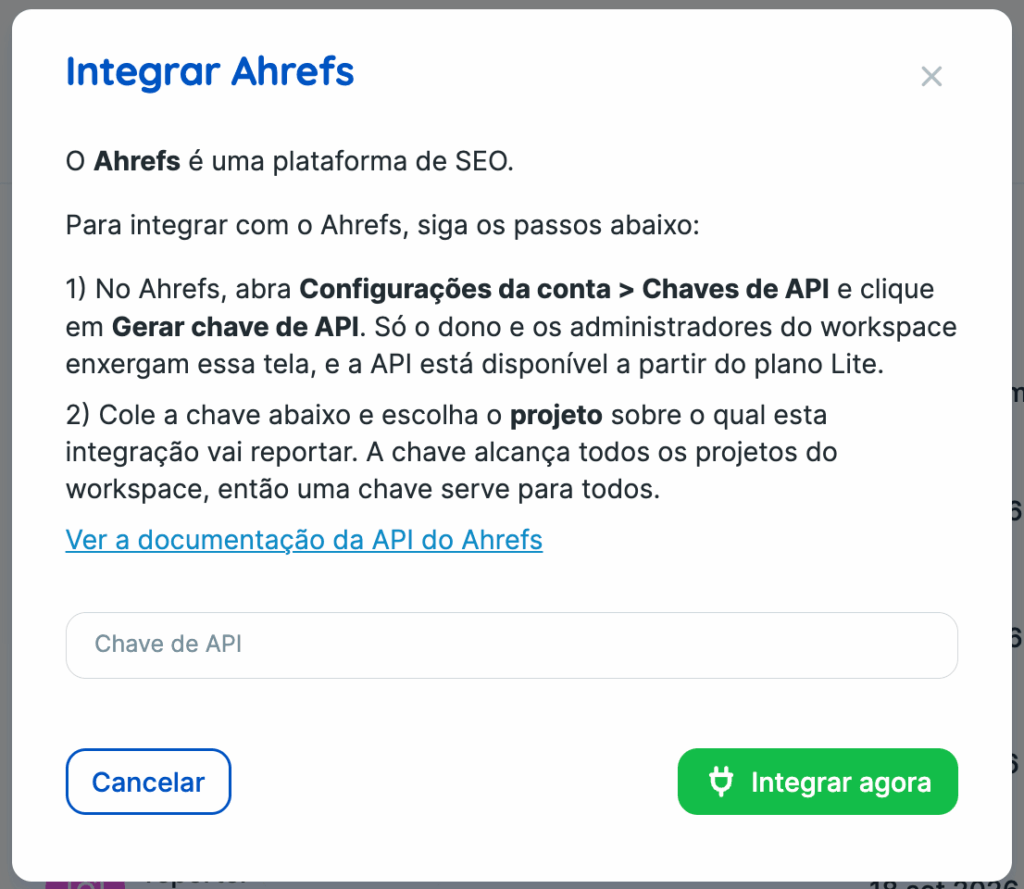
One key provides access to all projects in the workspace. Therefore, to integrate another project, just use the same key and choose the other project.
What can be tracked in the reports
Ahrefs has a standard report and dashboard template. Additionally, you can find ready-made goal suggestions in the Control and 65 indicators including numbers, graphs, and tables.
Authority and backlinks
- Domain Rating
- URL Rating
- Ahrefs Rank
- Backlinks
- Referring domains
Traffic and organic keywords
- Organic traffic
- Value of organic traffic
- Organic keywords also by position range: top 3, 4 to 10, 11 to 20, 21 to 50, 51 or worse
- Ranking pages
- Total search volume
Paid traffic
- Paid traffic
- Cost of paid traffic
- Paid keywords
AI Citations
- AI Citations
- Pages cited by AI
- AI citations by platform
Rank Tracker
- Monitored keywords and average position
- Share of voice
- Featured snippets and AI Overviews
- Competitors in monitored keywords
You can also find evolution graphs and tables of pages, keywords, keyword opportunities, referring domains, anchor texts, and performance by country.
How to read Ahrefs data
Some Ahrefs metrics work differently from social media and ad metrics. Therefore, it’s worth knowing these points before creating the report.
The metrics show the state of the site on a single day Domain Rating, backlinks, referring domains, estimated traffic, and keyword counts do not accumulate over the period. In other words, Reportei shows the value from the last day of the analyzed period without summing. This way, the comparison contrasts the end of one period with the end of the previous one.
In some metrics, smaller is better In Ahrefs Rank and position metrics, a smaller number indicates a better result. The comparison with the previous period already considers this.
Monetary values always appear in dollars Traffic value, cost of paid traffic, and CPC are shown in dollars because Ahrefs does not provide another currency.
The Site Explorer data is global just as the Ahrefs panel shows by default. The exception is the organic performance table by country.
The numbers match the Site Explorer when the Ahrefs panel uses the default setting Monthly volume and traffic model Adaptive If you use another configuration in the panel, the traffic, value, and volume numbers will be different from those in Reportei.
In the view with multiple projects metrics like Domain Rating, positions, and shares of voice appear as an average among the projects and not as a sum.
Rank Tracker and API quota
Rank Tracker metrics only appear for projects with keywords registered in the Ahrefs Rank Tracker. That’s why they are excluded from standard templates. When the project has no monitored keywords, Reportei displays a warning instead of numbers.
Additionally, each query to Ahrefs consumes units from your monthly API quota in Ahrefs. To spend as little as possible, Reportei reuses identical queries and stores the data for a while. For example, current day data is updated every 30 minutes, and data from previous days every 24 hours.
Warnings that may appear
- Quota exhausted when the monthly API quota in Ahrefs runs out, Reportei displays a specific message. In this case, there’s no need to reintegrate the account.
- Invalid or revoked key is the only case where Reportei requests reintegration. Create a new key in Ahrefs and integrate again.
- Project deleted Reportei notifies you when the project is deleted in Ahrefs.
- Period out of history Reportei notifies you when the requested period is older than the history your plan in Ahrefs allows you to consult.
Frequently Asked Questions
Why don’t the numbers in Reportei match those in Search Console Because Ahrefs works with estimates calculated from its index, while Search Console shows the actual data from the site. Therefore, the two numbers do not have to be the same.
Do I need a key for each project No. One key gives access to all projects in the Ahrefs workspace.
Which plan do I need to have In Reportei, the Premium plan. In Ahrefs, the Lite plan or higher, which unlocks the API.