
The integration with the Olist ERP formerly Tiny allows you to track sales and order data from your ecommerce operation directly in the Reportei reports
With this integration, you can view important metrics such as order volume, revenue, and average ticket, making it easier to track your store’s performance
⚠️ Attention the integration with Olist ERP is available for users of the PRO Plan.
What is Olist ERP
The Olist ERP formerly Tiny is a management platform for ecommerce that centralizes important sales operation information
It is mainly used to
- Organize and track orders over time
- Monitor sales and revenue
- Analyze the commercial performance of the store
- View orders by status
How to integrate Olist ERP with Reportei
To connect your Olist ERP account to Reportei, you need to use the API Token of the platform
Follow the steps below
1 Access your account on Olist ERP
2 Go to the API settings In the system menu, access Settings API Settings
3 Copy the API Token On the API screen, you must Copy the API Token existing one or Generate a new token if necessary
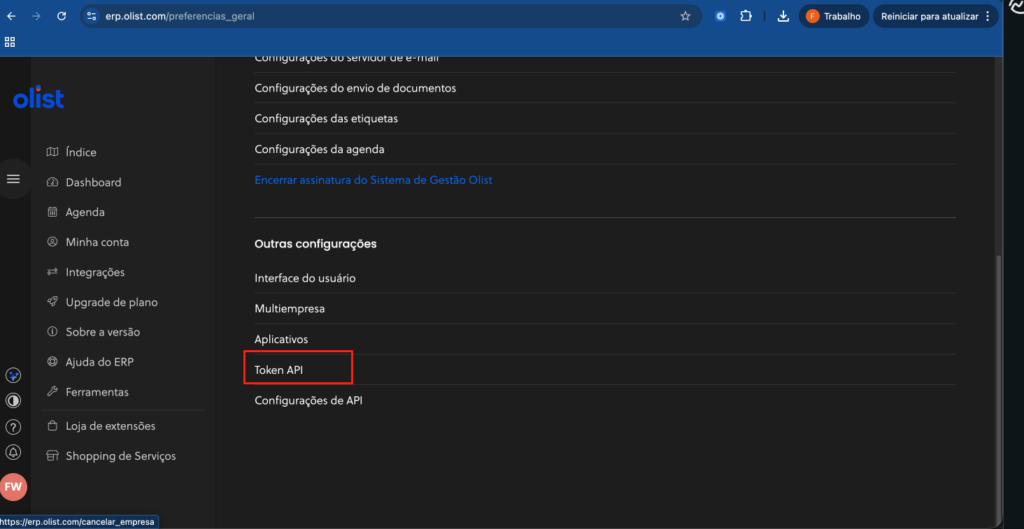
4 Connect to Reportei:
- Access the Integrations area in Reportei
- Select Olist ERP
- Paste the API Token
- Complete the connection
Ready Your sales and order data will start syncing with Reportei
Which Olist data can I see in the Reportei reports
The integration of Reportei with Olist ERP initially focuses on orders and sales data.
Currently, the available metrics are
- Total orders
- Total sales currency
- Average ticket currency
- Canceled orders
- Chart with Orders over time
- Chart with Sales over time
- Table with Orders by status
These metrics allow you to analyze sales evolution and better understand the operation’s behavior
Which areas of Olist are used in the integration
Olist has several modules such as
- Registrations
- Supplies
- Sales
- Finance
- Services
Currently, Reportei mainly uses data from the sales and orders module.
Important about the data
By default, the reports do not consider orders with the following statuses:
- Open
- Canceled
- Incomplete data
This ensures that the reports only reflect valid orders for sales analysis
If you need help, contact our support 😊