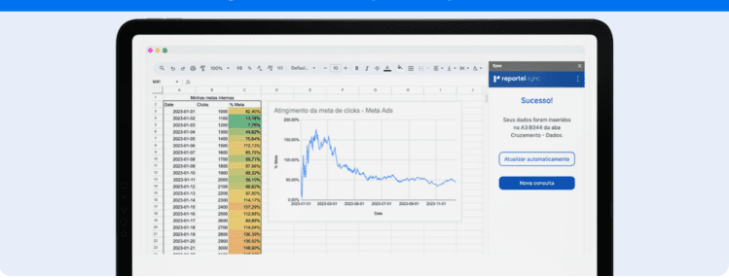
Learn about Reportei Sync, its features, and how it helps create marketing reports in Google Sheets more efficiently.
Generate a marketing report in Google Sheets can be a simpler and more efficient task with the help of the right tool.
In this scenario, Reportei Sync stands out as a practical solution for those looking to automate and centralize data from various platforms into spreadsheets.
With it, you can integrate information from social networks, ad campaigns, and other sources directly into Google Sheets, ensuring personalized reports that are always up-to-date and easy to share.
Therefore, in this article, we will show how to create complete marketing reports using Reportei Sync and optimize data analysis for more strategic marketing management. Follow along below.
What are the advantages of using Google Sheets for marketing reports
Creating marketing reports in Google Sheets is an important process for various agencies and companies seeking flexibility, collaboration, and automation. This is because this tool offers several benefits for analysts’ routines, such as
- Real-time collaboration since multiple users can access, edit, and collaborate on the same report without the need to send updated files via email. This facilitates teamwork and quick, efficient decision-making.
- Customization allowing you to add formulas, charts, and pivot tables according to your specific needs.
- Accessibility on any device due to being a cloud-based tool, Sheets allows you to view or edit reports practically wherever you are.
- Integration with other tools in addition to being compatible with other marketing analysis tools Sheets easily integrates with other Google services like Analytics, Data Studio, and Google Ads, facilitating data flow and the creation of complete and personalized dashboards.
- Change history control allows for tracking all changes made to the document, making it easier to recover data or monitor who made a specific change.
In conclusion, these benefits make Google Sheets an intelligent choice for creating marketing reports, offering a versatile, customizable, and accessible solution for professionals and teams.
How to export data from Reportei to Sheets
However, to make the development of your report in Google Sheets truly efficient, it is ideal to automate the capturing of metrics that will compose the spreadsheets.
To achieve this, Reportei launched the Sync tool, which integrates with Sheets and ensures that all data from your marketing strategies are sent to the spreadsheet in just a few seconds.
Since it is an extension of Google Sheets, Sync is very easy to install and start using. Below, you will find a step-by-step guide for this process.
1. Install the extension
The first step to accessing Reportei Sync is to request a free trial on the tool’s page. Once done, you will be redirected to the Google Workspace Marketplace where the extension will be available to be installed in your browser.
2. Access Reportei Sync
Next, within the Google Sheets spreadsheet where you want to work, go to the menu and select the Extensions option. There you will find Reportei Sync.
Upon opening the extension, a sidebar will appear, guiding you through the data import process.
3. Select the network and account
Within the sidebar, choose the network from which you want to import data, such as Meta Ads Google Ads Instagram, Google Analytics, among others.
Then, select the account associated with the chosen network. If you are using Sync for the first time, it will be necessary to import your Reportei account following the instructions displayed during the initial setup.
4. Define metrics and dimensions
Next, define the marketing metrics and dimensions you wish to analyze. This will allow you to customize the data to be imported, focusing on the most relevant aspects for your report.
5. Determine the analysis period
Choose the period you wish to analyze. These dates can vary according to your needs, from specific campaigns to longer periods for detailed assessments.
6. Choose the import location
The next step is to define where the data will be imported into the spreadsheet. You can choose to insert it in the current tab, create a new tab, or even select a specific cell to receive the information.
7. Data import
Finally, click on Import Data to complete the process. Google Sheets will automatically be filled with the selected information, ready to be analyzed and customized as needed.
Moreover, a major differentiator of Reportei Sync is its flexibility. After all, the spreadsheet can be fully customized, allowing you to choose dates, campaigns, and other essential parameters for your analyses.
What can be done with Reportei Sync reports
Speaking of customization, Reportei Sync offers a range of amazing features for creating reports in Google Sheets. Here’s what they are:
1. Cross-referencing data from multiple sources
To start, one of the major features of Reportei Sync is the ability to cross-reference and compare data from various sources, whether they are from marketing, sales, or other sectors.
In other words, you can combine the information imported from your Reportei accounts with your internal data, providing a broader and more strategic view of your business.
This makes it easier to gain deeper insights and make marketing decisions based on a holistic analysis.
2. Always updated data
Keeping your analyses based on updated information is essential for making agile and accurate decisions.
To assist in this process, Reportei Sync automatically updates the data every hour, ensuring that the spreadsheets in Google Sheets always reflect the most recent project results.
Thus, this feature eliminates the need for constant manual updates, saving time and preventing errors from outdated data.
3. Indicators from various channels in one place
Finally, with Reportei Sync, you can extract the main indicators from various platforms and bring everything into Google Sheets and also Looker Studio.
Supported channels include Instagram, Facebook, Meta Ads, YouTube, TikTok, LinkedIn, Google Analytics, Google Ads, RD Station, Search Console, Google My Business, Twitter, Pinterest, Shopify, and many others.
This offers a complete view of the performance of all your digital marketing strategies, facilitating analysis and monitoring of results in one place.
How to subscribe to Reportei Sync
Subscribing to Reportei Sync is very simple and brings a range of advantages for those who want to create marketing reports in Google Sheets.
The tool has an initial cost of R 149.00 per month and offers the following features:
- 1 Google Sheets user; you can create multiple spreadsheets but always using the same Google account.
- Unlimited data extraction
- Full integration with Reportei and the accounts registered on our platform
- Automatic scheduling
- Support via chat and email
Additionally, the payment is made in Brazilian reais without exchange rates, additional taxes, or extra costs, making the process simpler and more accessible.
In summary, for those who want to optimize report creation in Google Sheets, Reportei Sync is a complete and agile tool. Take advantage of the free trial and discover how this tool can transform your data management.