Get to know Reportei Flux and the features that help make your post calendar more efficient in your project’s routine
If you’re looking for a more strategic and organized way to manage your social media publications, Reportei Flux is the ideal solution to transform the routine of creating, approving, and scheduling content.
After all, with it, you can visualize all your planning in a centralized calendar, automate repetitive tasks, and ensure each post is published at the right time.
Therefore, in this article, we’ll show how Flux works in practice and the features that help organize a comprehensive post calendar within the platform. Follow along!
What is Reportei Flux
The Flux is the tool for post scheduling and complete social media management from Reportei, which is already known for facilitating the creation of reports, dashboards, goal tracking, and much more
Thus, while the traditional Reportei takes care of result analysis, Flux comes in the earlier phase of planning, creation, approval, and distribution of content.
In other words, with this new tool, you can:
- Schedule posts on multiple networks simultaneously such as Instagram, Facebook, TikTok, Threads, LinkedIn, Pinterest, Google My Business, and YouTube
- Organize publications by folders and view everything in calendar format
- Create approval workflows with the client or team with a unique link and centralized feedback
- Batch schedule posts and save time in operation
- Track the status of each content practically
- Work collaboratively without losing the history of changes
That said, its main differential is eliminating daily obstacles, especially in the approval stage, which is usually one of the most time-consuming when done by messages or scattered emails.
How to organize your post calendar with Reportei Flux
Want to make your post calendar more efficient and gain more control over what goes live on social networks.
Below, see the main features of Reportei Flux that make this process quick, visual, and collaborative.
1. Intuitive layout
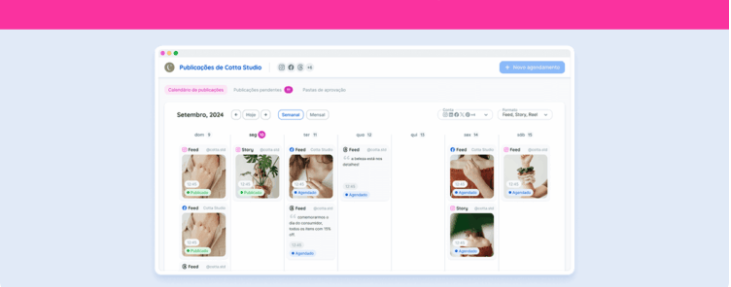
To begin, the Reportei Flux calendar allows for a clear and complete view of everything that has been published or is scheduled.
That said, you can switch between weekly or monthly views, which facilitates both macro analysis of campaigns and the fine-tuning of daily tasks.
Indeed, the layout was designed so that the whole team is always on the same page.
After all, each post appears with its status, thumbnail, and schedule, which prevents doubts, mismatches, and rework in the routine.
Thus, with this visual organization, you have access to three main advantages
- Predictability of publications
- Reduction of errors and content overlapping
- And greater control of the workflow even with multiple networks and clients
2. Content scheduling on different platforms
Without a doubt, one of the biggest pains for social media managers is repeating the same content manually on multiple networks.
However, with Flux you schedule once and distribute to all desired channels which helps save valuable time.
Furthermore, the centralization of publication facilitates:
- Review of text, media, and format before sending to the client
- Standardization of captions or customization by network. For example, using different CTAs for Instagram and LinkedIn
- Complete record of the approval flow and status in a single panel
In other words, instead of switching between several tabs, logins, and separate calendars, everything is in the same workspace, which is even more useful for those managing multiple profiles or accounts

3. Identification of content opportunities
From the intuitive calendar layout, you can also identify gaps, seasonality, and recurring themes that can become series, campaigns, or commemorative dates.
For example, it’s possible to identify if:
- You’re missing posts from an important editorial in the coming weeks
- Educational content was concentrated on just two days of the month
- The launch campaign for the new product is too close to another offer
In this way, Reportei Flux allows anticipating scenarios and making strategic decisions before a problem occurs.
4. Management of post approvals
The approval stage is one of the most sensitive in social media management and often the most time-consuming.
That’s why, with Flux, you can simplify the process through a workflow that allows you to:
- Send a group of posts with a single link
- Receive centralized feedback without screenshots, audios, or scattered emails
- See the status of each item in real-time
- Accelerate approvals with fewer back-and-forths

To further facilitate, when creating a new approval group, rename it using the client’s name along with the month the contents will be published.
For example, Reportei September. This way, the client easily identifies the approval email, and you don’t get lost in calendar planning.
5. Email notifications
After the client approves the content, the entire team registered in the group receives an automatic email notifying that the posts are released for scheduling.
This way, you avoid parallel conversations, keep the team aligned, and ensure that the calendar posts are scheduled at the right time.
But it’s important to highlight that only those in the approval group receive notifications.
Therefore, it’s essential to ensure that those responsible for service and content are registered to receive these notifications.

6. Data analysis to aid planning
Finally, planning content without looking at results is like flying blind
That’s why Reportei helps plan your post calendar by complementing Flux with automatic reports that show
- Which content performed best
- In which networks the audience engages most
- Which format delivers more reach, clicks, or conversions
- Which days and times work best
These insights feed the planning of the next month and help create a continuous cycle of improvement.
Try Reportei Flux for free
So, are you ready to set up a more organized, predictable, and collaborative post calendar?
Reportei Flux is ideal for helping in this process of reducing rework, centralizing processes, and giving more control to your planning.
Therefore sign up now to test for free and see in practice how it can transform your content routine.
FAQ frequently asked questions about Reportei Flux
Before closing, we’ve gathered the answers to the most common questions about the tool. Here we go
Yes, it centralizes scheduling, approval, calendar, and feedback from different social networks in one place
Yes, it is possible to schedule multiple posts at once, which speeds up campaigns and monthly schedules
Yes, it was designed especially for those managing multiple accounts and networks simultaneously
Yes, even when scheduling on multiple networks simultaneously, you can adjust text, hashtags, media, and CTA
No, they receive a link and approve directly via the browser
In the calendar itself, each post displays a label such as pending, approved, scheduled, or published
Yes, by email, but only for those in the approval group