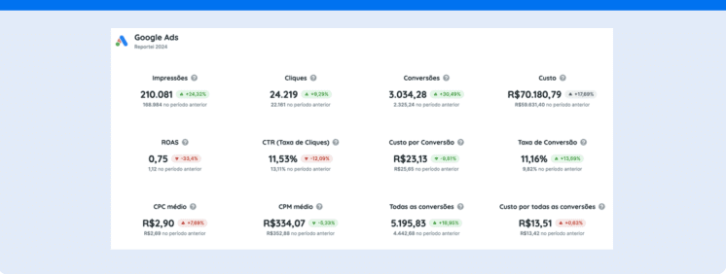
From CTR to ROAS, check out the most important Google Ads metrics and tips to improve your ad results.
In digital advertising, understanding and monitoring Google Ads metrics is fundamental to ensuring the success of any campaign.
After all, KPIs Key Performance Indicators provide valuable insights into your ad performance and help identify improvement points to maximize results.
Therefore, in this article, we will explore the main Google Ads KPIs to monitor in your reports such as CTR, CPA, and ROAS, along with practical tips to optimize each metric and improve your campaign performance. Follow along.
Which Google Ads metrics are most important?
From CTR to ROAS, we’ve put together a selection of 6 Google Ads KPIs that must be included in your reports and dashboards. Let’s go.
1. CTR
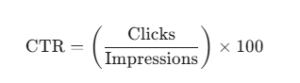
The CTR Click-Through Rate) or Click Rate is one of the Google Ads metrics used to measure ad effectiveness. It indicates the percentage of people who clicked on your ad relative to the total number of views (impressions) it received.
Its calculation is simple: divide the number of clicks by the number of impressions and multiply the result by 100, as shown in the formula below.
This metric is fundamental to assess how attractive and relevant your ad is to the audience. Thus, a high result usually means that the creative meets users’ expectations.
To improve CTR, it’s important to create attractive titles and descriptions, use relevant keywords, and optimize audience targeting.
Additionally, conducting A/B tests and ensuring that the ad aligns with users’ search intent can also help increase this rate.
2. CPC
The CPC (Cost Per Click) is a metric that indicates the amount you pay each time someone clicks on your ad. In other words, it is used to control advertising expenses and evaluate the cost-effectiveness of a campaign.
To calculate CPC, you need to divide the total amount spent on the campaign by the number of clicks received. For example, if you invested R$ 500 and received 200 clicks, the CPC would be R$ 2.50.
A high CPC may indicate that you are paying too much for clicks, which can consequently impact profitability.
Thus, to improve this result, you can optimize keywords by using those with lower competition and cost, without losing relevance.
Another point is to improve the Quality Score since Google Ads rewards more relevant and optimized ads with a lower Cost Per Click.
3. Conversion Rate
The Conversion Rate is a Google Ads metric that measures the percentage of users who perform a desired action after clicking on your ad. These actions can include making a purchase, filling out a form, signing up for a newsletter, or any other campaign-defined goal.
To calculate the Conversion Rate, the following formula is used:
For example, if your ad received 200 clicks and resulted in 10 conversions, the Conversion Rate would be 5%.
Thus, monitoring this metric is essential to evaluate the effectiveness of your campaigns in converting visitors into customers or leads, providing valuable insights into the performance of your marketing strategies.
A high Conversion Rate indicates that your ads and the user experience provided are aligned with the expectations and needs of the audience. Moreover, to enhance your results, it’s worth investing in strategies such as
- optimizing the website or landing page to ensure they are relevant, fast, and easy to navigate,
- adjusting audience targeting and using ads highly aligned with users’ search intents can increase the likelihood of conversion,
- working with clear offers and effective calls-to-action (CTAs).
4. CPA
The CPA (Cost Per Acquisition) is a Google Ads metric that indicates how much you are spending on average to generate a conversion or acquisition, whether it be a sale, a signup, or any other desired action.
Thus, this KPI is crucial for measuring the financial efficiency of your campaigns as it allows you to evaluate the cost-effectiveness of your marketing actions.
To calculate CPA, simply divide the total spent on the campaign by the number of conversions obtained, as shown in the formula.
Reducing CPA is closely related to the strategies we recommend for increasing the Conversion Rate. In other words, it involves optimizing campaign settings, ads, and landing pages without increasing the investment in Google Ads..
5. Quality Score
The Quality Score Quality Score) in Google Ads is a metric that evaluates the potential of the ad to achieve the desired goals. It is determined based on three main factors:
- expected click-through rate (CTR),
- ad relevance,
- and user experience on the landing page.
Based on this, the result is assigned from 1 to 10, with a higher score potentially resulting in better ad positions and lower CPCs.
To improve the Quality Score, Google suggests creating more relevant and attractive ads, using strong CTAs, appropriate audience targeting, and a landing page that offers a good user experience.
6. ROAS
Finally, the ROAS Return on Ad Spend) or Return on Investment in Ads is a fundamental metric in Google Ads that measures the financial return generated from the amount invested in advertising.
In other words, it indicates how much you earned for each monetary unit spent on ads. To calculate ROAS, simply use the formula below.
Thus, if you invested R$ 1000 in a campaign and generated R$ 5000 in sales, your ROAS will be 5 or 500%.
In other words, this KPI is essential for evaluating the financial efficiency of your campaigns as it allows you to determine if the investment actually generates the desired return.
Moreover, ROAS is a direct reflection of all the actions you take to optimize the results of your campaigns. Thus, the more improvements you make to enhance the metrics listed above, the greater the return you will obtain from your ads.
How to monitor the main Google Ads metrics using Reportei
In addition to generating automatic reports and offering customizable dashboards, Reportei features other functionalities that help monitor the main Google Ads metrics in a practical, efficient, and precise manner.
Check out the 4 that stand out the most on our platform:
- Reportei Sync: to export Google Ads data directly to Google Sheets and maintain precise tracking alongside other important project indicators.
- Paid Traffic Management Assistant powered by Reportei AI it uses real-time data to identify growth opportunities and suggest adjustments to improve ad performance.
- Indicator Control: facilitates the personalized tracking of the most important KPIs. Additionally, you can set goals for metrics and receive alerts when they are reached or fall below expectations.
- Overview: provides a wide and customizable view of the campaigns of all your projects registered in Reportei, allowing you to quickly analyze overall performance and identify areas needing attention.
With these resources, Reportei ensures you have full control over your Google Ads metrics, optimize the monitoring of key metrics, and increase the effectiveness of your marketing strategies.
Take advantage now to start your free trial and experience these features in practice.