One of the most anticipated features of all time on our platform, the automation of reports has arrived at Reportei to help further increase your productivity.
Now you can set up your reports to be generated and automatically sent to your client, team analysts, or simply to keep a data history and track whenever needed.
Automation is thus an additional step that comes to complement the three other methods of data collection and recording in Reportei.
- the report the first function we created, which is a way to view the metrics of a specific period that, although it can be edited with text, video, or image analyses, cannot have its dates or results altered once generated
- the Timeline arrived at the end of 2018 to tell the project’s story through the recording of all actions taken and the results obtained from them
- and this year we had the pleasure of introducing the dashboard which stands out for its flexibility and capability to capture data from different periods without needing to generate a report for each
Finally, we have report automation to help agencies, freelancers, and companies gain more time in gathering data about their social media with records weekly, biweekly or monthly.
But the benefits don’t stop there. Below you can see how the new feature can help improve communication with your clients or decision-makers.
A step further in your relationship with your clients
One of the great advantages of Reportei’s report automation is the option to send the document directly to your clients as soon as it is generated.
For those who have decision-makers who understand the metrics and like to frequently follow the generated results, this is a great way to optimize the process and ensure consistency.
Furthermore, having this commitment to sending information to the client is also a way to keep them updated about everything that is happening and how your work is contributing to the business results.
All of this opens doors both for retention of an account by the agency or freelancer, as well as for attempts to sell other services upsell that are useful for that decision-maker and make sense for the growth of their online presence.
But of course, even though automation helps maintain the frequency of sending information and is the most practical way, it does not replace the importance of client contact and also needs to be accompanied by a differentiator.
Therefore, in addition to sending this data, always try to schedule monthly meetings to discuss the next steps of the project and use our tools as a support to base your analyses and strategies and maintain alignment with the other party.
How to use Reportei’s report automation
For those who want to know more details about how to use report automation in Reportei, we show the complete step-by-step below.
First, you must access your Reportei account and go to your client’s page. There you will find all generated reports and the buttons for other functionalities, including the Automations.
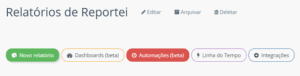
By clicking on it, you will be redirected to the area where your automations will be recorded, and you should click on New Automation From this point, four creation steps will be followed.
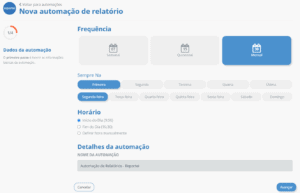
- Define the frequency with which your automation will occur: weekly, biweekly, or monthly time start, end of the day, or any other time you prefer, and choose a name to identify it
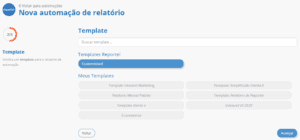
2 Select a template either the customizable one that is already automatically delivered by the report or one of your saved templates.
- Determine the period month, prior week, or fortnight, for instance, the integrations of the social media and the report details title and subtitle).
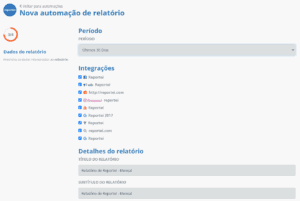
- Choose the type of notification to notify that the report has been generated in-app sends a message through the Reportei app email to yourself or someone on your team or email to the client in which it is possible to add sender, recipient, subject, personalized message, and who will receive the email reply It is also possible to define access to the report via link to the web version or via PDF download link.
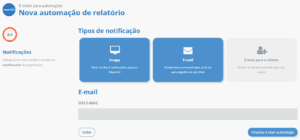
After that, just click on Create and finalize automation to save it to your client’s account and start generating the reports. To check those that have been created and their specifications, just access the Automations tab again.
On this page, you will find the defined settings and some possible actions such as pausing an automation for a while, generating a report at that moment, editing, or deleting.
It is also important to remember that this functionality is still in Beta so it is still undergoing some improvement processes.
Therefore, whenever we launch a feature, we ask users to send us feedback on errors, successes, and everything we can improve. This feedback is essential to bring Reportei even closer to our clients’ expectations.
Now that you are familiar with the report automation how about starting to test it Access or create your account on our website to use all of our features in your projects.