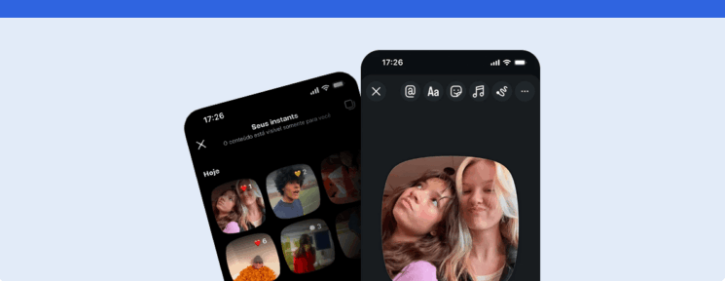
Find out what Instants on Instagram is and how it works. Also, check out how to post, view, interact with, or disable the feature, as well as tips on how to use it in your marketing strategy.
The Instagram Instants have arrived on the network to encourage different forms of interaction between users, content creators, and brands.
In recent years, the platform has launched and adapted different features to keep up with changes in audience behavior, like Reels, broadcast channels, and other tools aimed at closer conversations.
Now, Instants appears at a time when more spontaneous, private, and less produced content is gaining more and more space.
After all, not every post needs to be designed to go viral, and the value of content may lie precisely in sharing something more intimate with those who already have some kind of relationship with the profile.
Therefore, throughout this article, you will understand what Instants is, how this feature works, among other important information. Let’s go.
Keep reading to check out the details
- What is Instants on Instagram?
- How Instants works on Instagram
- How to post Instants on Instagram
- How to view and interact
- What features are available within the function
- What is the difference between Instants, Stories, Reels, and Notes?
- What are the benefits of the feature?
- How brands can use Instants in their marketing strategy
- How to disable Instants on Instagram
- FAQ frequently asked questions
- So, is it worth using or not?
Summary
- Instants is a feature for sharing quick, spontaneous, and temporary photos with selected groups, mutual followers, or close friends. Located in DMs, it focuses on ephemerality and privacy, requiring the photo to be taken instantly, with less aesthetic control, and disappearing after viewing without contributing to public lists of views or likes.
- To post, simply access Instagram DMs, open the Instants camera, capture the moment, and send it to chosen contacts. You can also use the standalone app, which reached 5 million downloads in 5 days. To view and interact, the recipient opens the image in their inbox and responds privately with emojis or text via DM.
- Its features include an instant camera without filters, captions with curved text on the side, and integrated chat responses. The central benefit is reducing the aesthetic pressure for perfect posts, generating more human connections, qualified exchanges via private messages, and a greater sense of closeness in digital environments overloaded with planned content.
- Companies can use the feature as a tool for relationship-building and qualified engagement to build community. The main strategies involve showing real behind-the-scenes of productions and events, releasing exclusive previews first-hand to engaged customers, and conducting quick idea tests using received feedback as a market gauge.
- If the user wants to stop receiving Instants in the inbox, the hiding process is simple: access the profile on Instagram, open the three-line menu, select the Content Preferences option in the What You See section, and activate the Hide Instants toggle in the inbox. The adjustment can be reversed at any time.
What is Instants on Instagram?
To begin, it is important to understand that Instants on Instagram is a way to share quick, spontaneous, and temporary photos with selected people.
Thus, the feature’s purpose is to capture something in the moment without major edits and elaborate productions.
In other words, instead of preparing more complete content for the feed, Stories, or Reels, the user can simply take a photo and send it to the group of Close Friends or mutual followers.
Together, the photos have an ephemeral logic, as they disappear after being viewed or after a limited period.
In practice, this makes Instants have a more intimate proposition than a traditional publication.
How Instants works on Instagram
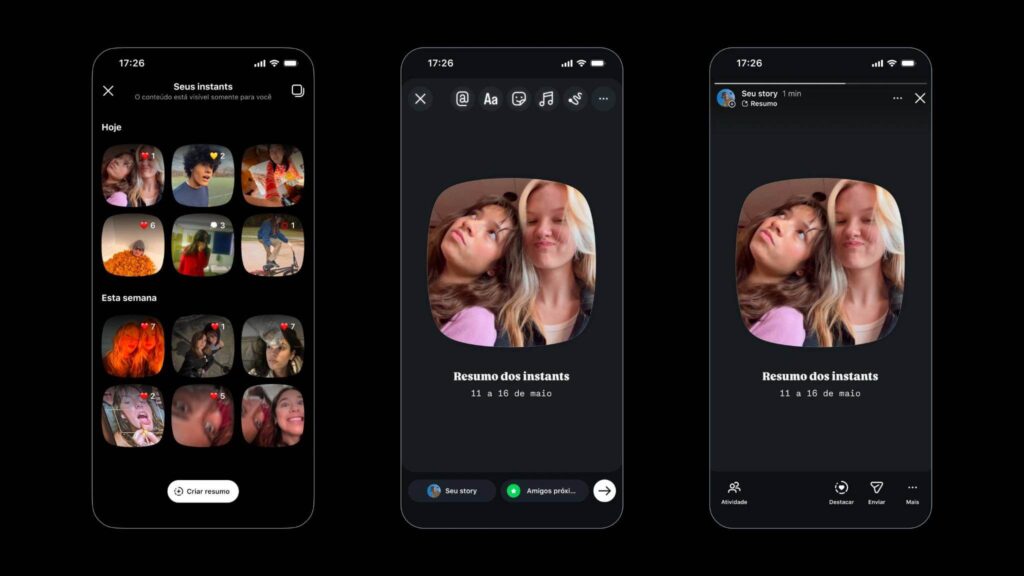
To understand how Instants works on Instagram, it is worth thinking of the feature as a direct and temporary send, not as a conventional post.
The user accesses the Instants camera, takes a photo at that moment, and quickly chooses with whom they want to share it.
After the publication, the recipient can view the content and react or respond via direct message.
Therefore, the experience is much more connected to conversation than public exposure.
It is also important to highlight that the operation of the feature relies on some main points.
- The photo needs to be taken at the moment.
- There is less aesthetic control.
- Sharing is restricted.
- Interaction tends to occur more privately.
In this way, Instants differentiate from other formats precisely by valuing spontaneity.
Not coincidentally, this movement also follows an important trend within social networks.
Increasingly, many relevant interactions occur in less public spaces such as DMs, closed lists, groups, and communities.
That said, a feature like Instants can make sense for those who want to get closer to a specific audience without relying solely on public reactions or massive reach.
How to post Instants on Instagram
In general, posting Instants is done through Instagram’s direct message area.
For this, you just need to
- Open the Instagram app.
- Go to the DMs tab.
- Look for access to Instants or the instant camera.
- Take a photo at the moment.
- Choose the group of people you want to share with.
In addition to being available within Instagram, the feature was also announced as a standalone app. It can be downloaded on iOS and Android devices. In fact, the feature already emerged strong according to data from AppMagic, with the Instants app amassing 5 million downloads in just five days after its launch, with Brazil ranking among the top five countries with the most installations globally.
In this case, the experience tends to be even more direct since the app opens focusing on the camera and quick sharing.
However, if the feature doesn’t appear for you yet, it doesn’t necessarily mean there’s something wrong with your account.
As with many Instagram updates, the release may be gradual.
Therefore, it’s advisable to keep the app updated and see if the feature will be available to more users over time.
How to view and interact
Viewing and interacting with Instants on Instagram also follows a quite simple logic.
When someone shares a photo with you, just open the received image, view the content, and react with emojis or reply via direct message.
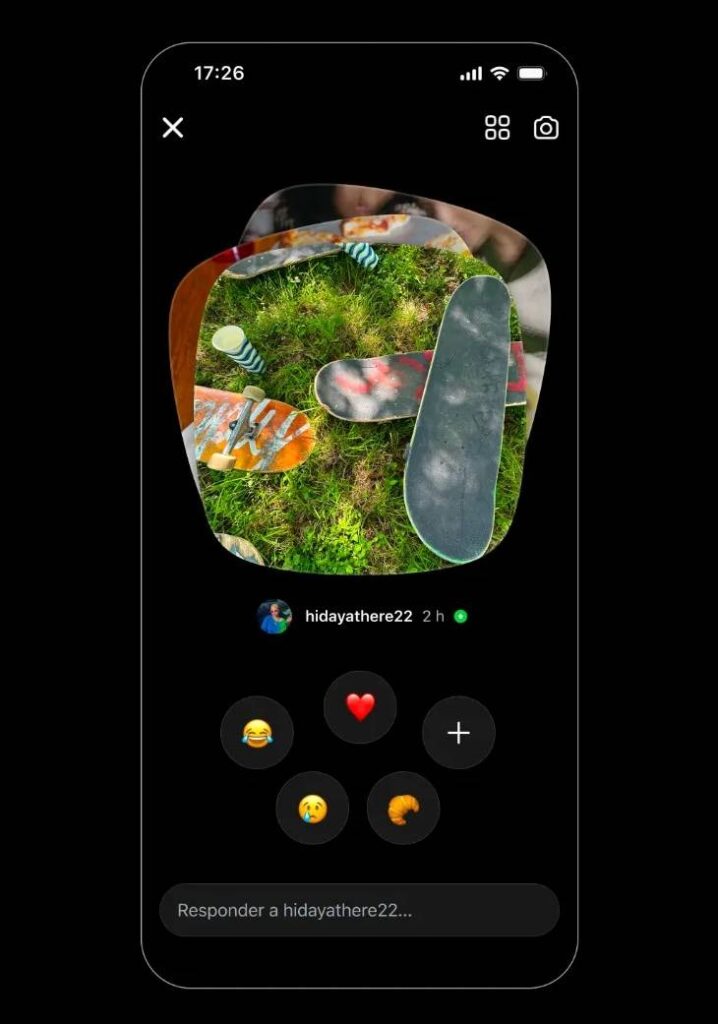
To interact with Instagram Instants, just tap on the post and react with emojis or send a direct response to the content creator. Image by Instagram.
The main difference is that the viewing tends to be more limited than in other formats.
After all, an Instant was not meant to be saved in the profile, accumulate likes, or circulate widely across the platform.
Due to this proposal, the feature has been compared to formats already known on other platforms like Snapchat and BeReal.
The similarity precisely lies in the idea of valuing the moment, reducing excessive production, and encouraging a more natural type of sharing.
For recipients, this can make the interaction lighter.
Thus, instead of publicly commenting on a post, the person can directly respond, start a conversation, and create a closer exchange with the content sender.
Also read What are views on Instagram? Understand how to increase views on Instagram Stories, Reels, and Feed.
What features are available within the function
Since Instants on Instagram is still a recent feature, it’s important to note that some functionalities may change or appear differently for each user.
Nevertheless, among the disclosed features, it is already possible to better understand the tool’s proposal.
- Instant camera the focus is on capturing the moment without depending on an elaborate production.
- Sharing with selected groups Instants can be sent to Close Friends or mutual followers according to the available options.
- Temporary content the photo disappears after viewing or after the period defined by the feature.
- Text on the photo before sending, you can tap the image to type a caption that appears in a curved format on the side of the frame.
- Responses via DM interactions happen more privately within the messaging area.
- Less editing the proposal is to reduce filters, adjustments, and excess production before sending.
These features show that Instants does not come to replace the formats that already exist on Instagram.
On the contrary, it enters as another possibility within the platform, especially for moments when the user wants to share something quickly without turning it into more planned content.
What is the difference between Instants, Stories, Reels, and Notes?
Without a doubt, the main difference between Instants, Stories, Reels and Notes is in the intention of use.
Although all are Instagram features, each plays a different role within the platform experience, as we’ll see below.
| Feature | Main format | Visibility | Most common use |
| Instants | Spontaneous photo | Temporary and more private | Share quick moments with selected people |
| Stories | Short photos and videos | Available for 24 hours | Show behind-the-scenes, routine, polls, links, and daily interactions |
| Reels | Short videos | More public and discovery-oriented | Gain reach, educate, entertain, and attract new audiences |
| Notes | Short text | Temporary and displayed in specific areas of the app | Share quick messages and start light conversations |
In other words, while Reels are more suitable for reaching new people, Stories help maintain relationships with those who already follow the profile.
Notes, in turn, work as small messages, almost like quick statuses to start conversations.
Instants, on the other hand, enter a more visual, spontaneous, and private proposition.
Thus, they can be useful when the intention is not necessarily to increase reach, but to create a closer interaction with a selected group.
What are the benefits of the feature?
From all this, we can see that Instants on Instagram bring some interesting benefits by encouraging simpler, more spontaneous, and closer communication.
Among the main ones are:
- Feeling of closeness as the content is more casual and shared with a smaller group, it tends to seem more human and less distant than a heavily produced publication.
- Less aesthetic pressure instead of requiring editing, scripting, or careful production, the feature values capturing the moment as it is. This can be useful for both regular users and creators and brands who want to communicate more naturally.
- More interactions via DM since responses occur privately, Instants can open up spaces for more direct conversations, spontaneous feedback, and more qualified exchanges.
- Accessible communication in an environment where many contents seem overly planned, simpler formats can help profiles appear closer to the audience.
- Relationship strengthening for brands, this approach can help build a community, better understand audience interests, and create more consistent connections.
In the end, the main differential of Instants lies in allowing for a lighter and less rigid presence on Instagram, bringing brands, creators, and users closer through more real and everyday content.
How brands can use Instants in their marketing strategy
As we mentioned above, Instants on Instagram can function as a complement to the strategy of brand content.
It should not replace other formats or paid campaigns, but it can occupy an important space when the objective is relationship-building.
For example, a brand can use Instants to show behind-the-scenes of events, campaigns, launches, or internal productions.
It can also share exclusive previews with closer followers, creating the feeling that this group received something firsthand.
Additionally, Instants can also function as a testing space.
After all, an idea shared quickly can generate DM responses and indicate whether the topic deserves to become a more structured post on the profile.
The main point is to understand that the value of Instants may lie less in massive reach and more in qualified engagement on Instagram.
That is, for brands that work on community, behind-the-scenes, and close relationships, this new feature can be an interesting way to strengthen ties.
How to disable Instants on Instagram
If you prefer not to use Instants or want to stop receiving it in your inbox, Instagram allows you to hide the feature directly through the app settings.
To do this, just follow the step-by-step guide below:
- Open Instagram and access your profile.
- Tap the three-line menu located in the upper right corner of the screen.
- Select the Content Preferences option within the What You See section.
- Activate the Hide Instants toggle in the inbox.
After this adjustment, the thumbnails of Instants will no longer appear in your DM. It’s worth remembering that if you use the standalone Instants app, you may need to uninstall it or disable notifications separately since the configuration in Instagram does not affect the app.
If you change your mind, just go back to the same menu and deactivate the Hide Instants toggle in the inbox so that the feature reappears normally.
Also read Repost on Instagram, what it is and how the feature works.
FAQ frequently asked questions
As Instants is still a new Instagram feature, it is natural for questions to arise about where the feature appears, how it works, and how it can be used in daily life.
Therefore, we have gathered some quick answers below to help those who are beginning to understand this new function.
It is a way to share quick, spontaneous, and temporary photos with selected people without major edits or elaborate productions.
The user accesses the Instants camera, takes a photo on the spot, and quickly chooses with whom to share: mutual followers or best friends. Then the recipient can react with an emoji or respond via direct message.
The feature is located within the direct message (DMs) area of Instagram. There is also a standalone Instants app available for iOS and Android.
Just open Instagram, access the DMs tab, tap on the Instants access or instant camera, take the photo at the moment, and choose the group of people you want to share with.
Just tap on the image on the side of the frame to open the keyboard and type the caption. The text appears in a curved format next to the photo but cannot be edited after sending. If you make a mistake, the only way to fix it is to delete and capture a new photo.
The photo disappears after being viewed by the recipient or after a limited period, following a logic similar to other ephemeral formats like Snapchat.
When someone shares a photo with you, just open the received image to view the content and if you want, react with an emoji or reply via DM.
No, the feature does not have a view list since the proposal is to be more private and less focused on public exposure.
Just access the Instants archive icon, grid icon on iPhone, or clock icon on Android within the feature’s camera and delete the desired publication.
Just access your profile, tap the three-line menu, go to Content Preferences, and activate the Hide Instants toggle in the inbox.
As with many Instagram updates, the release of the feature can be gradual. It’s worth keeping the app updated and watching to see if Instants will be made available for your account over time.
So, is it worth using or not?
Of course, it’s worth testing Instants on Instagram, especially if the profile already works with spontaneous content and closeness with the audience.
Additionally, the feature can help create a lighter communication, less produced and more aligned with the behavior of those seeking real interactions within the platform.
On the other hand, profiles that rely heavily on reach, traffic, and discovery might not find Instants to be the main growth channel.
In this case, it’s ideal to use the feature as support alongside other strategic actions.
But like any Instagram novelty, the most important thing is to monitor the tool’s evolution, test different uses, and observe if it truly generates relevant conversations.
After all, a good strategy doesn’t just depend on using all the available formats, but on understanding the role each can play in the relationship with the audience.
Did you enjoy learning about Instants on Instagram? Then also take the opportunity to read Instagram Feed, what it is, how to post, and tips on how to organize it for your company.