Learn how to add multiple links in your bio and drive more traffic to your website or other pages.
Since Instagram became one of the world’s leading social networks, one of the most missed features is the ability to add links to posts, as seen on other social networks. However, while this functionality is still not available on the platform, one way out is adding multiple links in the bio.
Who hasn’t come across a caption ending with a Call-to-Action inviting you to check out a website, blog, or another channel via the link available in the bio, right?
This feature has been indispensable for generating traffic through this and other social networks. The best part is that it works and you don’t have to use just one link on your profile.
In this article, we explain everything you need to know about the advantages of adding multiple links in the Instagram bio and which tools can assist in this mission. Let’s go!
Why add multiple links in the bio
Instagram is today one of the most prominent social networks in the world. Since 2018, there are more than 1 billion active users monthly and over 500 million accessing the platform daily.
This means that beyond developing relationships, Instagram has become an essential channel for driving traffic to company websites, landing pages, promoting blog content, and even generating sales through Instagram Shopping).
However, even with all this potential for strategic digital marketing actions, the network still hasn’t made it possible to add links to captions. Therefore, the bio link has become the main gateway for connecting with other brand channels.
Various tools have been created to allow multiple links to be added to the Instagram bio, making it easier for users to access all the content and touchpoints a company can offer.
Therefore, if you are not using this strategy to promote all available channels of your brand, know that you might be missing a great opportunity to leverage one of the largest social networks in the world to your advantage.
4 tools to add multiple links on Instagram
But how to use multiple links in the Instagram bio? Below we present to you 4 tools that are easy to use and offer free plans so you can test and find out which one is best for your brand or agency’s needs.
A major plus is that you don’t have to use them only on Instagram. They are also very simple to apply on other social networks since the idea is to create a personalized link that leads to a page with other available links. Check it out:
1 Linktree
One of the most well-known and widely used platforms to add multiple links in the Instagram bio is, without a doubt, Linktree.
With it, you can create an account for free, create a personalized URL with your brand name, and add unlimited links to different channels.
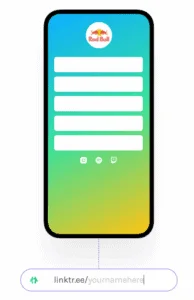
Linktree also stands out for being simple to set up. As shown in the example below, you can add a background color related to your company’s visual identity, your logo on the page, and set the layout of the buttons, spaces shown in white in the image.
In the paid plan, this customization is even more advanced. Additionally, you can also track data on each inserted link’s performance within the platform.
2 Linkinbio
The Linkinbio is one of the features you find in Later, a comprehensive platform for managing Instagram profiles and other social networks, whether to schedule posts, monitor hashtags, or track data generated by the network.
Later offers a Free plan including 1 profile per network (Instagram, Facebook, Twitter, and Pinterest) and Linkinbio with a link per post. Yes, you can also add the link directly in the post, and it appears in a format very similar to Instagram Shopping.
Another plus is that you can also track the results of each link through the platform’s own analytics feature.
3 Linklist
The Linklist is a fairly comprehensive platform for those who want to add multiple links in the Instagram bio and on other social networks.
Besides being free, the tool allows you to manage multiple profiles in a single account and customize your page so that it aligns with your brand’s image.
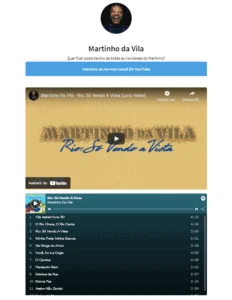
Another very interesting feature, as shown in the image below, is the ability to integrate with music and video apps..
Thus, by adding links from YouTube, Spotify, and other channels, you can have the embedded player and further ease access for users to your content.
4 Linkmebio
To conclude our list of tool recommendations for adding multiple links in the bio, we have Linkmebio, which also allows for a personalized experience for your company.
Through it, you can create a free account to manage the links in your profile or use more advanced plans to manage multiple profiles in a single account, making the platform ideal for agencies and freelancers.
The paid plans are quite affordable and also offer link performance reports and advanced options for integration with Google Analytics and Facebook Pixel..

Alternative to tools
Although the tools presented in the previous topic are useful, it is also possible to add links in the bio without using them. One way is to create a page on your own site that gathers all the links and put the link to that page in the bio.
Here are 8 best practices if you choose to use a website to place multiple links on Instagram.
- Ensure that your link page is organized and easy to navigate, just as you would with links in your bio. Consider dividing your links into categories to make them more accessible to your followers.
- Ensure that your link page is responsive so that it can be easily viewed on mobile devices, as most social media accesses occur via smartphones.
- Take the opportunity to customize the link page on your site to strengthen your brand and make the user experience more enjoyable.
- Use a shortened link for the link page on your site to make it easier to share and access. Consider using services like Bitly or Google URL Shortener.
- Use trackable URLs when creating the links that will be added to the bio. Use trackable URLs that allow you to identify the origin of the traffic that reaches your site. This is fundamental for analyzing the results and identifying which actions are generating more traffic and conversions.
- Create unique URLs for each link to facilitate the later analysis of data. Create a unique URL for each link added to the bio. This way, you can more precisely identify which link generated each visit or conversion.
- Use UTM parameters UTM parameters are codes that can be added to URLs to help identify the source of traffic. They allow you to identify, for example, if the traffic came from Instagram or Facebook or was generated by a specific campaign. Use these parameters in your URLs to facilitate later analysis of the data.
- Monitor browsing data; lastly, it is essential to monitor the browsing data generated by the links added to the bio. Use analysis tools like Google Analytics to track the performance of each link and identify opportunities for strategy optimization. Monitor indicators such as the number of visits, time spent on the site, conversions, and bounce rates to understand how users are interacting with your content.
5 Tips to improve your strategy for adding links in the bio
Besides just inserting links, it’s important to think about the order in which they appear and a call to action that encourages the user to click on the links.
Here are some tips to ensure you know how to strategically place multiple links on Instagram.
- Be strategic choose carefully which links you want to add based on your business objectives. For example, if you want to increase sales, you can add a link to your online store and another to a page with products on sale.
- Stay organized make sure your links are well-organized and easy to find. A recommended practice is to divide your links into categories like Blog, Online Store, or Social Networks.
- Keep your links updated regularly check that all your links are working correctly and are up-to-date. Ensure your links point to relevant and updated pages.
- Use a personalized URL many tools allow you to create a personalized URL for your link page. This is useful for strengthening your brand and making the URL easier to remember.
- Use persuasive language write an appealing description in your bio to encourage people to click on your links. Use persuasive language that highlights the benefits of clicking on each link.
After putting all these actions into practice, it’s time to evaluate what worked and what needs to be optimized. Want to learn more about this topic? Keep reading.
Analyze the traffic generated by the links in the bio
Data analysis is a critical aspect for improving your strategy of adding links in the bio. All the tools presented in the article offer data analysis features that allow you to track the performance of each link and understand which content has more engagement.
With this information in hand, it’s possible to optimize your strategy by adjusting the links based on what is generating more results. For instance, if you notice that a link to a specific product page is generating more sales than other links, you can highlight that link or replace less relevant ones.
Moreover, data analysis can also help understand the target audience’s behavior and preferences, allowing you to adjust your strategy to better meet their needs. For example, if you find that users are clicking more on links leading to video content, you can produce more content in that format and highlight those links in your bio.
Read also: The 10 most important metrics of any marketing report
So, did you like our tips on tools for adding multiple links in the bio? Then don’t miss our article with 7 tips to increase your brand’s engagement on Instagram!