Google Local Services Reports and Dashboards
Track the leads, calls, and spend from your local services ads with Reportei’s Google Local Services reports and dashboards
Trusted by more than 10,000 companies every month












No more wasting time!
With the Google Local Services report and dashboard integrated into Reportei, your team tracks leads, calls, and spend in one place, without needing to export spreadsheets or build reports manually.
On top of that, you get access to a range of important features that make presenting results even clearer and more practical, such as: customizing templates for your reports and dashboards, adding or removing metrics based on what’s essential for your project; adding analyses (in text, video, and photo) to complement the information with your own take on the results; and building a Timeline that lays out, in chronological order, every stage planned and executed in your local lead generation strategy.
In other words, you have all the tools you need to create reports and dashboards that help both improve your strategy and align goals with your clients!
Generate Google Local Services reports and dashboards in just a few clicks
Start generating Google Local Services reports and dashboards right now and bring together the results of your leads and calls automatically and with much more ease.
What metrics can I analyze in the Google Local Services report and dashboard?
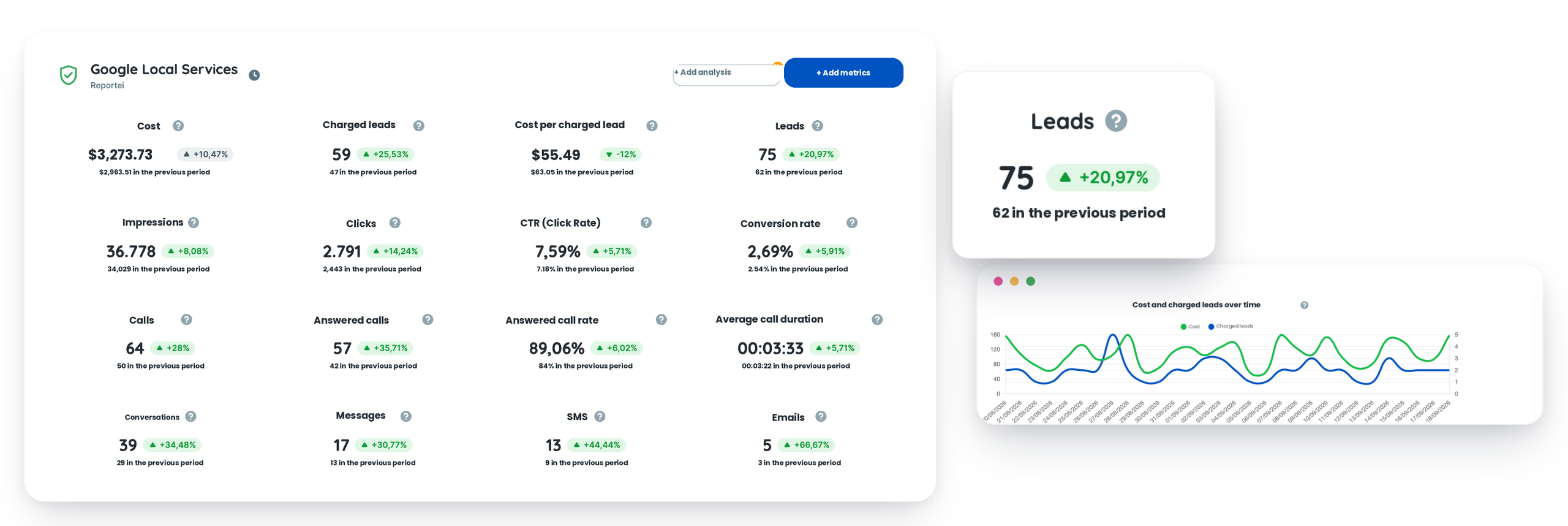
The Google Local Services report and dashboard includes the key metrics for evaluating the performance of your local services ads. These are:
Amount spent
Charged leads
Cost per charged lead
Leads
Daily budget
Impressions
Clicks
CTR
Average CPC
Average CPM
Conversion rate
Leads by phone
Leads by message
Leads by booking
Booked leads
New leads
In-progress leads
Declined leads
Expired leads
Credited leads
Calls
Connected calls
Call connection rate
Average call duration
Conversations
Conversations by message
SMS
E-mails
WhatsApp messages
Bookings
chart
Amount spent and charged leads over time
chart
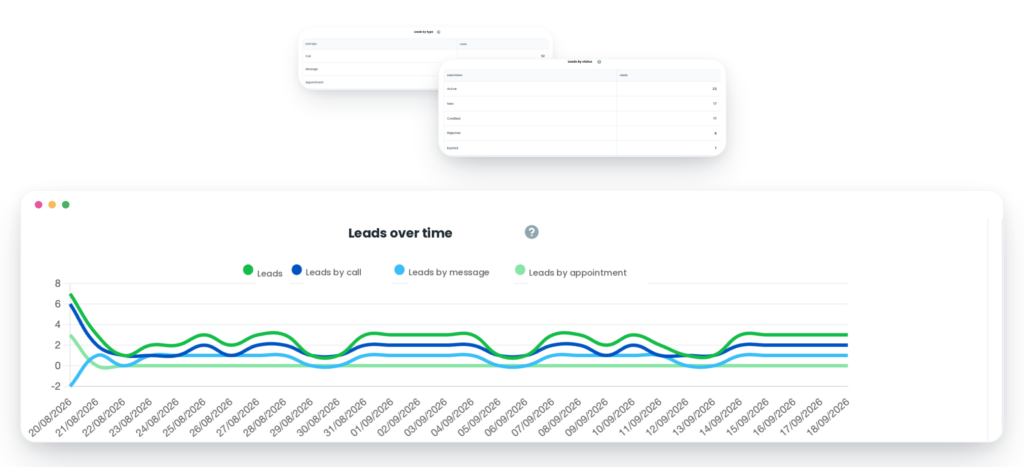
Leads over time (total, by phone, by message, and by booking)
chart
Impressions and clicks over time
chart
Calls over time (calls and connected calls)
chart
Leads by type
table
Leads by type
table
Leads by status
table
Leads by service category
table
Conversations by channel
A report and dashboard exclusive to Reportei!
By connecting your Google Local Services account to our tool, you can quickly import all your data and align results with those from other media and marketing channels, including Google Ads itself.
You can analyze performance from leads received to calls answered, understanding which service category and which channel are driving the most qualified leads and what’s behind the spend on these results!
This means you come out ahead with more day-to-day convenience and time savings that let you focus on what really matters: capturing and following up on your local leads.
On the other end, it also helps you build a closer relationship with your agency’s or company’s clients and decision-makers, so they understand not just the final result, but also the whole process behind getting there and the next steps for the future.
What are you waiting for? Use Reportei to generate Google Local Services reports and dashboards. You can also generate other digital marketing reports and dashboards and social media reports and dashboards that are part of your strategy.
Google Local Services reports: present data to your client in a more practical way
Used every day by more than 8,000 agencies, freelancers, traffic managers, and companies, Reportei lets you generate unlimited, professional, and customized reports to make communicating results with your clients easier.
That’s why our Google Local Services report includes the most important information to show whether your local lead generation strategy was a success or not, and what actions to plan for even better performance in the future.