
Check out our step-by-step guide on how to download YouTube Shorts using sites, apps, or software.
Just like TikTok and Instagram Reels, YouTube Shorts has become a global trend as it offers short and engaging videos that capture our attention in seconds. With the growth of this platform, many users wonder how to download YouTube Shorts mainly to share on other social networks.
Although YouTube does not offer a direct download feature, there are various tools and methods available that allow this task to be accomplished practically and safely.
Therefore, in this article, we will explore the best ways to download YouTube Shorts videos, ensuring the quality and integrity of the files. Continue reading to see in detail.
- What is YouTube Shorts
- Why downloading YouTube Shorts videos is useful
- How to download YouTube Shorts
- FAQ – Frequently Asked Questions
- Final Considerations
What is YouTube Shorts
The YouTube Shorts is a YouTube feature that allows users to create and share short videos up to 60 seconds long. Inspired by the success of platforms like TikTok and Reels it was launched precisely to compete in this growing market aimed at quick content consumption.
In this way, besides the short duration of the videos, the platform offers integrated creation tools that include the ability to record directly in the app, add music from the YouTube library, insert text and special effects, and make quick cuts.
With this, Shorts are easily accessible through the main YouTube app, allowing creators to reach the platform’s vast audience without needing to create a separate account or use a different app.
YouTube also provides a vertical feed format for Shorts where users can scroll infinitely through short videos, maximizing engagement and the discovery of new content. In other words, it’s a valuable feature for brands and creators looking to expand their online presence.
Read also YouTube Studio: Everything you need to know about YouTube’s creation studio
Why downloading YouTube Shorts videos is useful
Downloading Shorts can be useful for various reasons ranging from personal convenience to flexibility in using the content. Among them, it is worth highlighting:
- Sharing on other platforms which facilitates the dissemination of funny, informative, or inspiring videos among friends and followers.
- Offline access to continue consuming content in situations where internet access is limited or non-existent, such as during trips in areas with poor network coverage or when you want to save mobile data.
- Editing and remixing incorporating downloaded clips into your own projects as long as you respect copyright laws and give proper credit.
- Reference search to use in presentations or analyze in detail without relying on an internet connection.
- Personal storage and organization by creating thematic folders, catalogs by subject or interest to be able to access them quickly whenever needed.
- Ad-free viewing which can be pleasant during leisure moments or when you want to focus on a specific video without distractions.
In summary, downloading YouTube Shorts videos offers flexibility, convenience, and a range of possibilities for personal and professional use as long as it’s done ethically and legally, respecting the creators’ rights.
How to download YouTube Shorts
For those who want to go beyond content creation for the platform and wish to download YouTube Shorts videos to share on other networks, for example, it’s worth checking out the tips below.
Although there is no native tool for this on YouTube, there are other popular methods that can be followed, such as using online download sites, apps for Android and iPhone, browser extensions, and specific software. Understand.
1. Using online download sites
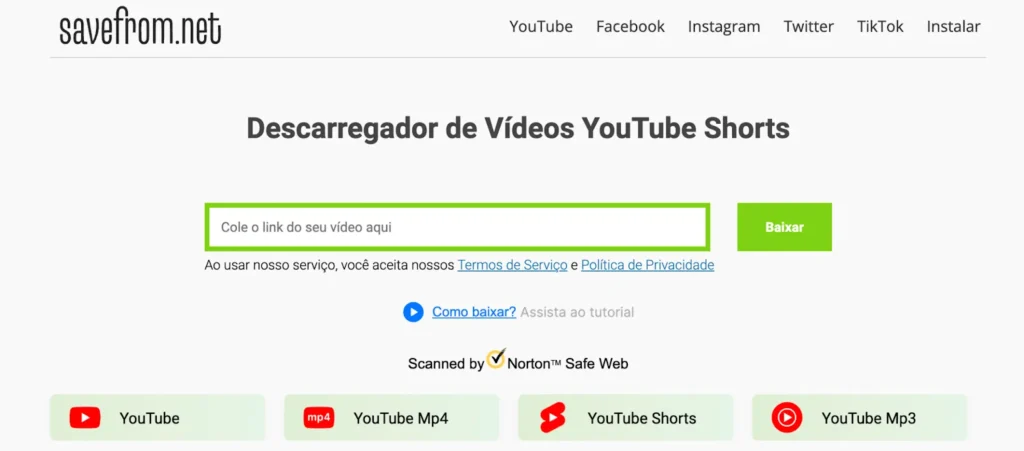
There are several sites that allow downloading Shorts directly through the browser, like SaveFromnet and ShortsDowncom In general, you can use them by following the steps below
- Open YouTube Shorts in your browser or app. Then click on Share and copy the video link you want to download
- Access the download site of your choice
- On the download site paste the copied link into the URL text box
- Select the desired quality and click on the download button The video will be downloaded to your device and can be shared, watched offline, or saved afterward.
2. Apps to download YouTube Shorts on Android and iPhone
There are several apps that allow downloading videos directly to your smartphone. A good example is Shorty Video Saver for Android. To use it, just:
- Download and install the app via Google Play Store
- Open YouTube Shorts and copy the video link desired
- Finally, paste the copied link into the app, select the desired quality for download, and download the video.
3. Browser extensions
There are several extensions for browsers like Chrome and Firefox that allow downloading YouTube videos, such as Video DownloadHelper Its use is very simple:
- Access the extension page and install it on your browser
- Open YouTube Shorts and access the video you want to download
- Click on the extension icon in your browser and follow the instructions to download the video
4. Desktop software
Finally, programs like 4K Video Downloader allow downloading YouTube Shorts videos directly to your computer or smartphone since it has an app version compatible with Android. For that, you just need to:
- Download the program and install it on your computer; there are versions for Mac and Windows
- Copy the link of the YouTube Shorts you want to download
- Open 4K Video Downloader, click on Paste link and select the desired quality and format
- Click on Download to download and save the video to your computer
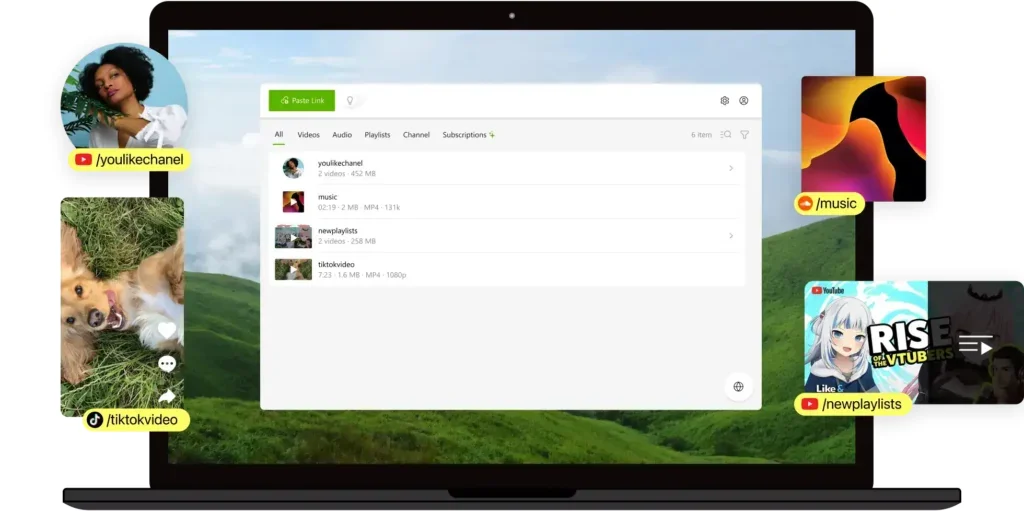
Software allows for practical downloading of YouTube Shorts videos. Image by 4K Video Downloader.
Regardless of the method chosen to download YouTube Shorts videos, it’s important to reinforce the legal and ethical considerations involved. Therefore, if you use apps to download third-party content, make sure you do not infringe copyright and use the downloaded videos responsibly.
Read also How to transcribe YouTube videos into text: Discover 4 tools via site, app, extension, and AI
FAQ – Frequently Asked Questions
Below we have compiled the main questions on the topic. Check it out!
To download, you need to use external tools since the platform does not offer direct downloads. Among the most common options are online sites, mobile apps, browser extensions, and computer software that basically work by copying the video link, pasting it into the chosen tool, and selecting the quality for download in a practical and safe way.
Although YouTube does not have direct integration with Telegram for downloads, it is possible to use bots within the app that work similarly to download sites. Just copy the Shorts link, send it to the bot, and follow the instructions to download the video, taking advantage of the practicality of these external tools.
Most external methods, such as specific sites and apps, allow downloading Shorts without a watermark as the content is obtained directly from the original YouTube link. Just choose a reliable tool, paste the video URL, and select the desired download option to maintain the quality and integrity of the file.
To download only the audio from a Shorts, you can use specific tools like CapCut or online converters such as YT5s or FreeConvert that allow converting the video into an MP3 file. The process consists of copying the Shorts link, pasting it into the chosen tool or importing the video, selecting the audio format, and quickly performing the download while maintaining good quality for offline use or projects.
There are several apps that perform this function well, like Shorty Video Saver for Android, which allows downloading videos directly to the phone by pasting the Shorts link, choosing the quality, and starting the download, being a practical solution for those who prefer to do everything via smartphone.
On iPhone, you can download YouTube Shorts using tools such as the sites SaveFromnet and ShortsDowncom accessed directly through the browser or compatible apps by following a simple process: copy the link of the video on YouTube Shorts, paste it into the chosen tool, select the desired quality, and perform the download to save the file on the device.
Final Considerations
Downloading YouTube Shorts videos can be a simple task when you use the right tools, like online sites, apps, or specific software, always respecting the platform’s usage guidelines and the creators’ copyright.
In this way, you ensure more flexibility to access, share, and reuse content practically, whether for entertainment, study, or the creation of new materials.
Want to know more about YouTube Shorts? Check out our article Shorts or TikTok: which platform to use in my digital strategy