Discover what the Reportei Flux feature is to automatically boost a post on Instagram and see how to set it up in your account.
Knowing how to boost a post on Instagram is essential for the routine of brands and agencies that wish to expand the reach of content, generate more engagement, or gain new followers
However, when this action needs to be repeated for each new post, the manual process can consume time that could make a difference in other strategic activities.
With this in mind, the Reportei Flux launched a new feature that helps with this issue: the Boost Posts. which allows new Instagram posts to be automatically turned into ads on Meta Ads.
Next, understand how the new feature works, what the prerequisites are, and check out the step-by-step process for creating your first automation.
Executive Summary
- The Flux’s Boost Posts automatically turns new Instagram posts into ads on Meta Ads following predefined rules.
- It is possible to automate Feed, Reels, and Stories postings, as well as choose the objective, budget, duration, and start time.
- All new content in the selected formats enters automation. In other words, individual post approval is not necessary.
- Audience targeting is done automatically by Meta Advantage.
- The ads are created in the connected Meta Ads account, where media investment is also charged.
What is the feature to automatically boost an Instagram post by Flux
As mentioned earlier, the Reportei Flux’s Boost Posts feature was created to automate a very common task in social media management: turning content published on Instagram into ads on Meta Ads.
Thus, instead of accessing the ad platform and setting up a campaign every time new content is published, the user creates an automation once.
With this, they define the boost objective, which formats should enter, how much they wish to invest, and how many days each ad will remain active.
Based on these rules, whenever compatible content is published on the connected profile, the Flux identifies the post and creates the ad automatically.
Thus, the feature aims to reduce manual steps and ease the routine of agencies and teams that frequently publish and boost content.
How Reportei chooses posts that will be automated
Additionally, one of the most important points to understand how to boost a post on Instagram via Flux is that the selection of content occurs by format.
In other words, when setting up the automation, you must choose between Reels, Feed, and Stories, so that all new content published in one of these models is considered for boosting.
In this way, it is essential to highlight that Flux does not analyze performance to choose only the best posts, nor does it use themes, captions, or hashtags as criteria.
On the other hand, the same post is never boosted twice. If it is identified by a second automation of the same profile, the status will be updated to Ignored.
Therefore, if the intention is to boost only certain types of content, the alternative is to separate the automations by format, since there is no post-by-post approval stage.
What are the prerequisites for boosting an Instagram post
But before setting up automation, it is also necessary to ensure that Instagram and the ad account are prepared to use the feature.
For this, some prerequisites are necessary, such as
- the Instagram profile must be a professional account linked to a Facebook Page.
- its integration with Flux needs to be done through Facebook login. Accounts connected directly through Instagram are not compatible and will require a new integration.
- it is necessary to connect a Meta Ads account that has access to the same profile, while the user responsible for the integration must have the necessary permissions on the Page, Instagram, and the ad account.
- finally, the Meta Ads account must have a valid payment method. However, this item is not checked during setup. Therefore, if there is a payment issue, the automation can be activated, but posts will appear with the status Error.
It is also worth considering that Meta Ads does not allow boosting content that was published before the profile was converted to a professional account.
Reportei Flux Image
How to boost an Instagram post automatically via Flux
With the prerequisites met, creating the first automation becomes a simple and organized process, allowing the main decisions about the ad to be defined before activation.
Next, check how to boost a post on Instagram via Flux.
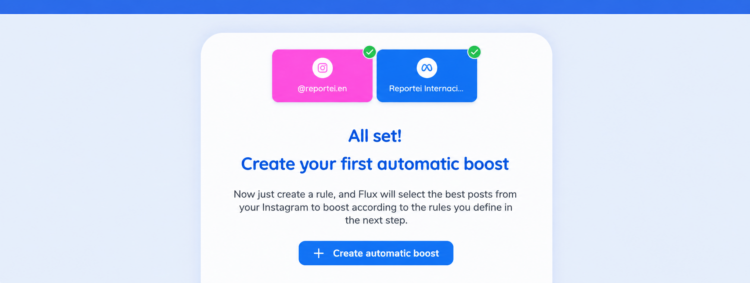
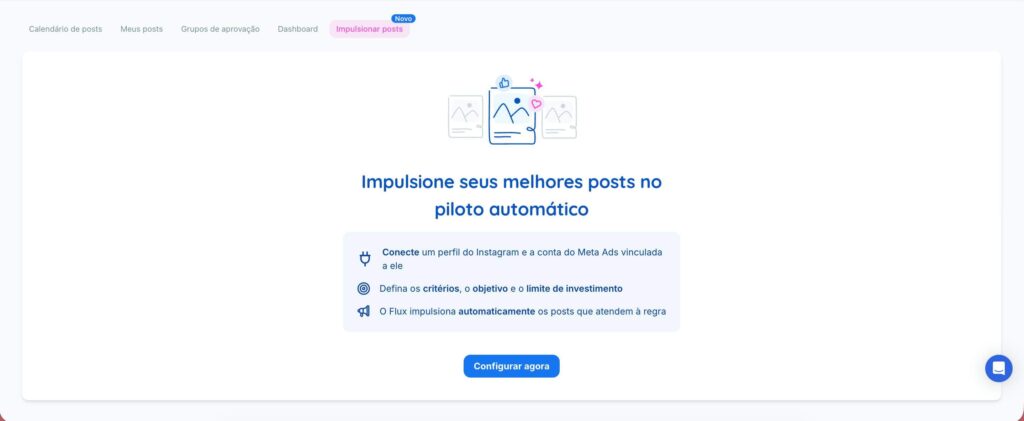
- To start, access your Reportei Flux account, and then the tab Boost Posts.
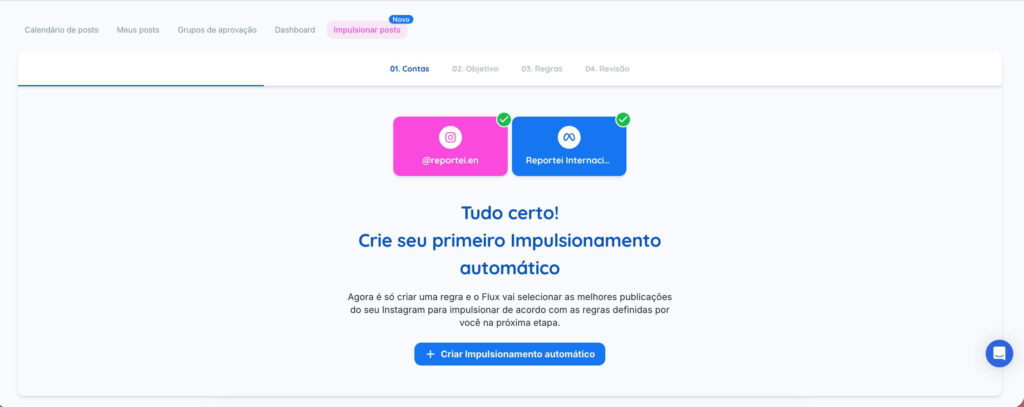
- Connect the Instagram profile via Facebook, and select which profile the tool should monitor. If the project already has this integration, you will proceed directly to the next step.
- Next, connect the Meta Ads account that has access to the profile. If there is more than one compatible option, choose which one you wish to use.
- Set up the automation following the steps presented by Flux to determine the objective, the rules, and review the publication.;
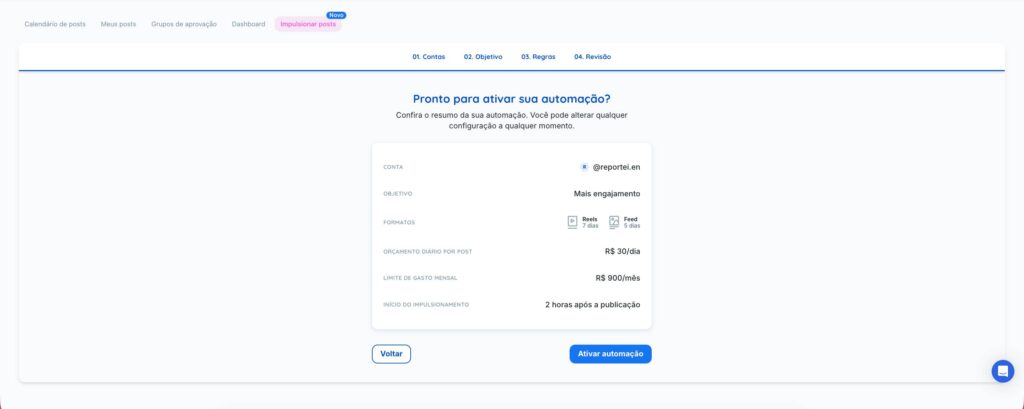
- In Review, check all settings and click on Activate automation.
Once this is done, the boost posts feature will start identifying eligible content and creating the ads automatically.
Reportei Flux Image
Steps defined for creating the automation
As we mentioned above, during the setup, you determine how new content should be boosted.
And the choices are mainly focused on two key steps, as we will show next.
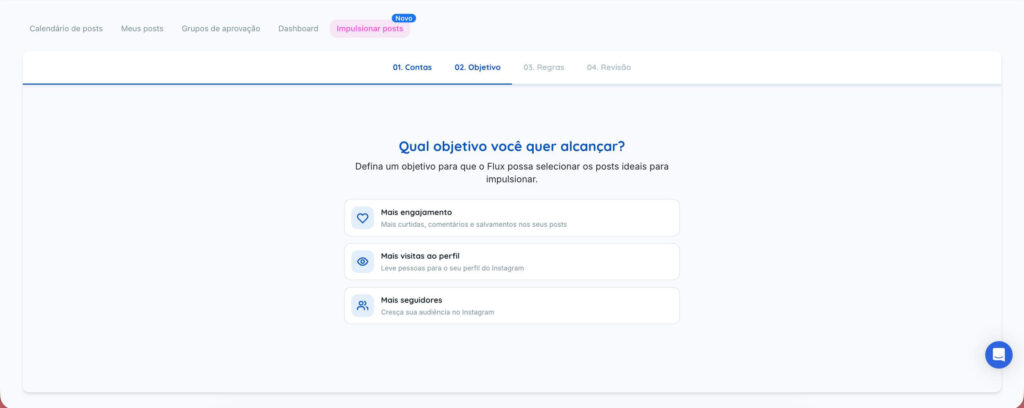
1. Objective
First, the Objective tab is used to select the result the ad should seek.
- More engagement, likes, comments, and saves.
- More profile visits, directing people to the Instagram profile.
- More followers, expanding the account’s audience.
Reportei Flux Image
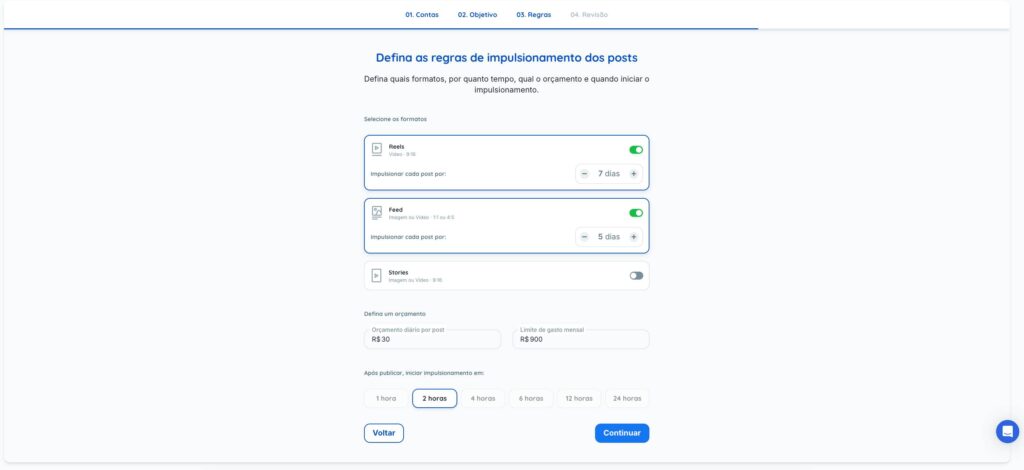
2. Rules
Next, in the Rules step, you choose the formats that enter the automation, Reels, Feed, and/or Stories, and for how many days each one will be boosted.
Additionally, the daily budget per post, the monthly spending limit, and when the ad should start, between one and 24 hours after publication, are also defined.
Reportei Flux Image
It is important to highlight that the monthly limit functions as a cap for the entire automation.
With this, before boosting a post, Flux calculates its estimated cost by multiplying the daily budget by the number of days.
If the amount exceeds the defined limit for that month, the content will not be boosted and will receive the status ‘Ignored, monthly cap reached’.
Additionally, it is worth noting that all media investment is charged directly by Meta to the client’s ad account.
That is, Reportei does not charge any amount related to the investment in your boosts.
Regarding audience definition
Another question that may arise is about audience segmentation, which is also done automatically by the Reportei Flux feature.
For this, Meta uses the Advantage, considering the country of the ad account and the age range from 18 to 65 years. Thus, it is not necessary to create an audience for each post.
What happens after activating the automation
After activating the automation to automatically boost a post on Instagram, the Flux checks the profile every hour for new eligible posts.
Thus, when it finds one, it initially receives the status Scheduled.
Next, the boosting starts according to the interval chosen in the setup, and the ad is created directly in the client’s Meta Ads account.
Once the defined number of days ends, the ad is closed, and the post changes to the status Completed.
What can be monitored
It is important to note that automation does not eliminate the possibility of monitoring what is happening with the ads.
This is because on the page Automatic boosting, the user finds an overview of active automations, boosted posts, and expenditures made in the month compared to the total configured cap.
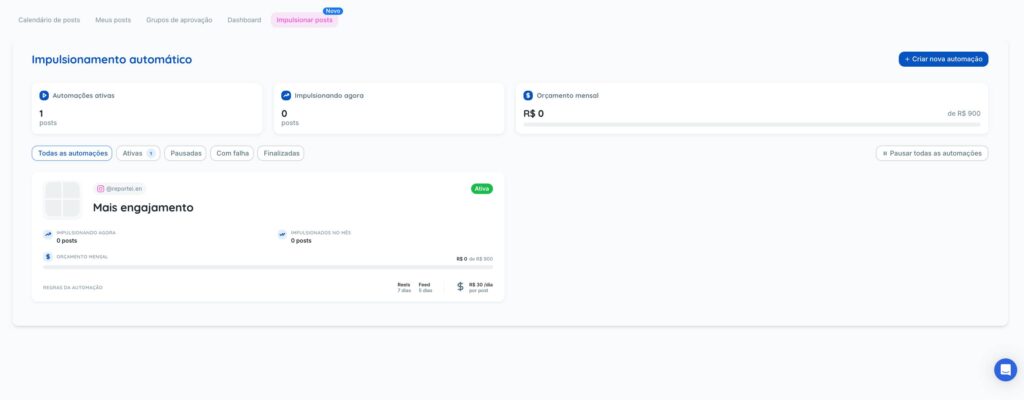
Additionally, it is possible to view the status of each automation: Active, Paused, Finished, or Failed, as well as the boosted posts of the month, budget, and rules.
Furthermore, when opening an automation, the monitoring becomes more detailed.
Thus, each post can appear with its updated status, for example, Scheduled or Boosting, and with information on expenses, reach, boosted days, estimated budget, and action history.
Finally, the ad metrics are updated hourly, which facilitates operation monitoring without needing to consolidate this information manually.
What you can adjust afterward
Another important point is that even with automation running, the settings are not rigid. Thus, it is possible to
- pause or reactivate an automation, edit its rules, change its name, and pause or resume a specific post.
- try to reactivate a boost that has failed.
- archive the automations that will no longer be used and all posts linked to them.
- or use the Pause All feature, which stops all account automations at once.
It’s important to note that when pausing a rule, no new content will be boosted.
However, posts that are already active will continue to be advertised normally until the end of the configured period.
Start boosting posts on Instagram automatically with Flux.
Now that you know how the Reportei Flux’s Boost Posts works, it’s time to start automating this process and reducing repetitive tasks without giving up control over budget, formats, and objectives.
Thus, instead of manually setting up each ad for Instagram posts, the team gains more time to focus on planning, content production, and result analysis.
Therefore, be sure to test Reportei Flux to learn about the new feature and discover how to automate more steps in your marketing routine.
FAQ: Frequently asked questions on how to boost a post on Instagram
Do you still have any questions about how the automation works? Below we quickly answer the main points about Boost posts by Flux.
No. The selection is made according to the formats defined in the automation. Thus, every new Feed, Reel, or Story post that belongs to the selected formats will be considered automatically.
No. The segmentation is done automatically by Meta through Advantage, considering the country of the ad account and people aged 18 to 65.
The investment is charged directly by Meta to the ad account connected to the automation. Reportei neither receives nor charges the amount allocated to media.
Flux prevents new boosts from exceeding the monthly cap. Before creating each ad, the tool calculates its estimated cost and if the amount exceeds the available limit, the post is ignored.
The content will appear with the status Error or Ignored, along with the reason. Depending on the case, it is possible to correct the issue and use the option to try again.
Yes. It is possible to create automations with different formats, objectives, and budgets for the same profile. However, each post can only be boosted once.
When activating automation, Flux considers eligible posts made in the last seven days. However, Meta does not allow boosting posts published before the profile is converted to a professional account.
Yes. Besides pausing a complete automation, Flux allows pausing or resuming specific posts, offering more control over the content already in the boosting process.