
Eduzz Reports and Dashboards
Generate Eduzz reports and dashboards in just a few clicks with Reportei
Companies that trust Reportei












Eduzz reports and dashboards in 3 seconds with Reportei
By integrating your Eduzz account with Reportei, you can generate Eduzz reports and dashboards in just a few seconds and access the main performance metrics and charts.
On a single screen, you can analyze Eduzz metrics alongside various other channels integrated into Reportei, making it much easier to extract insights and make your planning and investments more efficient.
Stay on top of Eduzz metrics
The Eduzz report and dashboard in Reportei brings together all your sales results in one place, making it easier to both analyze and share this information with your entire team.
Net revenue
Gross revenue
Total sales
Refunds
Paid invoices
Canceled invoices
Refunded invoices
Refund rate
And much more!
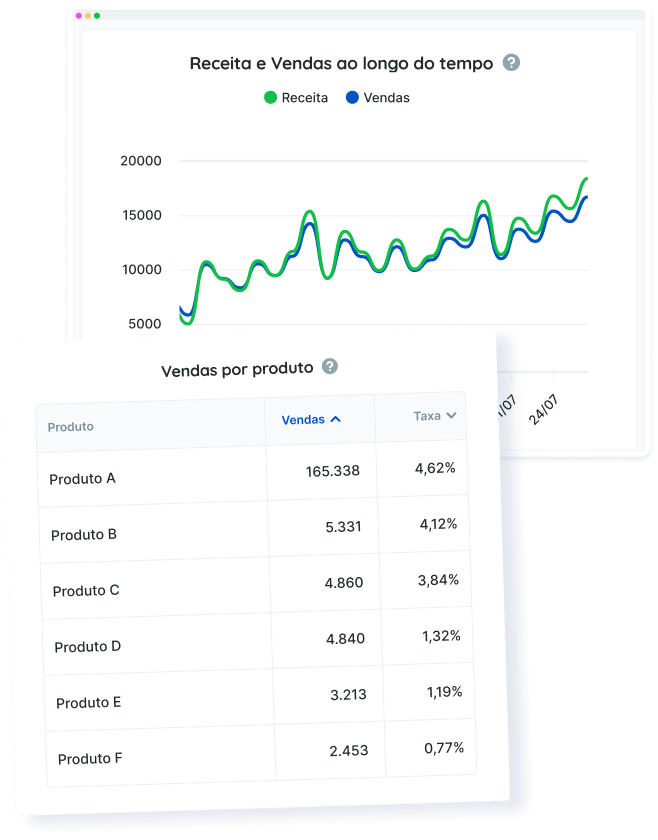
As with other Reportei reports, you can also analyze data through charts and tables, such as:
- Revenue over time chart, showing revenue growth throughout the period. Approved and completed sales are considered, including chargebacks and refunds;
- Sales source chart during the period;
- Product table, with a summary of product performance in terms of sales, percentage of sales, revenue, and revenue share.
Generate Eduzz reports and dashboards in just a few clicks!
Eduzz Reports: present data to your clients in a more practical way
Used daily by more than 10,000 agencies, freelancers, and companies, Reportei allows you to generate unlimited, professional, and customized reports to make communicating results with your clients easier.
That’s why our Eduzz report includes the most important information to demonstrate whether your strategy was successful and what actions should be planned to achieve even better performance in the future.
To present data in a clear and highly didactic way, you have access to several features that adapt perfectly to your needs and your client’s reality, such as:


Your benefits
- Add, remove, or reorder metrics according to what is most relevant for the project and decision-maker;
- Add one or more analyses (with text, videos, and images) to each section of the report, if you want to interpret the data and explain results in more detail;
- Create a Timeline to visually present which actions were taken at each stage of a campaign and what results were achieved;
- Download the report as a PDF;
- Send the report to your client via a link;
- Send the report via WhatsApp.
In addition to Eduzz reports, you can also generate reports for Instagram and Instagram Ads, Facebook and Facebook Ads, Google Analytics, Google Ads, YouTube, LinkedIn and LinkedIn Ads, Google Search Console, Google Business Profile, Mailchimp, and RD Station. Find the ideal plan for your projects and generate complete, customized, and objective reports for your clients!