Check out our list of 7 social media tools that help with planning, project management, creation, and results analysis routines.
The social media tools are an essential part of the routine for those who work with social networks and need to deal every day with planning, content creation, approvals, scheduling, and results analysis.
After all, without the support of these solutions, the operation tends to become disorganized, take more time than it should, and hinder the scalability of work.
In other words, in practice, it’s not enough to just have good ideas or post frequently.
To maintain consistency, gain productivity, and act more strategically, it’s essential to have tools that help structure processes and centralize activities.
And this applies both to those managing a single account and to social media professionals and agencies that handle several clients at once.
Therefore, throughout this article, you will discover 7 social media marketing tools that cover all stages of work from planning to automation. Let’s go!
Social media tools: discover 7 that stand out
But before moving on to the list, it’s worth highlighting an important point: there isn’t a single platform that solves everything.
In reality, what truly makes a difference in daily life is using digital tools for social media that complement each other by covering planning, organization, creation, publishing, and data analysis.
That’s why we’ve gathered widely used options by marketing professionals and agencies with practical usage examples at each stage. Follow along.

1 Google Sheets content planning
Without a doubt, planning is the starting point of any social media strategy, and Google Sheets continues to be one of the simplest and most effective tools for this stage.
After all, with it, you can create editorial calendars in a practical and free way, organize topics, define content formats, responsibilities, deadlines, and objectives for each publication.
In fact, one of the great benefits is the flexibility since the spreadsheet can be adapted to the reality of each project whether it be a more streamlined monthly plan or a detailed schedule with columns for channels, CTAs, status, and observations.
Additionally, it’s important to highlight that real-time collaborative work facilitates alignment among all team members.
2 Trello project organization
After planning comes execution, and it’s here that organization makes all the difference.
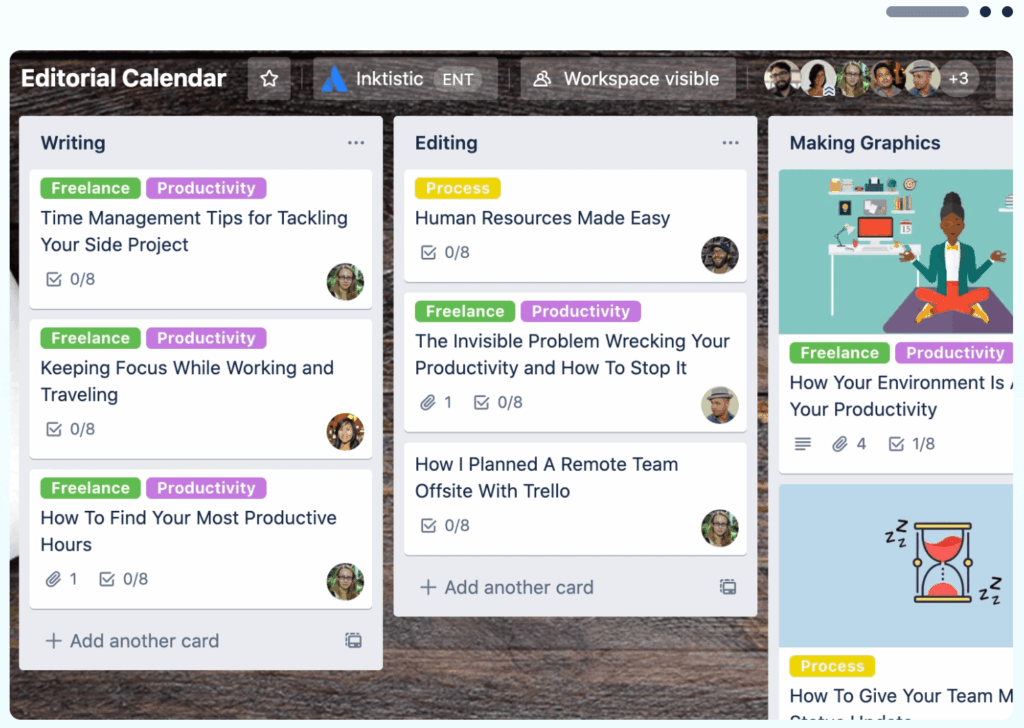
That said, Trello is one of the social media tools that gain relevance when it comes to process visualization and task management.
Based on the Kanban method, it allows organizing the workflow into boards, lists, and cards.
This way, it’s easy to see what’s in production, what’s awaiting approval, and what has been completed.
As such, it is a particularly interesting solution for small teams, freelancers, and agile projects.
Another positive aspect is the free plan, which allows up to 10 collaborators per workspace, serving well for those who are starting or structuring their operation.
3 Canva creation and design
When we talk about the visual creation stage, Canva stands out for making design more accessible for many freelancers and social media professionals who work with smaller teams.
This is because it offers ready-made templates for posts, stories, covers, and banners, allowing for the creation of visually professional pieces even without advanced design experience.
But beyond the layouts, Canva also offers a image library icons, and graphic elements that greatly speed up production.
Still, many social media professionals combine the tool with external libraries like Freepik to expand visual options and avoid repetitive content.
4 CapCut video editing
With the growth of short videos on social networks, CapCut has become one of the best social media tools focused on video.
After all, it allows for creating quick and dynamic edits with features like smart cuts, automatic subtitles, soundtracks, and effects designed for vertical formats.
Moreover, the intuitive interface facilitates video production even for those not familiar with more complex software, which helps social media professionals maintain consistency on Reels, TikToks, and Shorts without compromising production time.
5 ChatGPT insights with AI
We cannot deny that artificial intelligence is already part of the routine for many marketing professionals, and ChatGPT is a great example of how technology can support creative work.
This is because it can help generate content ideas, suggest topics, create scripts, draft caption variations, and even organize editorial calendars.
However, it’s important to emphasize that the tool works very well as support, not as a replacement for human work.
In other words, the generated texts need to be reviewed, tone adjusted, and aligned with the brand strategy.
Used this way, ChatGPT contributes to saving time and unlocking ideas in daily activities.
6 Reportei Flux content approval and scheduling
With the content ready, Reportei Flux steps in as a complete platform for post scheduling, content approval, and social media management.
With its features, it’s possible to schedule posts for Instagram, Facebook, TikTok, Threads, LinkedIn, Pinterest, and other networks all in one place.
In fact, the tool allows for batch scheduling, organization by folders, and calendar view, making it easier to control what will be published and when.
Another distinguishing feature is the content approval system via link which centralizes feedback and avoids endless message exchanges between the team and clients.
This way, it’s easier to keep everything organized and reduce rework in daily operations.
7 Reportei results analysis
Finally, after planning, creating, and publishing, it’s time to evaluate what really worked.
In this stage, Reportei stands out as a social media reporting and dashboards tool that integrates data from channels like Instagram, Facebook, YouTube, LinkedIn, TikTok, and many others, automating the collection of information that was previously done manually.
Besides the data, Reportei also
- allows for written analyses in reports, which facilitates the interpretation of results and presentation to clients and managers.
- offers an artificial intelligence tool to generate automatic metric analyses.
- goal tracking of registered projects,
- report customization according to each business’s needs, and much more.
In other words, with all these features, the tool makes the process more strategic and less operational.
Tips for choosing the best social media tools
With so many options available in the market, choosing the right tools can seem challenging.
Therefore, to facilitate this decision and assemble a set of solutions that truly help in daily activities, it’s worth considering some practical points before hiring or implementing any tool.
- Evaluate the volume of profiles and clients you manage, the greater the number of accounts, content, and approvals involved, the greater the need for workflow automation organization and centralization of information.
- Prioritize tools that cover different stages of the workflow, ideally combining solutions for planning, organization, creation, publication, and analysis, avoiding tools that do exactly the same thing and end up creating redundancy.
- Test before hiring, many social media tools offer free plans or trial periods. Taking advantage of these resources helps to understand if the solution truly fits into your routine and demands.
- Think of time savings and process clarity, the best tools are those that simplify work, reduce manual tasks, and leave more room for strategy, creativity, and results analysis.
It’s also worth remembering that more than using many tools, what really makes a difference in the social media routine is knowing how to choose well and combine solutions that complement each other.
By structuring a workflow that goes from planning to automation, it becomes easier to maintain consistency, gain productivity, and scale the operation safely.
Furthermore, with the right social media tools, work ceases to be merely operational and becomes more strategic, guided by data and focused on results.
This benefits not only those who execute but also clients and brands seeking a more professional digital presence.
FAQ frequently asked questions about social media tools
Before wrapping up, we’ve gathered some common questions from those researching social media tools with objective answers to help in choosing and using these solutions. Check it out.
Yes, especially in the beginning. However, with increased demand, paid tools tend to offer more automation and scale.
Yes, since they allow organizing content in advance, reducing manual tasks, and maintaining consistency in publications.
It is worth it as long as AI is used as creative support and the final content undergoes review and strategic adjustments.
Creation tools help produce content, while management tools organize, publish, approve, and analyze results.
Evaluate your needs, workload, available budget, and how the tools complement each other.
The concept is the same, but agencies typically need more collaboration, automation, and multi-client management resources.
Yes, they help prove results, adjust strategies, and make data-based decisions.