
Create reports and Dashboards with Airtable data
Bring your Airtable tables and views into Reportei, define your own metrics and show clients the numbers behind leads, sales, projects and campaigns.
More than 10,000 companies, agencies, traffic managers, franchisors and freelancers use Reportei












More flexibility by bringing any data into Reportei
Centralize data from any source
Import information on sales, CRM, leads, goals, budgets and much more.
Pair with other integrations
Gather information from multiple sources in a single report or dashboard.
Turn data into visual metrics
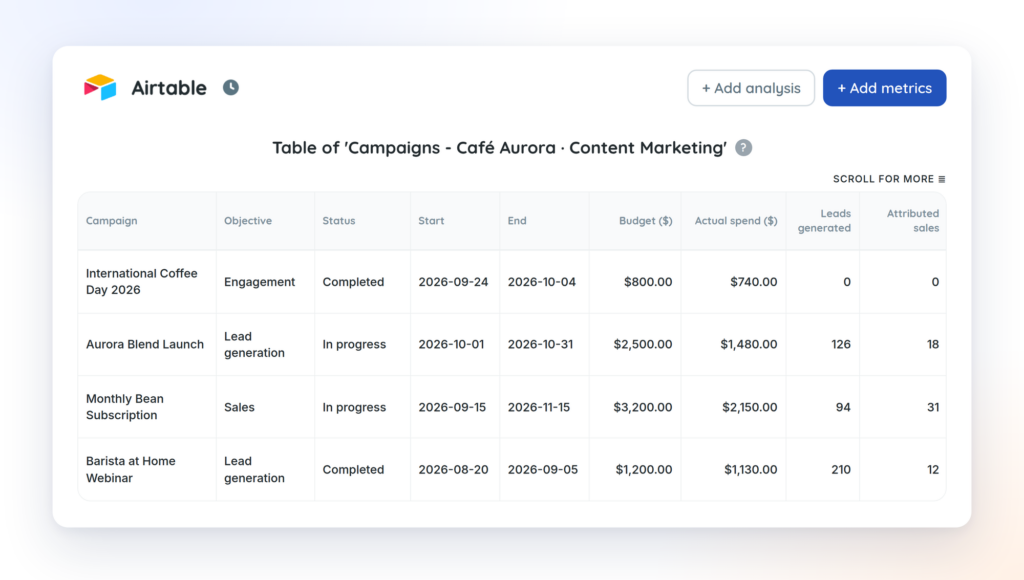
Create custom metrics, charts, tables and indicators from your table data.
Build reports and Dashboards
With the metrics created from your spreadsheet data, build reports and dashboards.
Connect your base and turn your data into reports and dashboards
1
Connect with an Airtable token
In Airtable, open Builder hub > Personal access tokens and click Create new token. Add the data.records:read, schema.bases:read and user.email:read scopes and give the token access to the bases you will use in your reports. Then paste the token into Reportei and choose the table or view. Note: Airtable shows the token only once, so copy it before closing the screen.
2
Map the table columns
Reportei reads the table and already brings the type of each field (number, date, text, select), since Airtable provides it. You only check how each column should be read.
3
Create metrics, charts or tables
Build the metrics manually or ask "Create metrics" for suggestions, which uses AI on a sample of your data.
4
Generate a report or Dashboard
Add the metrics to a report or dashboard and send it to your client.

Discover the benefits of creating reports in Reportei
- Add, remove or reorder metrics based on what matters most to the project and to the decision maker;
- Add one or more analyses (with text, videos and photos) to each section of the report, if you want to interpret the data and explain a result in more detail;
- Create a Timeline to show, in a more visual way, which actions were taken at each stage of a given campaign and which results were achieved;
- Download the report as a PDF;
- Send the report to the client via a link;
- Send the report via WhatsApp.