
Google Analytics is a great tool to understand the profile of the audience visiting your site and their behavior within your pages. With this platform, for instance, you can know how much time the user spent on your site, how many pages they visited, etc. But how do you identify the source of your site’s visits? If you have this question, this content is for you.
Why is it important to know the source of your site’s visits?
By identifying the source of your site’s visits and analyzing this data, you will have the means to reflect on whether certain efforts and actions have been worthwhile.
If, for example, you invest a lot of time in producing emails and they don’t contribute much to your site’s traffic, isn’t it time to change how these emails are produced, reduce the frequency of sending, and invest even more time in platforms that generate a lot of traffic for your site?
What are the possible sources of access to your site?
A user can reach your site using the following channels:
- Organic Search searches made on search engines like Google, Bing, and Yahoo that result in clicks on unpaid links on the results page
- Paid Search searches made on search engines that result in clicks on links sponsored via Google AdWords, Bing Ads, Yahoo Bing Network, etc.
- Referrals users who were browsing another site and clicked on a link that directs them to yours
- Direct users who type the full site address in the browser or access it through the browser’s favorites bar
- Social users who reached your site through social media like Facebook, Instagram, Twitter, LinkedIn, etc.
- Email people who reached your site through some email
- Display traffic from display media campaigns like Google’s Display Network, which allows you to insert ads on websites that are relevant to the service or product you sell
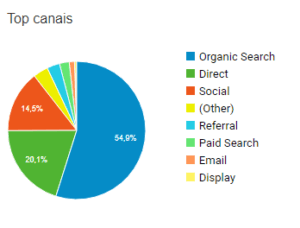
How to identify the source of your site’s visits
In Google Analytics, you can identify the source of your site’s visits by visiting the Acquisition tab of the tool. There, you can get an overview of your site’s traffic source, with maps and other important graphic details essential for this analysis.
However, when presenting this data to your client, it is necessary to ensure that the report is easy to understand and focuses on the most crucial information, like the professional reports generated by Reportei Our tool generates reports for social media in just 3 seconds, including the most important information from Facebook, Facebook Ads, Instagram, LinkedIn, YouTube, and of course, Google Analytics accounts.
Try our tool for free for three days here and generate many reports