
Integrate 159 platforms into your system with a single API.
Query metrics from 59 marketing, CRM and e-commerce platforms, such as Meta Ads, Google Ads and RD Station, and run actions in 100 more of your customers' apps, such as WhatsApp, Slack and ClickUp.
15-day trial. No credit card required.
Inside Connect
Companies already using Reportei Connect




What is Reportei Connect?
An API that brings data from 59 integrations into your system. You connect your customers' accounts and use the metrics inside your product.
Built by Reportei, with more than 10 years of experience in marketing reports and over 10,000 active customers.
- Connect accounts
- Use the Connect flow so your customers authorize access to the accounts on the platforms they use.
- Collect data
- Access marketing, CRM and e-commerce data through integrations maintained by Reportei.
- Deliver metrics
- Query the data Connect supports through a documented API, within each account's permissions.
In practice
One API call, the result in your customer's account.
See what you send to Connect and what happens on the other side, for each part of the API.
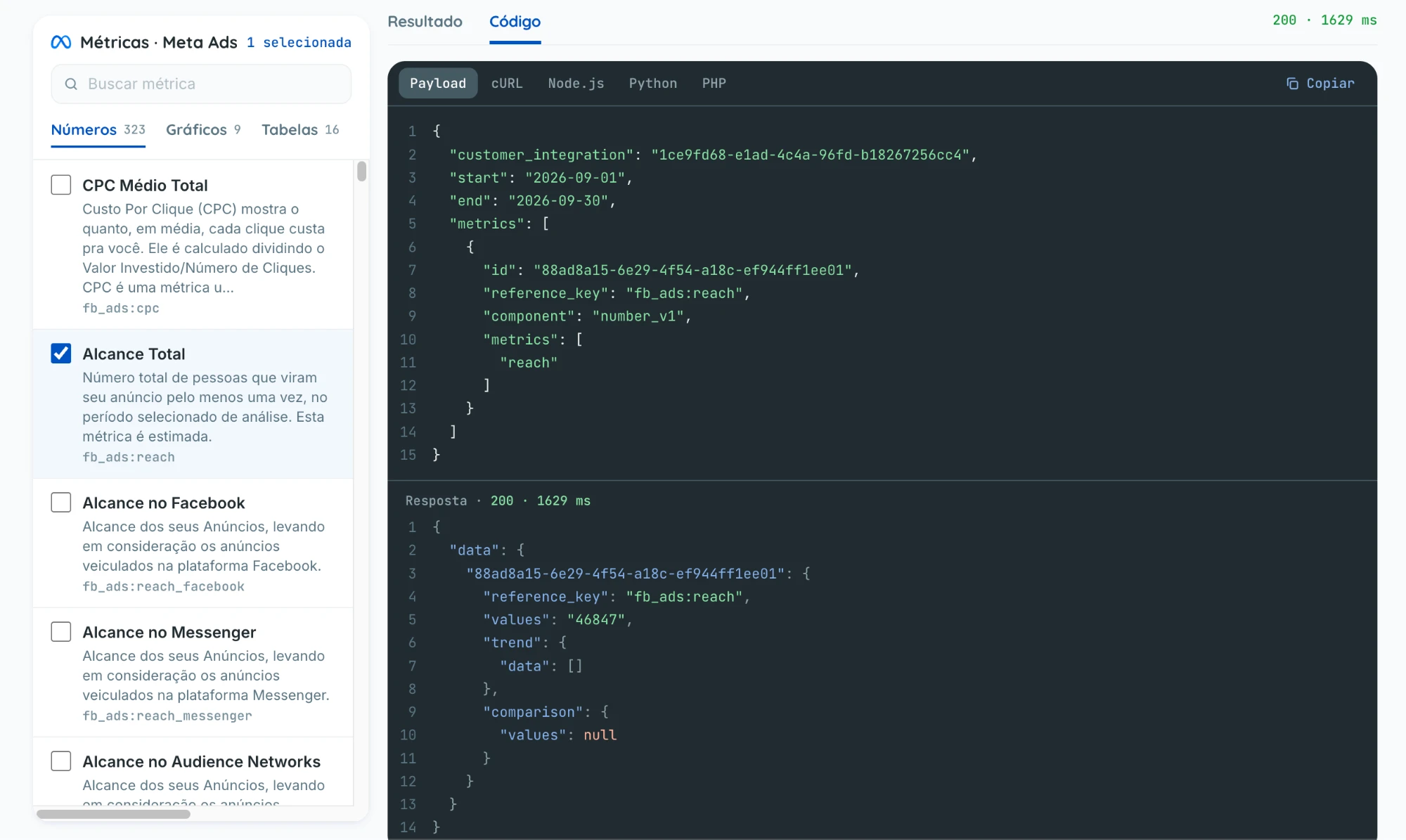
Request the metrics of a connected account
You choose the connection, the period and the metrics. Connect fetches them from the platform and returns the values in the same format for every integration.
POST /metrics/get-dataAuthorization: Bearer <your account key>x-customer-token: <customer token>
{
  "customer_integration": "1ce9fd68-e1ad-4c4a-96fd-b18267256cc4",
  "start": "2026-09-01",
  "end": "2026-09-30",
  "metrics": [
    {
      "id": "88ad8a15-6e29-4f54-a18c-ef944ff1ee01",
      "reference_key": "fb_ads:reach",
      "component": "number_v1",
      "metrics": ["reach"]
    }
  ]
}
200 OK · 1629 ms
{
"data": {
"88ad8a15-6e29-4f54-a18c-ef944ff1ee01": {
"reference_key": "fb_ads:reach",
"values": "46847",
"trend": { "data": [] },
"comparison": { "values": null }
}
}
}In your product
 Your customer's Meta Ads · September
Total reach
46,847
people saw the ads at least once
Illustrative values. The full contract of each endpoint is in the API documentation.
Features
Beyond reading data: publish, advertise and call LLMs through the same API
Use your customers' connected accounts to publish posts, manage Meta Ads, Google Ads and TikTok Ads and query metrics. To call AI models, register your own provider key. Each action has a page with an example request.
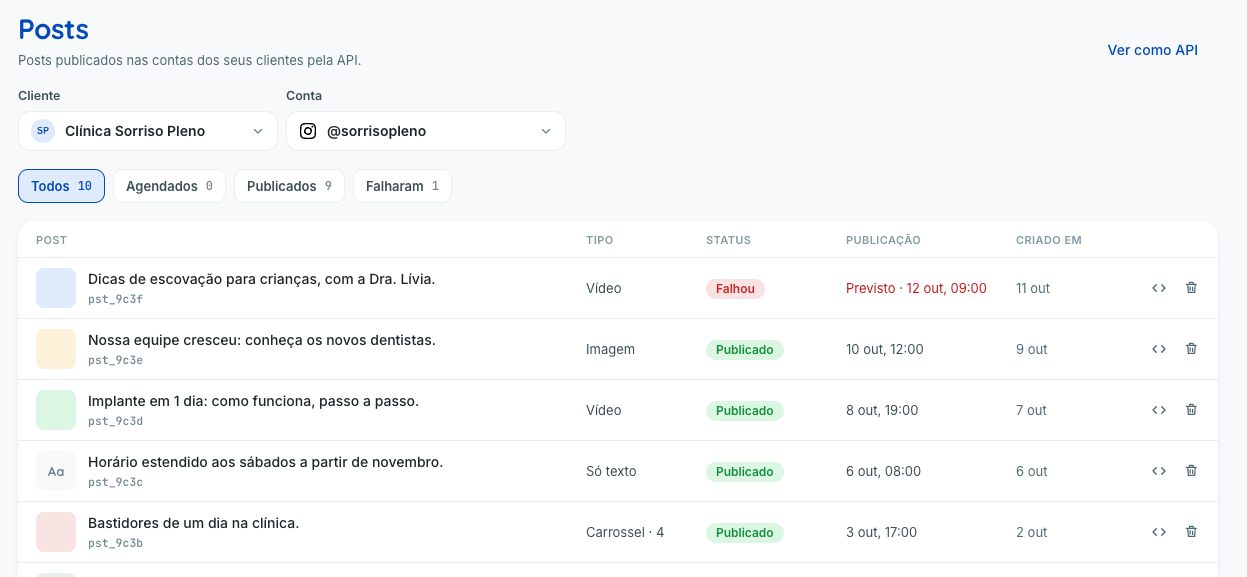
Posts
Publish to Instagram, Facebook, Threads, LinkedIn, Pinterest and YouTube Shorts.
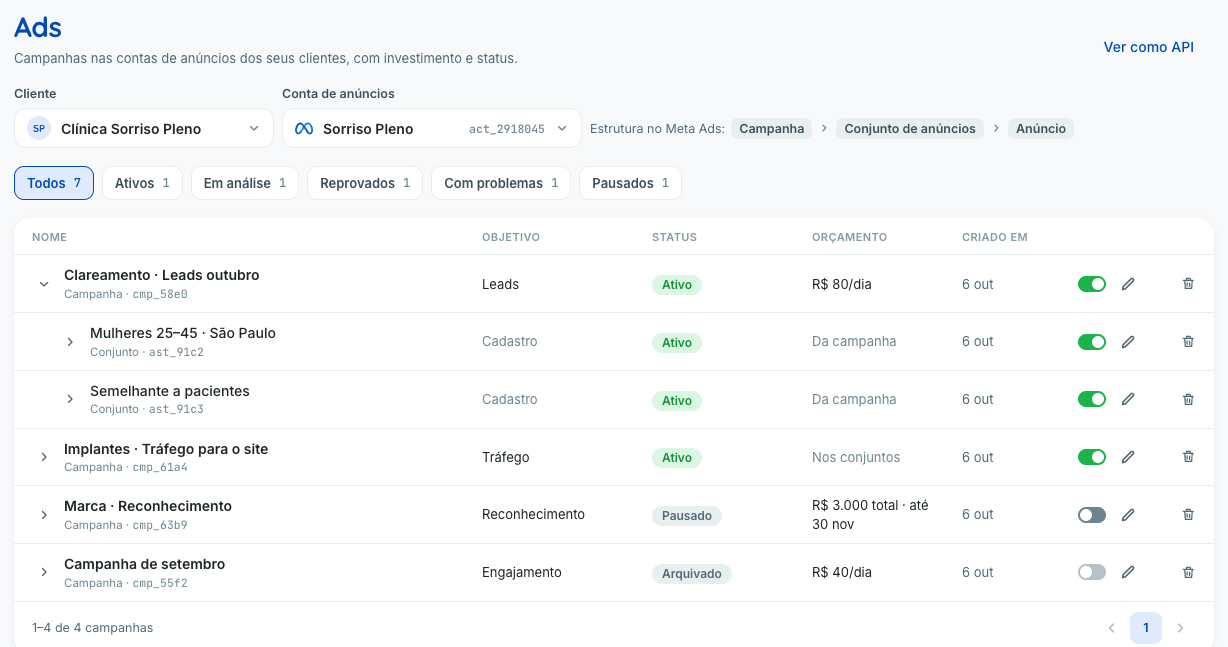
All of PostsAds
Create, boost and manage ads in your customers' Meta Ads, Google Ads and TikTok Ads.
- Create an ad on Meta Ads, Google Ads and TikTok Ads
- Boost an Instagram post via API
- Search interests, places and languages on Meta Ads and Google Ads
Metrics
Numbers, charts and tables from 59 platforms in the same format.
All of MetricsLLM
OpenAI, Anthropic and Meta in the OpenAI format, with your own key.
- Automatic fallback between LLM models
- Stream LLM responses over SSE
- Function calling with OpenAI, Anthropic and Meta
How it works in practice
From your customers' accounts to your system's features.
Connect the accounts
Choose among 159 integrations and ask your customer to authorize the accounts you will use.
Query the API
Integrate your system with Connect and query the metrics available in the connected accounts.
Use it in your product
Combine the metrics with your internal data and build reports, dashboards and analyses for your customers.
Connected accounts
Google Ads, Meta Ads, CRMs and e-commerce
Reportei Connect
Your product
Reports, dashboards and analyses
What we take care of
The work you don't have to do.
Integrating a platform is the easy part. Keeping the integration working for hundreds of accounts is what eats up the team.
App review on every platform
Standard native integrations use apps maintained by Connect that have passed the platforms' reviews. OAuth toolkits require you to register your product's own app.
One OAuth flow per network
You generate a link and your customer authorizes accounts on a screen hosted by Connect. For OAuth toolkits, you first register your product's app credentials.
Tokens that expire
Connect manages renewal where the integration supports it. Accounts connected through your own Meta app need reconnection when their token becomes invalid.
Connections that drop without warning
When a connection changes status or is removed, your system receives a webhook and can alert the customer right away.
Every API returns a different format
Metrics from every platform arrive in the same format, with the value for the period and for the previous period.
APIs that change all the time
New versions, deprecated fields and rate limits are handled by the Reportei team, which has maintained marketing integrations for over 10 years.
Connect in practice · Leadster
Media data in Leadster's dashboard.
Leadster already gathered data on leads and interactions from its chatbots. What was missing was tying those results to media spend.
With Reportei Connect, it started crossing its internal data with Google Ads, Meta Ads and LinkedIn Ads in its Super Dashboard.
Cost per conversion, CPM and performance by campaign, in a consolidated view of the channels.
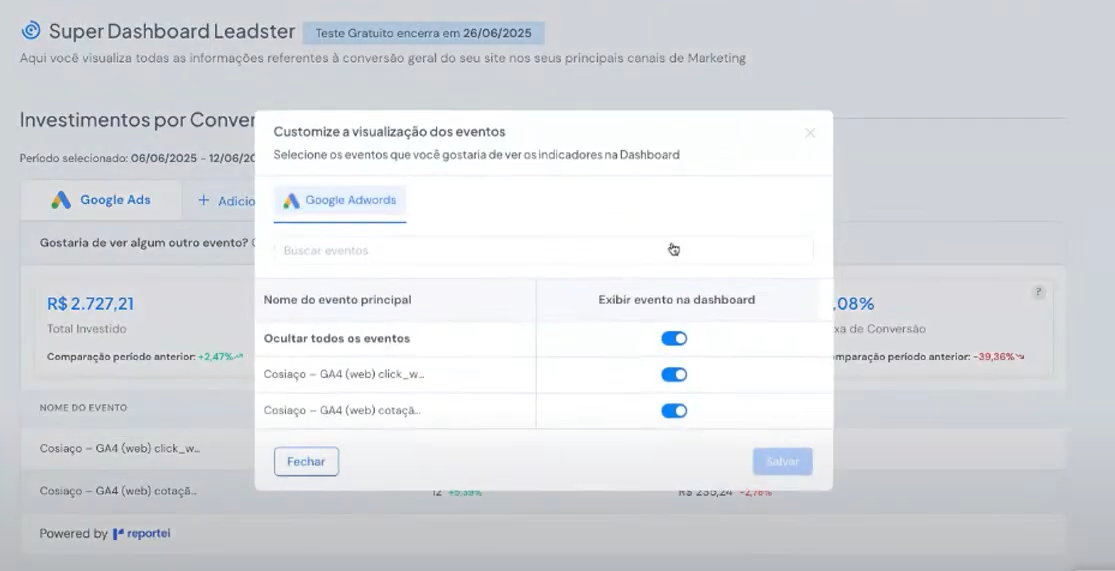
1 / 5Leadster Super Dashboard - custom events and spend per conversion
159 integrations for your product
Paid media, social networks, CRM and e-commerce to query metrics, and toolkits to run actions in apps such as WhatsApp, Slack and ClickUp. Find the platforms you need and use them all through the Reportei Connect API.
159 integrations found
- Meta Ads

- Instagram Business

- Threads

- Google Ads

- Google Analytics

- Google Analytics 4

- Google Business Profile

- Google Search Console

- Ahrefs

- Google Sheets

- Airtable

- YouTube

- LinkedIn (pages)

- LinkedIn (personal profiles)
- LinkedIn Ads

- TikTok

- TikTok Business
- TikTok Ads

- X Ads

- X (Twitter)


- Pinterest Ads
- Spotify Ads

- Microsoft Ads

- Kwai Ads

- ChatGPT Ads

- Google Local Services

- RD Station Marketing

- RD Station CRM

- HubSpot Marketing
- HubSpot CRM
- Pipedrive

- Kommo

- GoHighLevel

- ActiveCampaign

- Mailchimp

- Klaviyo

- E-goi

- PhoneTrack

- CallRail

- Twilio

- Keyword.com

- GreatPages

- Shopify

- TikTok Shop

- WooCommerce

- Nuvemshop

- Magazord

- Olist

- Hotmart

- Eduzz

- Kiwify

- iFood

- iFood Analytics

- Goomer

- Cardápio Web

- Repediu

- Acuity SchedulingToolkit

- AgendorToolkit

- AsaasToolkit

- AsanaToolkit

- AttioToolkit

- AWeberToolkit

- BaremetricsToolkit

- beehiivToolkit

- BitlyToolkit

- BrevoToolkit

- CalendlyToolkit

- CanvaToolkit

- Capsule CRMToolkit

- ChatwootToolkit

- ClickUpToolkit

- ClockifyToolkit

- CloudflareToolkit

- Constant ContactToolkit

- Conta AzulToolkit

- CrispToolkit

- DiscordToolkit

- DropboxToolkit

- DubToolkit

- EventbriteToolkit

- EverhourToolkit

- Fathom AnalyticsToolkit

- FigmaToolkit

- folkToolkit

- FreshBooksToolkit

- FreshdeskToolkit

- FrontToolkit

- GetResponseToolkit

- GitHubToolkit

- GitLabToolkit

- GmailToolkit
- Google CalendarToolkit
- Google ChatToolkit
- Google DocsToolkit

- Google DriveToolkit
- Google FormsToolkit

- Google Tag ManagerToolkit

- Google TasksToolkit

- Grafana CloudToolkit

- GumroadToolkit

- InstantlyToolkit

- IntercomToolkit

- JiraToolkit

- JotformToolkit

- KeapToolkit

- KitToolkit
- Lemon SqueezyToolkit

- MailjetToolkit

- MakeToolkit

- ManychatToolkit

- Melhor EnvioToolkit

- MentionToolkit

- Mercado LivreToolkit

- Mercado PagoToolkit

- Microsoft TeamsToolkit

- MiroToolkit

- MixpanelToolkit

- NetlifyToolkit

- NotionToolkit

- OmnisendToolkit

- OneDriveToolkit

- Outlook CalendarToolkit

- Outlook MailToolkit

- PagerDutyToolkit

- PandaDocToolkit

- PostHogToolkit

- PrintfulToolkit

- PrintifyToolkit

- RechargeToolkit

- SalesflareToolkit

- SalesloftToolkit

- SE RankingToolkit

- SegmentToolkit

- SentryToolkit

- SharePointToolkit

- SlackToolkit

- StripeToolkit

- SupabaseToolkit

- Superhuman DocsToolkit

- SurveyMonkeyToolkit

- TallyToolkit

- Teamwork.comToolkit

- TodoistToolkit

- Toggl TrackToolkit

- TypeformToolkit

- VercelToolkit

- VimeoToolkit

- WebexToolkit

- WebflowToolkit

- WhatsAppToolkit

- WiseToolkit

- WistiaToolkit

- WordPress.comToolkit

- WrikeToolkit

- Zendesk SellToolkit

- ZoomToolkit
An integration is a platform available in the catalog. A connection is an account on that platform linked to Connect, and it is the unit used for billing. See how the plan works. Details of each integration.
Toolkits
Beyond data: 100 apps your product operates
Send WhatsApp messages, create Jira issues, book on Google Calendar. 1,184 tools your product and your AI agents run on your customer's account, through the same API.
Build it with AI
Your coding agent does the integration.
Copy the prompt and paste it into Claude Code, Cursor or Codex. It guides the agent to open your sign-up, read the API specification and implement the integration in your project's backend.
 Claude Code
 Cursor
 Codex
 OpenClaw
 Grok
I need to integrate Reportei Connect into this project. Read the instructions at https://app.connect.reportei.com/provision-trial.md and follow the steps described there.You fill in your details when the agent asks and review the implementation before shipping.
> I need to integrate Reportei Connect into this project…
Reading app.connect.reportei.com/provision-trial.md
Sign-up link sent. Waiting for you to create the account
Account created. Key saved as CONNECT_API_KEY in .env
Reading the specification at /openapi.json
Creating customers and the connection link in the backend
Smoke test: metrics from a connected account
API documentation
Endpoints, authentication, errors and examples for every resource.
Read the docsOpenAPI specification
The API contract in a single file, for your agent to read before writing code.
Open openapi.jsonConnect Explorer
Connect an account, pick the metrics and copy a ready-made payload into your code.
Try it in the Explorer
Plans and pricing
Grow with your customers. Connect keeps up.
One plan with connections included and a fixed price per additional connection, the same on every platform in the catalog. No setup fee.
What counts as a connection?
Each platform account your customer connects to Connect counts as one connection. A single customer can have several connections.
Example: one customer of your software
- 1 Instagram profile1 connection
- 1 Google Ads account1 connection
- 1 Meta Ads account1 connection
1 customer, 3 connected accounts = 3 connections
Every integration is available on the plan. The monthly fee varies with the number of accounts your customers connect. Billing questions
Frequently asked questions
About Connect
What can I do with Reportei Connect?
Connect your customers' accounts on 59 marketing, CRM and e-commerce platforms and query their metrics through a single API.
You can also publish to your customers' Instagram, Facebook, Threads, LinkedIn, Pinterest and YouTube Shorts and create and manage Meta Ads, Google Ads and TikTok Ads campaigns, ad sets and ads, subject to the connected accounts' permissions.
With toolkits, your product runs actions in 100 more of your customers' apps, such as sending WhatsApp messages, creating tasks in ClickUp or posting to a Slack channel. Toolkits bring no metrics.
Do I need to create and get an app approved on each platform?
Standard native integrations use apps maintained by Connect, so you do not need your own app on each network. OAuth toolkits require you to register your product's app credentials in Connect and meet the platform's requirements. Your customer must always authorize access. Other connection modes use the credentials required by the app.
Do my customers need a Reportei account?
No. Your system generates a connection link and the customer authorizes the accounts on a ready-made Connect screen. After that, they keep using only your product.
What data can I query?
The metrics supported on each platform, within the permissions of the connected account. The metrics catalog of each integration is in the API and in the Connect Explorer, where you test the query before writing code.
How are my customers' tokens stored?
Connect stores credentials encrypted and uses them for authorized queries and actions. Renewal depends on the connection mode and provider support. When you use your own Meta app, Connect neither verifies nor renews tokens issued by that app; the account must be reconnected if they become invalid.
What if a customer's connection loses access?
For managed native integrations, Connect checks connections regularly and sends a webhook when their status changes or they are removed. Your system should also handle authorization errors from API calls and request reconnection when needed. Tokens from your own Meta app are not checked automatically.
Can I implement it with an AI agent?
Yes. The prompt in the Build it with AI section guides Claude Code, Cursor or Codex to open your sign-up, read the OpenAPI specification and implement the integration in your project's backend.
Pricing and connections
What is the difference between a customer and a connection?
One end customer of your product can have several connections. Each connection is one of that customer's accounts on one platform. If they connect an Instagram account and a Google Ads account, that is two connections.
Are all 59 integrations included in the plan?
Yes. They are all available on the same plan and have the same price per connection. Access depends on the permissions of the connected account and is limited to the data and metrics Connect supports.
How are several accounts on the same platform counted?
Each connected account counts as one connection, even if it belongs to the same customer. For example, three Google Ads accounts are three connections.
How is the bill calculated?
The billed quantity is the daily average of active connections during the cycle, rounded up. Connections above those included in the plan are charged at the additional price in the price table.
If the plan includes 10 connections and the rounded average for the cycle is 14, you pay for the plan plus 4 additional connections.
If I remove an account, does the price go down?
Removing an account reduces the number of active connections. The effect on the bill depends on how many days it was active in the cycle and on the final daily average, rounded up. The plan's base price still includes the plan's connections.
Can I try it without a credit card?
Yes. You can try Reportei Connect for 15 days without adding a credit card.
Can I cancel at any time?
Yes. You can request cancellation at any time and it takes effect at the end of the current billing cycle.
See the full conditions in the Reportei Connect terms of service.
See Connect applied to your product.
Try it for 15 days with no card, or walk our team through your use case.